TI-84 Plus CE lesson 8: Derivatives, integrals and the derivative graph
The TI-84 Plus CE works out a derivative at a point and a definite integral in one line, and it can draw the graph of f′(x) next to f(x). Seeing the two graphs together is the fastest way to understand, and check, where a function has its maximum and minimum points.
Objective
Find derivatives at a point and definite integrals, draw the graph of y = f′(x) and read it, and find areas and distances, all in Rad mode.
By the end, students can:
- use the d/dx template (math 8) and the ∫ template (math 9)
- use Y1 inside a template instead of retyping the function
- draw y = f′(x) as Y2 and link its zeros to the maximum and minimum of f
- use CALC 6:dy/dx and 7:∫f(x)dx on a graph
- find an area between two curves and a distance travelled by splitting at the crossing points
Which courses this lesson suits
- IB Maths AA (SL and HL): Papers 2 and 3
- IB Maths AI (SL and HL): every paper
- A Level Maths (UK and IAL): calculator allowed in every paper
AA Paper 1 is calculator-free: use these skills on Papers 2 and 3, and to check Paper 1-style practice.
Before you start
Set Rad mode: mode, move to RADIAN, enter, then 2nd mode (QUIT). Calculus with trig functions needs radians.
The key presses, step by step
Every key is shown as it is printed on the calculator, like 2nd or enter. A second function (printed above a key) is 2nd then that key; a menu item is chosen by its number, or by moving to it and pressing enter.
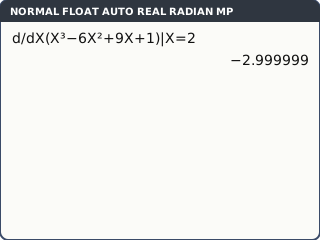
Derivative at a point: press math 8. The d/dx template appears. Type X in the small box after d/d, the function X³ − 6X² + 9X + 1 in the brackets, and 2 after X =. Press enter: −2.999999.
The calculator finds the gradient numerically, so the last digits can be off: −2.999999 means −3. Write f′(2) = −3.
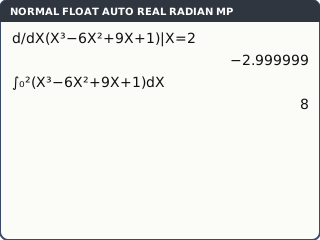
What the screen shows after this step (our drawing of the TI-84 Plus CE screen, not a photo). Definite integral: math 9. Type the lower limit 0, the upper limit 2, the function, and X after d. enter: 8.
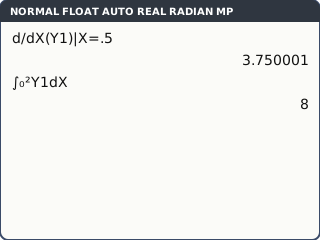
What the screen shows after this step (our drawing of the TI-84 Plus CE screen, not a photo). Use Y1 instead of retyping. Put Y1 = X³ − 6X² + 9X + 1 in y=. On the home screen, inside a template, press alpha trace (the shortcut menu above trace) and choose Y1. For example d/dX(Y1)|X=0.5 gives 3.750001.
Change Y1 once and every calculation that uses it follows: no typing slips between parts of a question.
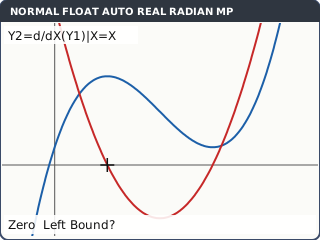
What the screen shows after this step (our drawing of the TI-84 Plus CE screen, not a photo). Draw the derivative graph. In y= move to Y2 and press math 8. Type X in the d/d box, Y1 in the brackets (alpha trace, Y1), and X after X = (not a number). So Y2 = d/dX(Y1)|X=X.
Change the view to see both: window, Xmin = −1, Xmax = 5, Ymin = −4, Ymax = 8, then graph.
Y2 is the gradient of Y1 at every x. Where Y1 climbs, Y2 is above the axis; where Y1 falls, Y2 is below.
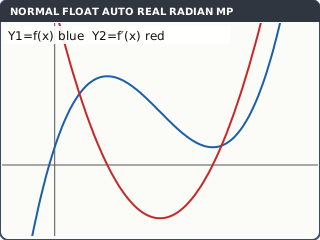
f (blue) and the derivative graph f′ (red) in the window −1 ≤ x ≤ 5, −4 ≤ y ≤ 8 (our drawing of the TI-84 Plus CE screen, not a photo). Read the link. 2nd trace (CALC) 2:zero, press ▼ to move to Y2, and answer Left Bound?, Right Bound? and Guess? around x = 1, then again around x = 3. Then CALC 4:maximum on Y1 near x = 1 and 3:minimum near x = 3: the same x-values.
f′(x) = 0 exactly where f has a turning point. The last digits may wobble (something like 0.9999998 instead of 1): round to 3 s.f.
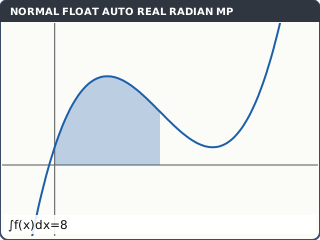
What the screen shows after this step (our drawing of the TI-84 Plus CE screen, not a photo). Areas from the graph. 2nd trace (CALC) 7:∫f(x)dx on Y1, Lower Limit? 0 enter, Upper Limit? 2 enter: the region is shaded and ∫f(x)dx = 8 appears. (6:dy/dx gives the gradient at the x you type.)
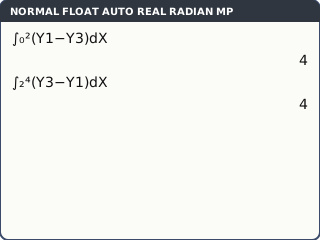
What the screen shows after this step (our drawing of the TI-84 Plus CE screen, not a photo). Area between two curves. In y= type Y3 = X + 1 and turn Y2 off (move to its = sign and press enter). CALC 5:intersect: First curve? Y1 enter, then ▼ to Y3 for Second curve? enter, then a guess. Y3 meets Y1 at x = 0, 2 and 4. Between 0 and 2 Y1 is on top; between 2 and 4 Y3 is. So area = ∫₀²(Y1 − Y3)dX + ∫₂⁴(Y3 − Y1)dX = 4 + 4 = 8.
Or type ∫₀⁴abs(Y1 − Y3)dX in one go: abs( is math, ► to NUM, 1:abs(. Splitting at the crossings is what to write down.
What the screen shows after this step (our drawing of the TI-84 Plus CE screen, not a photo).
Your turn: check your understanding
Try these straight after the key presses, on your own calculator, before looking at the answers.
- With Y1 = X³ − 6X² + 9X + 1, work out d/dX(Y1)|X=4. What does the screen show, and what do you write?
- Work out ∫₁³ Y1 dX.
- Look at your derivative graph (Y2). For which x is f decreasing?
Show the answers
- The screen shows 9.000001; write f′(4) = 9.
- 6
- Where Y2 is below the x-axis: 1 < x < 3.
Exam efficiency
- Put the function in Y1 once and use Y1 everywhere: in d/dx, in ∫, and in the graph.
- Write the calculus in your working, e.g. "∫₀⁴|v(t)|dt = 9.55", then the answer: the template is not working.
- Graph first for areas: it shows where the curves cross, which is where you split the integral.
- Keep crossing points stored: after CALC zero or intersect, X holds the answer; on the home screen X sto→ A keeps it.
Worked exam-style example
Question. A particle moves in a straight line with velocity v = 4 sin t − t m s⁻¹, for 0 ≤ t ≤ 4. (a) Find its acceleration when t = 1. (b) Find the value of t > 0 when it is at rest. (c) Find its displacement over the 4 seconds. (d) Find the distance it travels.
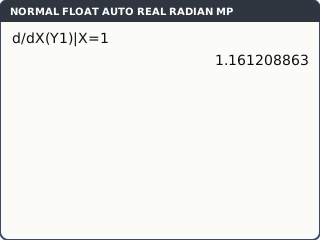
Rad mode. Y1 = 4sin(X) − X. (a) d/dX(Y1)|X=1 enter: 1.161208863.
What the screen shows after this step (our drawing of the TI-84 Plus CE screen, not a photo). (b) window: Xmin 0, Xmax 4, Ymin −8, Ymax 3, graph. CALC 2:zero around the crossing: X = 2.474576787. On the home screen store it: X,T,θ,n sto→ alpha math (A) enter.
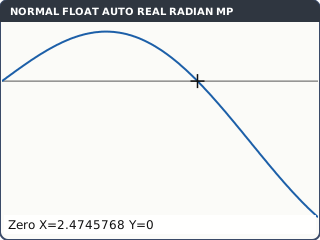
What the screen shows after this step (our drawing of the TI-84 Plus CE screen, not a photo). (c) ∫₀⁴Y1 dX = −1.385425517. (d) Split at A, where v changes sign: ∫₀^A Y1 dX = 4.080919975 and ∫_A⁴ Y1 dX = −5.466345492, so the distance is 4.080919975 − (−5.466345492) = 9.547265467.
Displacement can be negative; distance cannot. The part below the axis is counted as positive.
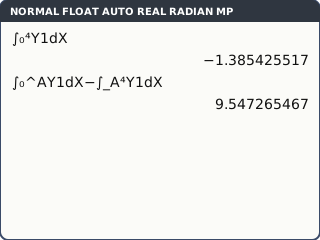
What the screen shows after this step (our drawing of the TI-84 Plus CE screen, not a photo).
What to write down
(a) a = dv/dt = 1.16 m s⁻² at t = 1. (b) v = 0 ⇒ t = 2.47 s. (c) ∫₀⁴ v dt = −1.39 m.
(d) Distance = ∫₀⁴|v| dt = 9.55 m.
Practice
Do these on your own calculator. Write the answers to 3 significant figures unless the task says otherwise.
- f(x) = ln(x² + 1). Find f′(2). What does the screen show?
- Find ∫₀^π x sin x dx (Rad mode; π is 2nd ^).
- Graph y = x·e^(−x) and its derivative graph. Where does the derivative graph cross the x-axis, and what are the coordinates of the maximum of y?
- Find the area enclosed by y = x² and y = 2 + x.
- y = x³ − 6x² + 9x + 1. Find the x-coordinates where the gradient is −2. (Draw Y2 = d/dX(Y1)|X=X and Y3 = −2, then intersect.)
- v = t² − 3t m s⁻¹ for 0 ≤ t ≤ 4. Find the displacement and the distance travelled.
Show the practice answers
- The screen shows .8000000107; f′(2) = 0.8.
- 3.14 (it is exactly π)
- x = 1; maximum (1, 0.368)
- They meet at x = −1 and x = 2; area = 4.5
- x = 1.42 or x = 2.58
- Displacement −2.67 m; distance 6.33 m
Common mistakes
- Deg mode with trig functions: every derivative and integral is wrong. Set RADIAN.
- Writing the calculator's last digits: −2.999999 is −3, and .8000000107 is 0.8.
- Typing a number instead of X after X = in Y2: that draws a flat line, not the derivative graph.
- Integrating straight across a crossing point for an area or a distance: the parts cancel. Split, or use abs(.
- A window that hides a turning point or a crossing: change Xmin, Xmax, Ymin and Ymax until you can see every feature.
1-minute quick check
Answer these without looking back. Most need no calculation: they check that the key presses have stuck.
- Which keys give the d/dx template?
- Which keys give the ∫ template?
- How do you type Y1 on the home screen quickly?
- What do you type in Y2 to draw the derivative of Y1?
- Where the derivative graph crosses the x-axis, what does the graph of f have?
Show the quick-check answers
- math 8
- math 9
- alpha trace, then Y1 (or vars → Y-VARS).
- d/dX(Y1)|X=X
- A turning point (maximum or minimum).
Teaching this lesson (about 55 minutes)
| 0–5 min | Starter: sketch y = x³ − 6x² + 9x + 1 and guess where its gradient is 0. |
| 5–15 min | Steps 1–3: d/dx and ∫ templates, and using Y1. Your turn tasks 1 and 2. |
| 15–27 min | Steps 4–5: draw the derivative graph, change the window, and link zeros of f′ to the turning points. Your turn task 3. |
| 27–35 min | Steps 6–7: CALC ∫f(x)dx and the area between two curves. |
| 35–44 min | Worked example: the particle. Displacement against distance. |
| 44–52 min | Practice tasks 1–6; check the answers. |
| 52–55 min | 1-minute quick check. |
Students need their own TI-84 Plus CE. With a projector, the calculator-skills guides below have a Show on the board view and an animated walkthrough of the key presses.
Matching calculator guides
- How to find a numerical derivative and definite integral on the Casio fx-CG50, TI-84 Plus CE and TI-Nspire CX II
- How to find intersections, zeros, maximum and minimum points on the Casio fx-CG50, TI-84 Plus CE and TI-Nspire CX II
- How do I know if my calculator is in radians or degrees?