TI-84 Plus CE lesson 7: Tables: checking, sign changes and sequences
A table of values is the quickest way to check an answer, compare two models, trap a root between two numbers, or find the first term of a sequence that passes a target. Two screens do all of it: TBLSET to choose the x-values, and TABLE to read them.
Objective
Use TBLSET and TABLE to read values of one or two functions, zoom the step in to locate a root, and answer "smallest n such that …" questions.
By the end, students can:
- set TblStart and ΔTbl in TBLSET and read the TABLE
- type your own x-values with Indpnt: Ask
- find a sign change, then make ΔTbl ten times smaller to trap a root to 2 decimal places
- compare two models side by side with Y1 and Y2
- use a step of 1 to find the smallest whole n that passes a target
Which courses this lesson suits
- IB Maths AA (SL and HL): Papers 2 and 3
- IB Maths AI (SL and HL): every paper
- A Level Maths (UK and IAL): calculator allowed in every paper
A Level: the sign-change steps are the numerical methods skill of locating a root in an interval.
Before you start
Check mode is on FUNCTION (not SEQ or PARAMETRIC). Clear any old functions in y=.
The key presses, step by step
Every key is shown as it is printed on the calculator, like 2nd or enter. A second function (printed above a key) is 2nd then that key; a menu item is chosen by its number, or by moving to it and pressing enter.
Press y= and type Y1 = X³ − 2X − 7 (X is X,T,θ,n), then enter.
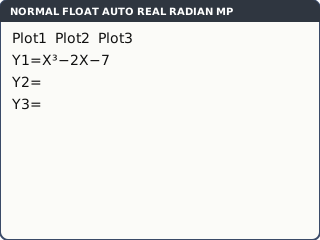
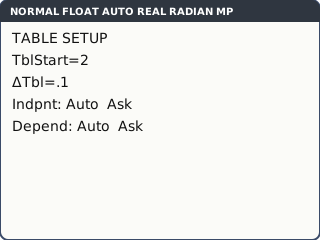
What the screen shows after this step (our drawing of the TI-84 Plus CE screen, not a photo). Press 2nd window (TBLSET). Set TblStart = 2 and ΔTbl = .1 (type 0.1), with enter after each. Leave Indpnt and Depend on Auto.
TblStart is the first x in the table; ΔTbl is the gap between x-values.
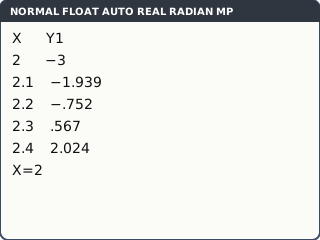
What the screen shows after this step (our drawing of the TI-84 Plus CE screen, not a photo). Press 2nd graph (TABLE). Y1 changes sign between X = 2.2 (−.752) and X = 2.3 (.567), so a root lies between them. Scroll with ▼ and ▲; highlight a value to see it in full at the bottom.
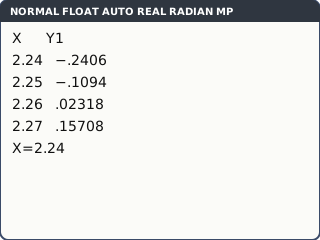
What the screen shows after this step (our drawing of the TI-84 Plus CE screen, not a photo). Zoom the step in. Back in TBLSET set TblStart = 2.24 and ΔTbl = .01, then TABLE again. The sign changes between 2.25 (−.1094) and 2.26 (.02318). Check the halfway value 2.255: Y1 is still negative, so the root is between 2.255 and 2.26, and it is 2.26 to 2 d.p.
Each zoom gives one more decimal place. The halfway check is what shows the rounding is right.
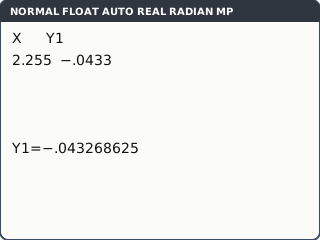
What the screen shows after this step (our drawing of the TI-84 Plus CE screen, not a photo). Your own x-values. In TBLSET choose Indpnt: Ask. Now TABLE starts empty: type any x, such as 2.255, and enter. Y1 appears next to it: −.043268625.
Ask is the fastest way to check a set of answers or fill in a table from a question with uneven x-values.
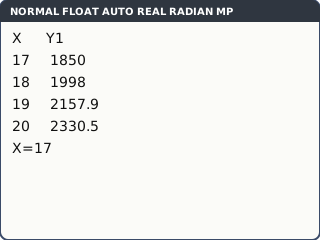
What the screen shows after this step (our drawing of the TI-84 Plus CE screen, not a photo). Sequences. For "the smallest n with 500 × 1.08ⁿ > 2000", type Y1 = 500 × 1.08^X, set Indpnt back to Auto, TblStart = 17 and ΔTbl = 1. In TABLE, n = 18 gives 1998 (highlight it: the full value is just under 2000) and n = 19 gives 2157.9. So n = 19.
X plays the part of n. A step of 1 gives only whole numbers, which is what "smallest n" needs. (mode SEQ is another way, with u(n) in y=; switch back to FUNCTION afterwards.)
What the screen shows after this step (our drawing of the TI-84 Plus CE screen, not a photo).
Your turn: check your understanding
Try these straight after the key presses, on your own calculator, before looking at the answers.
- Make a table of y = 2x² − 5 from x = −2 in steps of 0.5. What are y at x = 0.5 and at x = 1.5?
- x³ + x − 5 = 0 has one root. Use a table with ΔTbl = 0.1 to find the interval of width 0.1 that contains it.
- With Indpnt: Ask, find y = 2x² − 5 at x = 0.37.
Show the answers
- −4.5 and −0.5
- Between 1.5 and 1.6 (the sign changes there; the root is 1.52 to 3 s.f.).
- −4.7262
Exam efficiency
- Check an answer you found by algebra: put the equation in Y1 and look at the table at your x. It should be 0 (or very close).
- For two models, put one in Y1 and one in Y2: the table shows where one overtakes the other.
- Say what you saw: "f(2.25) < 0 and f(2.26) > 0, so there is a root between 2.25 and 2.26" earns the method mark.
- Watch out for "greater than": if a term equals the target exactly, it does not count.
Worked exam-style example
Question. A town's population is modelled by P = 1200 × 0.94^t and a second town's by Q = 300 + 25t, where t is the number of years from now. (a) Find the first whole year in which Q is greater than P. (b) Use a table to find, to 1 decimal place, when the two populations are equal.
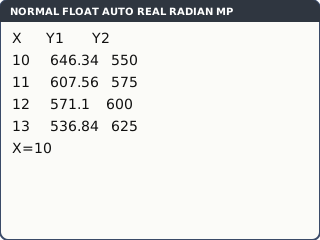
(a) Y1 = 1200 × 0.94^X, Y2 = 300 + 25X. TBLSET: TblStart = 0, ΔTbl = 1. TABLE and scroll down: at X = 11, Y1 = 607.56 and Y2 = 575; at X = 12, Y1 = 571.1 and Y2 = 600. So the first whole year is t = 12.
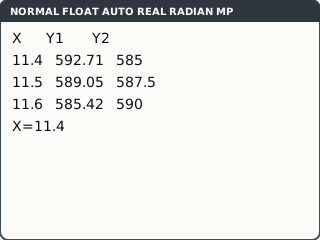
What the screen shows after this step (our drawing of the TI-84 Plus CE screen, not a photo). (b) TBLSET: TblStart = 11.4, ΔTbl = .1. At X = 11.5, Y1 = 589.05 is still above Y2 = 587.5; at X = 11.6, Y1 = 585.42 is below Y2 = 590. So they are equal between 11.5 and 11.6. The Solver (lesson 6) gives t = 11.52522319, so t = 11.5 to 1 d.p.
What the screen shows after this step (our drawing of the TI-84 Plus CE screen, not a photo).
What to write down
(a) t = 11: P = 608 > Q = 575; t = 12: P = 571 < Q = 600. So in year 12.
(b) P − Q changes sign between t = 11.5 and t = 11.6; t = 11.5 years (1 d.p.).
Practice
Do these on your own calculator. Write the answers to 3 significant figures unless the task says otherwise.
- Show that e^x − 3x = 0 has a root between 1.51 and 1.52, and give the root to 2 decimal places.
- Find the smallest whole number n for which 3 × 1.2ⁿ > 100.
- With Indpnt: Ask, find g(x) = 5 ÷ (x² + 1) at x = 0.3, 1.7 and 4.2.
- The arithmetic series 4 + 7 + 10 + … has Sₙ = n(8 + 3(n − 1)) ÷ 2. Find the smallest n for which Sₙ > 1000.
- A student says x = 1.8 is a solution of x³ − 2x − 3 = 0. Use a table to check.
Show the practice answers
- f(1.51) = −0.00327 < 0 and f(1.52) = 0.0122 > 0, so there is a root between them; the root is 1.51 (2 d.p.).
- n = 20 (n = 19 gives 95.8; n = 20 gives 115)
- 4.59, 1.29 and 0.268
- n = 26: S₂₅ = 1000, which is not more than 1000, and S₂₆ = 1079.
- f(1.8) = −0.768, not 0, so x = 1.8 is not a solution.
Common mistakes
- Leaving Indpnt on Ask and wondering why the table is empty: switch back to Auto.
- A step that is too big jumps over two roots close together: if the graph shows more roots than the table, make ΔTbl smaller.
- Rounding a root from the sign change alone: check the halfway value before writing 2 d.p.
- Missing the strict inequality: S₂₅ = 1000 is not greater than 1000.
- Calculator in SEQ mode: Y1 is missing from y=. Set mode back to FUNCTION.
1-minute quick check
Answer these without looking back. Most need no calculation: they check that the key presses have stuck.
- Which keys open TBLSET?
- Which keys open the TABLE?
- What does ΔTbl set?
- How do you type your own x-values?
- What do you need to see in the table to say there is a root?
Show the quick-check answers
- 2nd window
- 2nd graph
- The step between x-values.
- TBLSET → Indpnt: Ask.
- A change of sign in Y between two x-values (for a continuous function).
Teaching this lesson (about 55 minutes)
| 0–5 min | Starter: without a calculator, is x³ − 2x − 7 positive or negative at x = 2 and at x = 3? What does that tell you? |
| 5–15 min | Steps 1–3: Y1, TBLSET, TABLE and the first sign change. |
| 15–22 min | Step 4: zooming ΔTbl in and the halfway check. Your turn task 2. |
| 22–30 min | Steps 5–6: Indpnt Ask and sequences. Your turn tasks 1 and 3. |
| 30–40 min | Worked example: the two towns. |
| 40–52 min | Practice tasks 1–5; check the answers. |
| 52–55 min | 1-minute quick check. |
Students need their own TI-84 Plus CE. With a projector, the calculator-skills guides below have a Show on the board view and an animated walkthrough of the key presses.
Matching calculator guides
- How to make a table of values on the Casio fx-CG50, TI-84 Plus CE and TI-Nspire CX II
- How to find terms and sums of sequences on the Casio fx-CG50, TI-84 Plus CE and TI-Nspire CX II