TI-84 Plus CE lesson 6: The Solver: any equation, and finding a parameter
The Numeric Solver in the MATH menu solves equations PlySmlt2 cannot: exponentials, logs, trig, and formulas with several letters. It finds one root at a time, near your guess, so the skill is guiding it to every root the question wants. The graph shows how many there are.
Objective
Solve any equation in one unknown with the numeric Solver, find every root with guesses, bounds or a graph, and find an unknown constant in a formula.
By the end, students can:
- open the Numeric Solver from math and type the two sides of an equation as E1 and E2
- solve with graph (SOLVE) and read E1−E2 to check the answer
- find a different root by changing the guess or the bound
- solve f(x) = g(x) from a graph with CALC 5:intersect
- find a parameter, such as an interest rate or a decay constant, from a formula with several letters
Which courses this lesson suits
- IB Maths AA (SL and HL): Papers 2 and 3
- IB Maths AI (SL and HL): every paper
- A Level Maths (UK and IAL): calculator allowed in every paper
Before you start
Set Rad mode (mode, RADIAN) for the trig practice task. Clear Y1 and Y2 in y= before step 6.
The key presses, step by step
Every key is shown as it is printed on the calculator, like 2nd or enter. A second function (printed above a key) is 2nd then that key; a menu item is chosen by its number, or by moving to it and pressing enter.
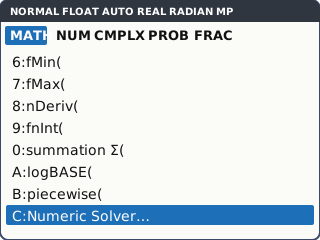
Press math. The Numeric Solver is the last item of the MATH tab, so press ▲ once to jump to it (C:Numeric Solver…), then enter.
▲ from the top of a TI menu wraps round to the bottom: quicker than scrolling down. This is the menu on OS 5.3 and later; on an older operating system the last item is B:Solver… (see the note in step 2).
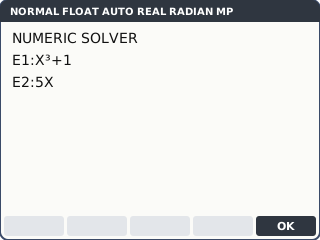
What the screen shows after this step (our drawing of the TI-84 Plus CE screen, not a photo). Type each side of the equation in its own box. To solve x³ + 1 = 5x, type X³ + 1 after E1: and 5X after E2: (X is X,T,θ,n, ³ is ^ 3), then press graph (OK). If an old equation is there, clear it first.
No rearranging: f(x) = g(x) goes in as E1 = f(x), E2 = g(x). On an older operating system the classic Solver (B:Solver…) asks for one expression after 0 = (type f(x) − g(x)), solves with alpha enter and shows left−rt instead of E1−E2.
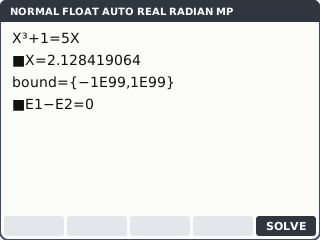
Typing the two sides as E1 and E2 (our drawing of the TI-84 Plus CE screen, not a photo). Next to X = type a guess, 2, then press graph (SOLVE). The answer replaces the guess: X = 2.128419064. A small square marks the variable that was solved, and E1−E2 = 0 says both sides agree.
E1−E2 is the check: if it is not 0 (or tiny, like 1E−12), the Solver has not found a root.
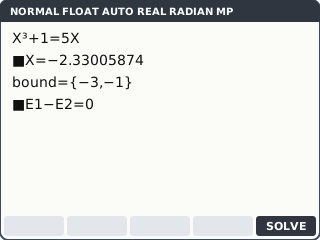
What the screen shows after this step (our drawing of the TI-84 Plus CE screen, not a photo). A cubic can have three roots, but the Solver gives the one nearest the guess. Change X to 0 and solve again: X = .2016396757. For the third, move to the bound line and type {−3, −1} ({ is 2nd (), change X to a guess inside that interval, −2, then solve: X = −2.33005874.
Graph y = x³ − 5x + 1 first if you do not know how many roots there are or roughly where. Keep the guess inside the bound.
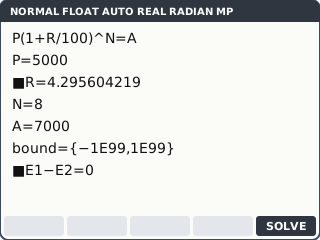
What the screen shows after this step (our drawing of the TI-84 Plus CE screen, not a photo). Finding a parameter. £5000 grows to £7000 in 8 years at R% a year: type E1: P(1 + R/100)^N and E2: A (letters with alpha), then graph (OK). Every letter gets a line. Fill in P = 5000, N = 8, A = 7000, put the cursor on R, and graph (SOLVE): R = 4.295604219.
The Solver keeps every value you typed. Change A or N and solve again for a new rate without retyping the formula.
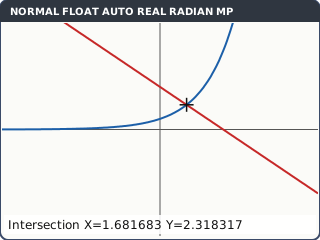
What the screen shows after this step (our drawing of the TI-84 Plus CE screen, not a photo). Solving from a graph. For e^(0.5x) = 4 − x: y=, Y1 = e^(0.5X) (e^ is 2nd ln), Y2 = 4 − X. zoom 6 (ZStandard). Then 2nd trace (CALC) 5:intersect, enter on the first curve, enter on the second, move near the crossing and enter (Guess?).
The graph shows every solution at once, so you know when you have them all. The Solver then gives each one quickly.
What the screen shows after this step (our drawing of the TI-84 Plus CE screen, not a photo).
Your turn: check your understanding
Try these straight after the key presses, on your own calculator, before looking at the answers.
- Use the Numeric Solver to solve x³ + 2x = 4. What does E1−E2 show?
- The graph of y = k·e^(0.3x) passes through (5, 20). Type E1: K·e^(0.3X) and E2: Y, fill in X = 5 and Y = 20, and solve for K.
- x² = 2^x has a solution with x < 0. Find it with a guess of −1, then check it with CALC 5:intersect on Y1 = X², Y2 = 2^X.
Show the answers
- x = 1.18 (3 s.f.); E1−E2 = 0, so it is a root.
- k = 4.46 (3 s.f.)
- x = −0.767 (3 s.f.)
Exam efficiency
- Graph first, then solve: the graph tells you how many roots to find and gives a good guess for each.
- The Solver remembers the last equation. Clear E1 and E2 before typing a new one.
- Use bound = {a, b} when the question gives an interval, such as 0 ≤ t ≤ 10, so the Solver cannot wander outside it.
- Write the equation you solved in your working, then the solutions to 3 s.f.: the key presses are not working.
Worked exam-style example
Question. The temperature of a cup of tea is T = 20 + 70e^(−kt) °C, t minutes after it is made. After 5 minutes it is 65 °C. (a) Find k. (b) Find how long the tea takes to cool to 40 °C.
(a) In the Numeric Solver type E1: 20 + 70e^(−K*X) and E2: T, then graph (OK). Fill in X = 5 and T = 65, put the cursor on K with a guess of 0.1, and graph (SOLVE): K = .0883665505.
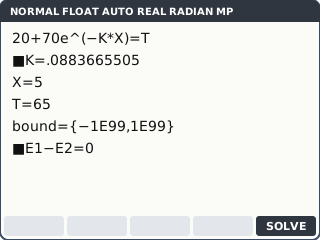
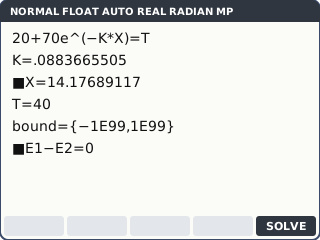
What the screen shows after this step (our drawing of the TI-84 Plus CE screen, not a photo). (b) K is now stored with its full value. Change T to 40, move the cursor to X (guess 10), and graph (SOLVE): X = 14.17689117.
Using the stored K keeps every digit. Typing 0.0884 instead can change the answer.
What the screen shows after this step (our drawing of the TI-84 Plus CE screen, not a photo).
What to write down
(a) 65 = 20 + 70e^(−5k) ⇒ k = 0.0884 (GDC).
(b) 40 = 20 + 70e^(−kt) ⇒ t = 14.2 minutes (GDC).
Practice
Do these on your own calculator. Write the answers to 3 significant figures unless the task says otherwise.
- Solve ln x = 3 − x.
- Find all three solutions of 2^x = x² + 1. (Two are whole numbers; use a bound for the third.)
- In Rad mode, find all the solutions of cos x = x ÷ 4.
- £2000 is invested at 3.5% a year compound interest. Find how many whole years it takes to reach £3000.
- Solve x·e^(−x/2) = 0.5 (there are two solutions).
Show the practice answers
- x = 2.21
- x = 0, x = 1 and x = 4.26 (bound {3, 6})
- x = −3.60, −2.13 or 1.25
- 2000 × 1.035ⁿ = 3000 ⇒ n = 11.8, so 12 years.
- x = 0.715 or x = 4.31
Common mistakes
- Typing a whole equation in E1 and leaving E2 as it was: put the left side in E1 and the right side in E2. (On the classic Solver of older operating systems, the 0 = line needs f(x) − g(x).)
- Stopping at one root: the Solver gives only the root nearest the guess. Graph to see how many there are.
- Not checking E1−E2: a non-zero value means the answer is not a root.
- Forgetting the old equation is still there: clear E1 and E2 before typing a new one.
- Rounding a parameter such as k before using it again: keep the stored value.
1-minute quick check
Answer these without looking back. Most need no calculation: they check that the key presses have stuck.
- Which menu holds the Numeric Solver?
- Which key solves for the variable the cursor is on?
- What should E1−E2 be after a good solve?
- How do you make the Solver look only between 3 and 6?
- Which CALC item finds where two graphs meet?
Show the quick-check answers
- math (the last item, C:Numeric Solver…: press ▲ to reach it).
- graph (SOLVE). On the classic Solver of older operating systems it is alpha enter.
- 0 (or a tiny number such as 1E−12).
- Set bound = {3, 6}.
- 5:intersect (2nd trace).
Teaching this lesson (about 55 minutes)
| 0–5 min | Starter: why can't e^(0.5x) = 4 − x be solved by rearranging? Sketch both sides. |
| 5–18 min | Steps 1–4: the Numeric Solver, guesses and bounds on x³ + 1 = 5x. |
| 18–25 min | Your turn tasks 1 and 3. |
| 25–33 min | Steps 5–6: a formula with several letters, and the graph method. Your turn task 2. |
| 33–42 min | Worked example: the cooling tea. Stress keeping K stored. |
| 42–52 min | Practice tasks 1–5; check the answers. |
| 52–55 min | 1-minute quick check. |
Students need their own TI-84 Plus CE. With a projector, the calculator-skills guides below have a Show on the board view and an animated walkthrough of the key presses.
Matching calculator guides
- How to solve equations, polynomials and simultaneous equations on the Casio fx-CG50, TI-84 Plus CE and TI-Nspire CX II
- How to find intersections, zeros, maximum and minimum points on the Casio fx-CG50, TI-84 Plus CE and TI-Nspire CX II