TI-84 Plus CE lesson 4: The CALC menu: value, zero, maximum, minimum and intersect
Roots, turning points and intersections come up on almost every calculator paper. On the TI-84 Plus CE they all live in one menu, CALC, and they all ask the same three questions. This lesson makes those questions automatic.
Objective
Find values, zeros, maximum and minimum points and intersections of graphs with the CALC menu, answer its prompts quickly, and keep the full result for later parts.
By the end, students can:
- open the CALC menu with 2nd trace and choose 1: value, 2: zero, 3: minimum, 4: maximum or 5: intersect
- answer Left Bound?, Right Bound? and Guess? so the calculator finds the point you want
- find an intersection by choosing the first curve, the second curve, then a guess
- use the X that CALC leaves in memory on the home screen
- reject a solution outside the domain the question gives
Which courses this lesson suits
- IB Maths AA (SL and HL): Papers 2 and 3
- IB Maths AI (SL and HL): every paper
- A Level Maths (UK and IAL): calculator allowed in every paper
Before you start
Students need lesson 3: a window that shows the point they are looking for. CALC only finds points inside the current view.
The key presses, step by step
Every key is shown as it is printed on the calculator, like 2nd or enter. A second function (printed above a key) is 2nd then that key; a menu item is chosen by its number, or by moving to it and pressing enter.
y=: Y1 = X³ − 4X² + 2X + 3 and Y2 = 1. window: Xmin −3, Xmax 5, Ymin −5, Ymax 6. graph. Then 2nd trace (CALC).
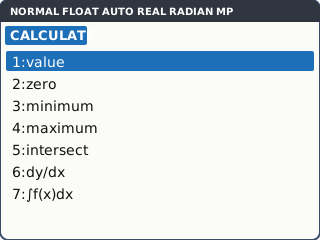
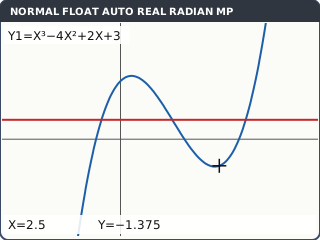
What the screen shows after this step (our drawing of the TI-84 Plus CE screen, not a photo). 1: value. Type the x value, 2.5, and press enter: Y = −1.375. With two graphs, ▲ and ▼ switch between them at the same x.
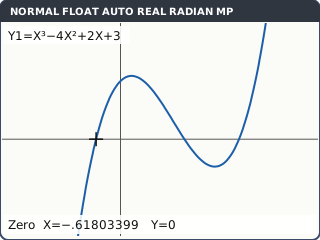
What the screen shows after this step (our drawing of the TI-84 Plus CE screen, not a photo). 2: zero. Left Bound?: move the cursor with ◄ to just left of the crossing you want and press enter. Right Bound?: move just right of it, enter. Guess?: move near it, enter. Here, for the left-hand crossing: X = −.61803399.
The bounds tell the calculator which crossing you mean. Repeat 2: zero for each of the others: X = 1.618034 and X = 3.
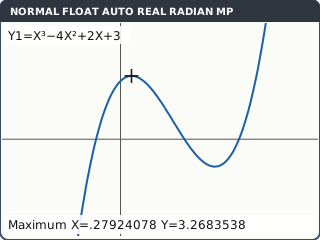
What the screen shows after this step (our drawing of the TI-84 Plus CE screen, not a photo). 4: maximum (or 3: minimum) works the same way: Left Bound?, Right Bound?, Guess?. The local maximum is at X = .27924078, Y = 3.2683538; the local minimum at X = 2.3874259, Y = −1.416502.
These are found numerically, so the last digit can differ by one from a friend's calculator. Round to 3 s.f.
What the screen shows after this step (our drawing of the TI-84 Plus CE screen, not a photo). 5: intersect. First curve?: enter (Y1). Second curve?: enter (Y2). Guess?: move near the crossing you want and enter. The right-hand crossing of y = 1 is at X = 3.1700865. Repeat with a different guess for the others.
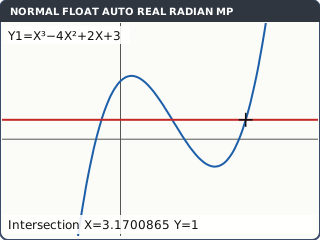
What the screen shows after this step (our drawing of the TI-84 Plus CE screen, not a photo). Keep the full answer. After any CALC result the X value is stored in X. Press 2nd mode (QUIT), then X,T,θ,n sto→ alpha math (A) enter: A now holds every digit of the intersection.
The next CALC result overwrites X, so store it straight away if a later part needs it.
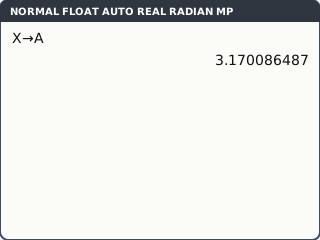
What the screen shows after this step (our drawing of the TI-84 Plus CE screen, not a photo).
Your turn: check your understanding
Try these straight after the key presses, on your own calculator, before looking at the answers.
- Graph Y1 = 2^X and Y2 = X + 3 (choose a window that shows both crossings). Find both intersections.
- Find the minimum point of y = e^x − 3x.
- In RADIAN mode, find the positive x where 2 sin x = x ÷ 2.
Show the answers
- x = 2.44 and x = −2.86 (3 s.f.). One window: Xmin −4, Xmax 4, Ymin −2, Ymax 8.
- (1.10, −0.296) (3 s.f.)
- x = 2.47 (3 s.f.). Use 5: intersect with Y1 = 2sin(X), Y2 = X/2.
Exam efficiency
- Get the view right first (lesson 3): CALC cannot find a point that is off the screen.
- Bounds that are too wide can catch the wrong point: keep them close either side of the one you want.
- Write what you did, then the answer: "intersection of y = f(x) and y = 40 from GDC: x = 7.08".
- Store an X you need later before running CALC again.
- Check the domain: a crossing outside it is rejected, with a reason.
Worked exam-style example
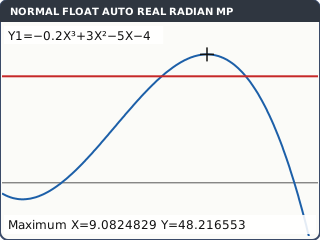
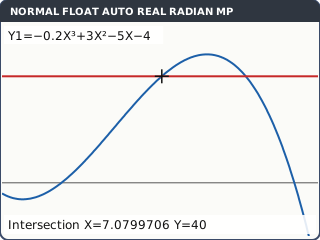
Question. A company's profit, in thousands of dollars, from selling x hundred items is P(x) = −0.2x³ + 3x² − 5x − 4, for 0 ≤ x ≤ 14. (a) Find the smallest number of items for a profit (P > 0). (b) Find the maximum profit and the x where it happens. (c) Find the values of x for which the profit is more than 40 thousand dollars.
y=: Y1 = −0.2X³ + 3X² − 5X − 4 (the first minus is (−)), Y2 = 40. window: Xmin 0, Xmax 14 (the domain), Ymin −20, Ymax 60. graph.
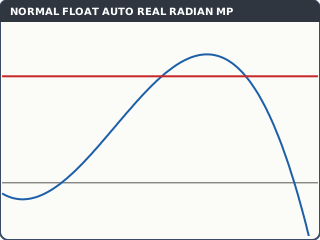
What the screen shows after this step (our drawing of the TI-84 Plus CE screen, not a photo). (a) 2nd trace 2: zero, with bounds either side of the crossing between 2 and 3: X = 2.6356628.
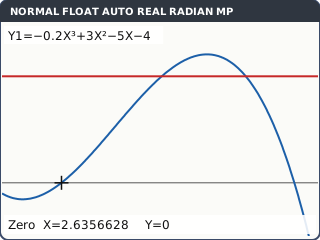
What the screen shows after this step (our drawing of the TI-84 Plus CE screen, not a photo). (b) 2nd trace 4: maximum, bounds either side of the peak: X = 9.0824829, Y = 48.216553.
What the screen shows after this step (our drawing of the TI-84 Plus CE screen, not a photo). (c) 2nd trace 5: intersect, Y1 then Y2, guess near the left crossing: X = 7.0799706. Again with a guess near the right crossing: X = 10.797799. The third crossing of the cubic with y = 40 is at a negative x, outside 0 ≤ x ≤ 14.
What the screen shows after this step (our drawing of the TI-84 Plus CE screen, not a photo).
What to write down
(a) P(x) = 0 at x = 2.64 (GDC), so at least 264 items (x is in hundreds, and the profit is only positive after this crossing).
(b) Maximum P = 48.2 thousand dollars when x = 9.08 (about 908 items).
(c) P(x) = 40 at x = 7.08 and x = 10.8 (the third solution is negative: reject it), so P > 40 for 7.08 < x < 10.8.
Practice
Do these on your own calculator. Write the answers to 3 significant figures unless the task says otherwise.
- Find the zeros of y = x² − 2x − 5.
- Find the maximum point of y = 6xe^(−0.4x) for x ≥ 0.
- Use 1: value to find y when x = 1.5 on y = ln(x + 2).
- Find where y = x³ − 4x² + 2x + 3 meets y = 1.
- Find the positive zero of y = x² − 2x − 5 with 2: zero, then QUIT and type X² enter on the home screen without retyping the zero. What do you get?
Show the practice answers
- x = 3.45 and x = −1.45
- (2.50, 5.52)
- y = 1.25
- x = −0.481, 1.31 and 3.17
- 11.9 (X still holds the zero, so this is (1 + √6)², exactly 7 + 2√6).
Common mistakes
- Pressing enter three times without moving the cursor: the bounds do not surround the point, and you get ERROR: NO SIGN CHANGE or the wrong point.
- Looking for a point that is off the screen: change the view first.
- Using 2: zero for an intersection: zero finds where one graph crosses the x-axis; intersect finds where two graphs meet. (Or graph Y1 − Y2 and use zero.)
- Copying only 3 s.f. of X into a later part: store X instead.
- Giving a solution outside the domain: say why it is rejected.
1-minute quick check
Answer these without looking back. Most need no calculation: they check that the key presses have stuck.
- Which keys open the CALC menu?
- What three things does 2: zero ask for?
- What does 5: intersect ask for before Guess?
- Where is the x value of the last CALC result kept?
- CALC says ERROR: NO SIGN CHANGE. What should you try?
Show the quick-check answers
- 2nd trace
- Left Bound?, Right Bound?, Guess?
- First curve? and Second curve?
- In X (store it with X sto→ alpha letter).
- Set the bounds closer either side of the point (and check it is on the screen).
Teaching this lesson (about 55 minutes)
| 0–5 min | Starter: sketch y = x³ − 4x² + 2x + 3 roughly. How many zeros, maxima and minima? |
| 5–20 min | Steps 1–4: value, zero (all three), maximum and minimum. Model Left Bound / Right Bound / Guess slowly, then fast. |
| 20–27 min | Steps 5–6: intersect, and storing X. |
| 27–35 min | Your turn tasks 1–3. |
| 35–43 min | Worked example: the profit model and its domain. |
| 43–52 min | Practice tasks 1–5. |
| 52–55 min | 1-minute quick check. |
Students need their own TI-84 Plus CE. With a projector, the calculator-skills guides below have a Show on the board view and an animated walkthrough of the key presses.
Matching calculator guides
- How to find intersections, zeros, maximum and minimum points on the Casio fx-CG50, TI-84 Plus CE and TI-Nspire CX II
- How to find the roots and vertex of a quadratic on the Casio fx-CG50, TI-84 Plus CE and TI-Nspire CX II
- How to draw trig graphs and read off max, min and solutions on the Casio fx-CG50, TI-84 Plus CE and TI-Nspire CX II