TI-84 Plus CE lesson 3: Graphs and changing the view: Y=, WINDOW, ZOOM and TRACE
Most graph questions go wrong before any solving starts: the curve is drawn in a view that hides the part the question is about. This lesson is about changing the view until the graph shows everything that matters.
Objective
Draw any function, then change the view with WINDOW and ZOOM until the graph shows every feature the question needs, and read values with TRACE.
By the end, students can:
- enter functions in y= and turn functions and stat plots on or off
- set Xmin, Xmax, Ymin and Ymax in window from the question's domain and values
- use zoom 6: ZStandard, 0: ZoomFit, 7: ZTrig, 1: ZBox, 2: Zoom In, 3: Zoom Out and 5: ZSquare, and undo a zoom with ZOOM MEMORY 1: ZPrevious
- trace along a curve and jump to an exact x value by typing it
- say when a graph is hiding something (a blank screen, a curve leaving the top, a missing turning point)
Which courses this lesson suits
- IB Maths AA (SL and HL): Papers 2 and 3
- IB Maths AI (SL and HL): every paper
- A Level Maths (UK and IAL): calculator allowed in every paper
Before you start
Set RADIAN mode (lesson 1). Clear old functions in y=: put the cursor on each one and press clear.
The key presses, step by step
Every key is shown as it is printed on the calculator, like 2nd or enter. A second function (printed above a key) is 2nd then that key; a menu item is chosen by its number, or by moving to it and pressing enter.
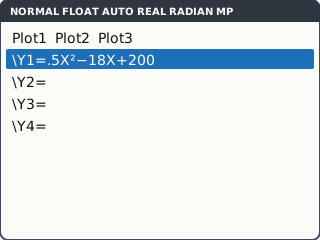
Press y=. Next to Y1= type 0.5X² − 18X + 200 (X is the X,T,θ,n key). This models the cost, in dollars, of making x items. Press enter.
A function is drawn only when its = sign is highlighted: move onto the = and press enter to turn it off or on. Check that Plot1, Plot2 and Plot3 at the top are not highlighted, or old statistics data is drawn too.
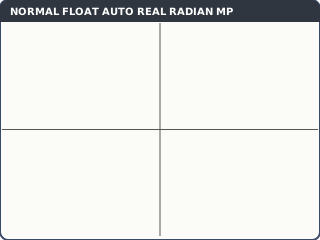
What the screen shows after this step (our drawing of the TI-84 Plus CE screen, not a photo). Press zoom 6: ZStandard: x and y both from −10 to 10. The screen shows the axes and nothing else, because every value of the cost is above 10.
A blank graph is a view problem, not a mistake in the function.
ZStandard: the curve is above the top of the screen (our drawing of the TI-84 Plus CE screen, not a photo). Press zoom 0: ZoomFit. It keeps Xmin and Xmax and fits the y range to the curve. Now part of the curve shows, falling from left to right, but the lowest point is still out of view to the right.
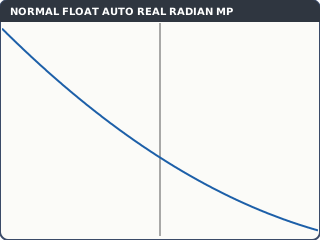
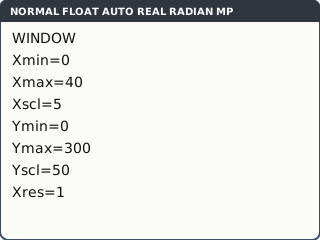
ZoomFit fits y, but the x range is still wrong (our drawing of the TI-84 Plus CE screen, not a photo). Set the view from the question. Press window and type Xmin = 0, Xmax = 40, Xscl = 5, Ymin = 0, Ymax = 300, Yscl = 50, pressing enter after each. Press graph: the whole U shape, with its minimum, is in view.
Xscl and Yscl only set the spacing of the tick marks. The x range comes from the question (the number of items cannot be negative); the y range from a few values of the function.
What the screen shows after this step (our drawing of the TI-84 Plus CE screen, not a photo). Press trace. A cursor sits on the curve, with X and Y at the bottom. ◄ and ► move it. To go to an exact x, type the number: 10 enter puts the cursor at X = 10, Y = 70.
With two functions drawn, ▲ and ▼ move the cursor from one curve to the other; the top-left corner says which one.
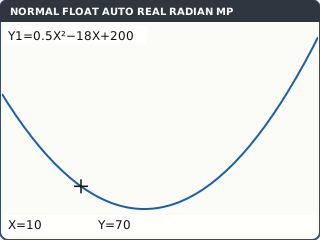
What the screen shows after this step (our drawing of the TI-84 Plus CE screen, not a photo). The other zooms, from zoom: 1: ZBox (move to one corner, enter, to the opposite corner, enter: the box becomes the screen), 2: Zoom In and 3: Zoom Out (move to the centre you want and press enter), 5: ZSquare (the same scale on both axes, so a circle looks round) and 7: ZTrig (a view for trig graphs in the current angle mode).
Went too far? Move across to the MEMORY tab and choose 1: ZPrevious to go back one step.
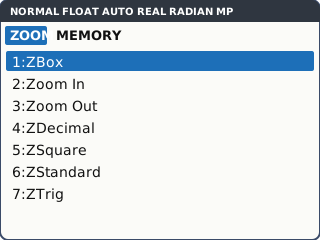
The ZOOM menu (more items below 7, including 0: ZoomFit) (our drawing of the TI-84 Plus CE screen, not a photo).
Your turn: check your understanding
Try these straight after the key presses, on your own calculator, before looking at the answers.
- Graph Y1 = X³ − 12X² + 20 in zoom 6: ZStandard. The graph looks like it has no lowest turning point. Change the window so the turning point near x = 8 shows, then trace to X = 8. What is Y there?
- Graph Y1 = √(25 − X²) and Y2 = −√(25 − X²) in ZStandard. The circle looks like an oval. Which zoom makes it round?
- Use zoom 2: Zoom In twice on any graph, then get back to the view you started with without typing a window.
Show the answers
- Y = −236. A view such as Xmin −5, Xmax 15, Ymin −300, Ymax 100 shows both turning points.
- zoom 5: ZSquare (equal scales on both axes).
- zoom, MEMORY tab, 1: ZPrevious: once for each zoom (twice here).
Exam efficiency
- Before drawing, write down the domain from the question: that is your Xmin and Xmax.
- Work out two or three values of the function (or use ZoomFit) to choose Ymin and Ymax.
- If a graph question asks about a turning point or a crossing, make sure you can see it before you use the CALC menu (lesson 4).
- Sketching the graph in your answer? Copy the window values: they give your axes their scale.
Worked exam-style example
Question. A cup of coffee cools so that its temperature after t minutes is T = 20 + 60e^(−0.08t) °C, for 0 ≤ t ≤ 60. (a) Choose a window that shows the whole model and sketch it. (b) Find the temperature after 30 minutes. (c) What temperature does the coffee approach?
y=, Y1 = 20 + 60e^(−0.08X). e^( is 2nd ln; the minus inside the bracket is (−).
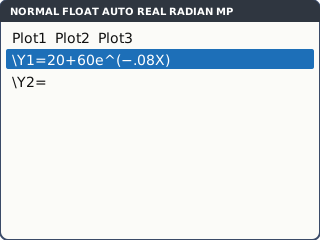
What the screen shows after this step (our drawing of the TI-84 Plus CE screen, not a photo). (a) From the question: t from 0 to 60, so Xmin = 0, Xmax = 60, Xscl = 10. At t = 0 the temperature is 80, and it never goes below 20, so Ymin = 0, Ymax = 90, Yscl = 10. graph.
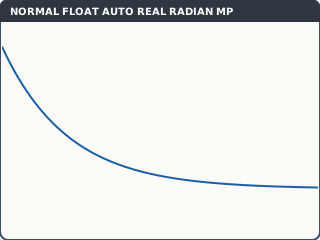
What the screen shows after this step (our drawing of the TI-84 Plus CE screen, not a photo). (b) trace, type 30, enter: Y = 25.443077.
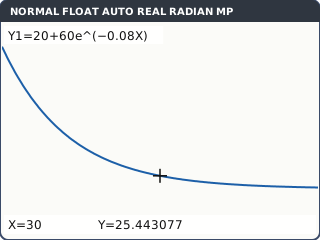
What the screen shows after this step (our drawing of the TI-84 Plus CE screen, not a photo). (c) Trace to X = 60: Y = 20.493785. The curve flattens out above 20, because e^(−0.08t) gets closer and closer to 0.
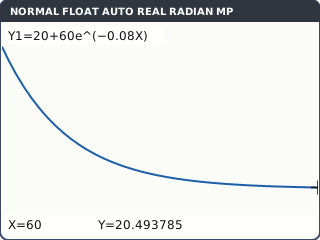
What the screen shows after this step (our drawing of the TI-84 Plus CE screen, not a photo).
What to write down
(a) A sketch with t from 0 to 60 and T from 0 to 90: a decreasing curve starting at (0, 80), flattening towards T = 20.
(b) T(30) = 20 + 60e^(−2.4) = 25.4 °C (3 s.f.).
(c) As t gets large, e^(−0.08t) → 0, so T → 20 °C (room temperature).
Practice
Do these on your own calculator. Write the answers to 3 significant figures unless the task says otherwise.
- Y1 = 0.02X³ − 0.6X² + 4X for 0 ≤ x ≤ 25. Choose a window that shows the whole graph, then use trace to find Y at X = 15.
- Using the graph from task 1, where does the curve meet the x-axis for 0 ≤ x ≤ 25?
- A ball's height is h = 30t − 4.9t² + 2 metres. Choose a window from the question (t ≥ 0, h ≥ 0) that shows the whole flight, then trace to t = 5.
- Graph Y1 = e^(X/10) in ZStandard: it looks almost flat. Change the window to Xmin 0, Xmax 50, Ymin 0, Ymax 160 and trace to X = 40.
- Graph Y1 = X³ − X and Y2 = 0.1 in ZStandard. Use zoom 1: ZBox around the origin. How many times do the graphs meet?
Show the practice answers
- Y = −7.5. One good window: Xmin 0, Xmax 25, Ymin −15, Ymax 45.
- x = 0, 10 and 20
- h = 29.5 m. A window such as Xmin 0, Xmax 7, Ymin 0, Ymax 55 shows the whole flight.
- Y = 54.59815 (that is e⁴).
- 3 times. In ZStandard the crossings are too close together to count.
Common mistakes
- Assuming a blank screen means a wrong function: it is usually the view. Try ZoomFit, then set the window from the question.
- Leaving a stat plot switched on: ERROR: INVALID DIM or extra dots on the graph. Turn Plot1–3 off in y=.
- Typing Xmin and Xmax the wrong way round: ERROR: WINDOW RANGE.
- Using ZStandard for every graph: −10 to 10 is rarely the domain of a real model.
- Using a trig graph in the wrong angle mode: ZTrig follows the mode, so set RADIAN or DEGREE first.
1-minute quick check
Answer these without looking back. Most need no calculation: they check that the key presses have stuck.
- Which zoom keeps your x range and fits the y range to the curve?
- Which zoom makes a circle look round?
- How do you undo the last zoom?
- In TRACE, how do you jump straight to x = 12?
- Where do Xmin and Xmax usually come from in an exam question?
Show the quick-check answers
- zoom 0: ZoomFit
- zoom 5: ZSquare
- zoom, MEMORY tab, 1: ZPrevious
- Type 12 and press enter.
- The domain in the question (for example 0 ≤ t ≤ 60).
Teaching this lesson (about 55 minutes)
| 0–5 min | Starter: show the blank ZStandard screen from step 2. Ask: is the function wrong? |
| 5–15 min | Steps 1–3: Y=, ZStandard, ZoomFit. Why each view hides the minimum. |
| 15–25 min | Steps 4–5: setting the window from the question, TRACE and typing an x value. |
| 25–33 min | Step 6 and your turn tasks 1–3: ZBox, ZSquare, ZPrevious. |
| 33–42 min | Worked example: the cooling coffee. |
| 42–52 min | Practice tasks 1–5. |
| 52–55 min | 1-minute quick check. |
Students need their own TI-84 Plus CE. With a projector, the calculator-skills guides below have a Show on the board view and an animated walkthrough of the key presses.
Matching calculator guides
- How to find intersections, zeros, maximum and minimum points on the Casio fx-CG50, TI-84 Plus CE and TI-Nspire CX II
- How to draw trig graphs and read off max, min and solutions on the Casio fx-CG50, TI-84 Plus CE and TI-Nspire CX II
- How to find the roots and vertex of a quadratic on the Casio fx-CG50, TI-84 Plus CE and TI-Nspire CX II