TI-84 Plus CE lesson 2: The home screen: storing values and avoiding rounding errors
A value you work out in part (a) is usually needed in part (b). This lesson makes storing it a habit, so a rounded number is never typed back in and the final answer is right to 3 significant figures.
Objective
Store any value in a letter, use the letters in later calculations and formulas, and explain why rounding too early can change the final answer.
By the end, students can:
- store a value with sto→ then alpha and a letter
- find the letters printed above the keys (A on math, B on apps, C on prgm, H on ^, R on ×, X on sto→)
- type a formula using stored letters and change one value with 2nd enter (ENTRY)
- chain calculations with Ans for a repeated percentage change
- show a case where a rounded value typed back in gives the wrong 3 s.f. answer
Which courses this lesson suits
- IB Maths AA (SL and HL): Papers 2 and 3
- IB Maths AI (SL and HL): every paper
- A Level Maths (UK and IAL): calculator allowed in every paper
Before you start
Students need lesson 1's habits: the mode screen, QUIT, ANS and ENTRY. Stored letters stay in memory when the calculator is turned off, so old values may be there already: that is the point of step 2.
The key presses, step by step
Every key is shown as it is printed on the calculator, like 2nd or enter. A second function (printed above a key) is 2nd then that key; a menu item is chosen by its number, or by moving to it and pressing enter.
Type 7.25, press sto→, then alpha math (the letter A is printed above math) and enter. The screen shows 7.25→A and the value 7.25.
sto→ writes → on the line. alpha then gives the green letter printed above the next key.
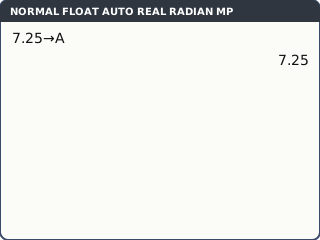
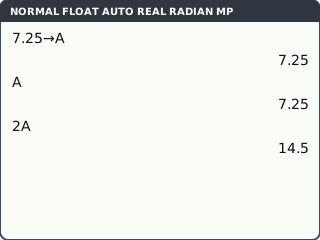
What the screen shows after this step (our drawing of the TI-84 Plus CE screen, not a photo). Recall it: alpha math (A) enter shows 7.25. A letter can go anywhere a number can: 2A enter gives 14.5 (no × needed).
A letter you never stored is not empty: it holds whatever was stored last time, often from another lesson. Store before you use.
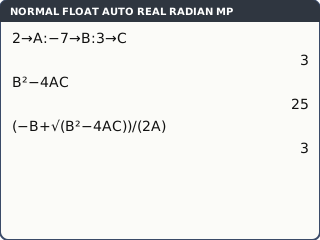
What the screen shows after this step (our drawing of the TI-84 Plus CE screen, not a photo). Several values on one line: the colon is alpha .. Type 2 sto→ alpha math alpha . (−) 7 sto→ alpha apps alpha . 3 sto→ alpha prgm enter: A = 2, B = −7, C = 3.
Now type the formula once: B² − 4AC enter gives 25, the discriminant of 2x² − 7x + 3.
Change one value later and press 2nd enter (ENTRY) until the formula line is back, then enter: the formula is reused with the new value.
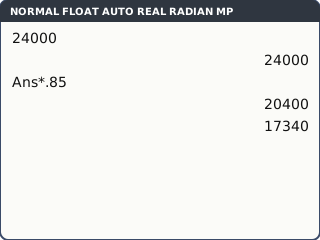
What the screen shows after this step (our drawing of the TI-84 Plus CE screen, not a photo). Ans chains. A car worth 24000 loses 15% of its value each year. Type 24000 enter, then × 0.85 enter (the line starts Ans*0.85). Each extra enter is one more year: 20400, then 17340, and so on.
Count the presses: the screen keeps every line, so you can check which year you are on.
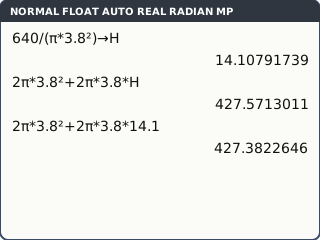
What the screen shows after this step (our drawing of the TI-84 Plus CE screen, not a photo). Why store at all? A cylinder has volume 640 cm³ and radius 3.8 cm. The height is 640 ÷ (π × 3.8²). Type 640 ÷ (π × 3.8²), then sto→ alpha ^ (H) and enter on the same line: the screen shows 14.10791739, now stored in H. The surface area 2π × 3.8² + 2π × 3.8 × H is 427.5713011, so 428 cm² to 3 s.f.
With the height rounded to 14.1 and typed back in, the same formula gives 427.3822646: 427 cm². The 3 s.f. answer is wrong.
π is 2nd ^. Rounding errors grow when a rounded value is multiplied by something large.
What the screen shows after this step (our drawing of the TI-84 Plus CE screen, not a photo).
Your turn: check your understanding
Try these straight after the key presses, on your own calculator, before looking at the answers.
- Store 4.6 in R (sto→ alpha ×). Use R to work out πR² and 2πR.
- Store A = 1, B = −3 and C = −5 on one line. Work out B² − 4AC, then the larger root (−B + √(B² − 4AC)) ÷ (2A).
- Now store 2 in B only. Use 2nd enter (ENTRY) to bring back B² − 4AC and press enter. What is the new value?
Show the answers
- πR² = 66.5, 2πR = 28.9 (3 s.f.).
- B² − 4AC = 29; larger root 4.19 (3 s.f.).
- 24. Nothing was retyped except the new B.
Exam efficiency
- Store every answer you might need again, straight away: a letter takes two key presses.
- Write the rounded value in your working, but use the stored one on the calculator.
- Use letters that match the question (H for height, R for radius) so you remember what each one holds.
- Before a long question, store fresh values: an old letter from another day gives a wrong answer with no warning.
Worked exam-style example
Question. A solid sphere has volume 200 cm³. (a) Find its radius r. (b) Find its surface area. Give your answers to 3 significant figures.
(a) r = ∛(3V ÷ 4π). The cube root is math 4: ∛(. Type ∛(3 × 200 ÷ (4π)) enter: 3.627831679.
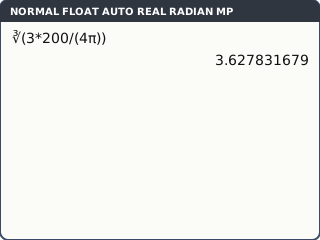
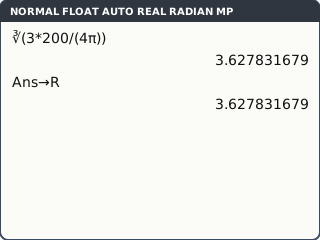
What the screen shows after this step (our drawing of the TI-84 Plus CE screen, not a photo). Store it straight away: sto→ alpha × (R) enter. The line reads Ans→R.
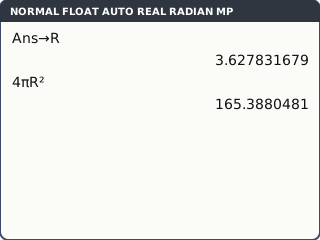
What the screen shows after this step (our drawing of the TI-84 Plus CE screen, not a photo). (b) 4πR² enter: 165.3880481.
What the screen shows after this step (our drawing of the TI-84 Plus CE screen, not a photo).
What to write down
(a) (4/3)πr³ = 200, so r = ∛(600 ÷ 4π) = 3.63 cm.
(b) Surface area = 4πr² = 165 cm² (using the stored r, not 3.63).
Practice
Do these on your own calculator. Write the answers to 3 significant figures unless the task says otherwise.
- Store 2.35 in K (K is alpha (). Work out K³ − 4K.
- A cylinder has volume 450 cm³ and radius 3.6 cm. Work out its surface area twice: with the height stored, and with the height rounded to 3 s.f. and typed in. Give both to 3 s.f.
- Work out (√7)¹⁰ by typing √(7) enter then Ans^10. Then type 2.65^10. Give both answers to the nearest whole number.
- A town has 5000 people and grows by 3% a year. Use an Ans chain to find the population after 5 years, to the nearest whole number.
- Store 0.35 in P. Work out P(1 − P)³ to 3 s.f.
Show the practice answers
- 3.58
- Stored: 331 cm². Rounded height: 333 cm². Only the first is right.
- 16807 (exactly 7⁵) and 17079: rounding √7 to 2.65 puts the answer out by 272.
- 5796
- 0.0961
Common mistakes
- Pressing sto→ then the key without alpha: you store into the wrong thing or get an error. It is sto→ alpha letter.
- Typing the rounded value from part (a) into part (b): use the stored letter.
- Using a letter that still holds an old value: store before you use.
- Writing calculator syntax as working (Ans→R, 4πR²): write the maths: r = 3.63, S = 4πr² = 165.
- Using − for a negative value in A, B or C: −7→B needs (−).
1-minute quick check
Answer these without looking back. Most need no calculation: they check that the key presses have stuck.
- Which keys store the answer on the screen in A?
- Which key types the colon that separates two commands on one line?
- You type B²−4AC and get a strange answer. What should you check?
- Which keys bring back the formula line so you can run it with a new value?
- Should you write the rounded or the stored value in your working?
Show the quick-check answers
- sto→ alpha math enter
- alpha .
- That A, B and C were stored for this question, not left over from earlier.
- 2nd enter (ENTRY), pressed until the line appears, then enter
- Write the rounded value; keep using the stored one on the calculator.
Teaching this lesson (about 55 minutes)
| 0–5 min | Starter: the cylinder (step 5) worked two ways on the board. Which answer is right, and why do they differ? |
| 5–15 min | Steps 1–2: storing and recalling, where the letters are on the keys. |
| 15–25 min | Steps 3–4: a formula with stored letters, ENTRY to change one value, and an Ans chain. |
| 25–32 min | Your turn tasks 1–3 in pairs. |
| 32–40 min | Worked example: the sphere, storing r before part (b). |
| 40–52 min | Practice tasks 1–5. |
| 52–55 min | 1-minute quick check. |
Students need their own TI-84 Plus CE. With a projector, the calculator-skills guides below have a Show on the board view and an animated walkthrough of the key presses.
Matching calculator guides
- How to use standard form and round to significant figures on the Casio fx-CG50, TI-84 Plus CE and TI-Nspire CX II
- How to solve equations, polynomials and simultaneous equations on the Casio fx-CG50, TI-84 Plus CE and TI-Nspire CX II
- How to change a fraction to a decimal on your calculator (and back)