TI-84 Plus CE lesson 11: DISTR: normal, binomial, Poisson, tests and intervals
Probability distributions are on every calculator paper. On the TI-84 Plus CE they are all in one menu, DISTR. The marks are lost on the details: the order of μ and σ, a bound of 1E99, and turning "at least" into a binomcdf.
Objective
Find normal, binomial and Poisson probabilities and inverse normal values from the DISTR menu, and run a χ² goodness of fit test and a t-interval.
By the end, students can:
- use normalcdf(lower, upper, μ, σ) with ±1E99 for one-sided probabilities
- use invNorm with the Tail setting to find a value from a probability
- use binompdf and binomcdf, writing "at least" as 1 − binomcdf
- use poissonpdf and poissoncdf
- run χ²GOF-Test and TInterval and read p-values written in E notation
Which courses this lesson suits
- IB Maths AA (SL and HL): Papers 2 and 3
- IB Maths AI (SL and HL): every paper
- IB Maths AI HL
- A Level Maths (UK and IAL): calculator allowed in every paper
Steps 1–5 are for every course. Steps 6–7 (the χ² goodness of fit test and the t-interval) are IB AI HL; A Level students meet tests through the binomial and normal distributions instead.
The key presses, step by step
Every key is shown as it is printed on the calculator, like 2nd or enter. A second function (printed above a key) is 2nd then that key; a menu item is chosen by its number, or by moving to it and pressing enter.
2nd vars opens DISTR. 1: normalpdf( is the height of the curve: not a probability. 2: normalcdf( is the one you want for P(a < X < b). Choose 2.
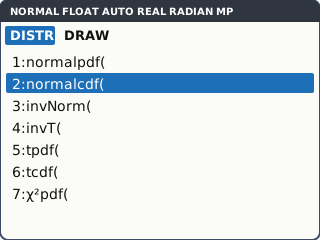
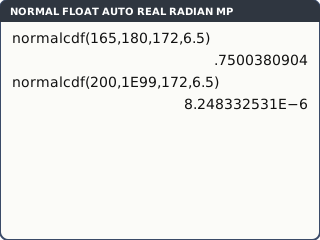
What the screen shows after this step (our drawing of the TI-84 Plus CE screen, not a photo). X ~ N(172, 6.5²). For P(165 < X < 180): lower 165, upper 180, μ 172, σ 6.5. Move to Paste, enter, enter: 0.7500380904.
For a one-sided probability use 1E99 as the missing bound: E is 2nd , (EE). P(X > 200) = normalcdf(200, 1E99, 172, 6.5) = 8.248332531E−6.
8.248332531E−6 means about 0.00000825: read the E−6 at the end before you write the answer. The TI order is μ then σ, the opposite of the Casio.
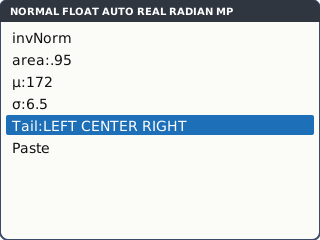
What the screen shows after this step (our drawing of the TI-84 Plus CE screen, not a photo). Inverse normal: 2nd vars 3: invNorm(. area 0.95, μ 172, σ 6.5, Tail: LEFT, Paste: 182.6915486. This is the k with P(X < k) = 0.95.
For P(X > k) = 0.1, choose Tail: RIGHT with area 0.1, or use LEFT with area 0.9. Both give the same k.
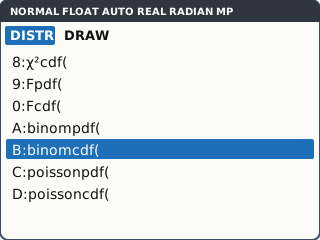
What the screen shows after this step (our drawing of the TI-84 Plus CE screen, not a photo). Binomial, X ~ B(15, 0.22). Scroll down DISTR to A: binompdf( (exactly) and B: binomcdf( (at most). binompdf(15, 0.22, 3) = P(X = 3) = 0.2457053831. binomcdf(15, 0.22, 4) = P(X ≤ 4) = 0.7805296924.
At least: P(X ≥ 5) = 1 − P(X ≤ 4) = 1 − binomcdf(15, 0.22, 4) = 0.2194703076.
binomcdf always means "less than or equal to". Rewrite the question in that form first: X > 4, X ≥ 5 and "at least 5" are all 1 − binomcdf(…, 4).
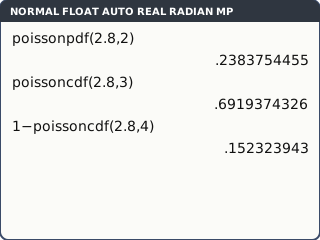
What the screen shows after this step (our drawing of the TI-84 Plus CE screen, not a photo). Poisson, X ~ Po(2.8): C: poissonpdf(2.8, 2) = P(X = 2) = 0.2383754455; D: poissoncdf(2.8, 3) = P(X ≤ 3) = 0.6919374326; P(X > 4) = 1 − poissoncdf(2.8, 4) = 0.152323943.
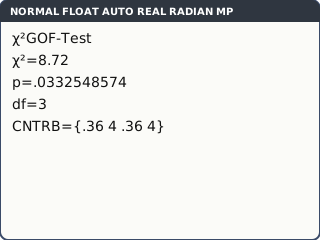
What the screen shows after this step (our drawing of the TI-84 Plus CE screen, not a photo). AI HL: a χ² goodness of fit test. A spinner with 4 equal sectors is spun 100 times: 28, 35, 22, 15. Put the observed counts in L1 and the expected counts (25 each) in L2. stat, TESTS tab, D: χ²GOF-Test…. Observed L1, Expected L2, df 3, Calculate.
df is the number of categories minus 1 (minus any parameters you estimated from the data).
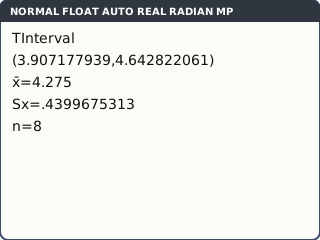
What the screen shows after this step (our drawing of the TI-84 Plus CE screen, not a photo). AI HL: a t-interval. Eight masses, 4.2, 3.8, 4.5, 4.9, 4.1, 3.6, 4.4, 4.7, go in L1. stat, TESTS tab, 8: TInterval…. Inpt: Data, List L1, Freq 1, C-Level 0.95, Calculate.
C-Level is a decimal, 0.95. With summary statistics instead of data, choose Inpt: Stats and type x̄, Sx and n.
What the screen shows after this step (our drawing of the TI-84 Plus CE screen, not a photo).
Your turn: check your understanding
Try these straight after the key presses, on your own calculator, before looking at the answers.
- X ~ N(50, 8²). Find P(X < 60).
- X ~ B(10, 0.4). Find P(X ≥ 6).
- A test gives p = 4.5E−3. Is this less than 0.05? Write p as an ordinary decimal.
Show the answers
- normalcdf(−1E99, 60, 50, 8) = 0.894 (3 s.f.)
- 1 − binomcdf(10, 0.4, 5) = 0.166 (3 s.f.)
- p = 0.0045, which is less than 0.05. E−3 moves the decimal point 3 places left.
Exam efficiency
- Write the probability statement first, e.g. X ~ N(172, 6.5²), P(165 < X < 180) = …, not "normalcdf(165, 180, 172, 6.5)": calculator syntax is not working.
- Store a probability you will reuse (sto→ alpha letter) instead of retyping a rounded value.
- For discrete distributions, turn every inequality into ≤ before using a cdf: P(X < 5) = P(X ≤ 4).
- Read the end of every answer for E−: 8.25E−6 is not 8.25.
- In a test, write the hypotheses, the p-value and the conclusion in context.
Worked exam-style example
Question. Adult heights X cm follow N(172, 6.5²). (a) Find the probability that a randomly chosen adult is taller than 185 cm. (b) 15 adults are chosen at random. Find the probability that at least one is taller than 185 cm.
(a) normalcdf(185, 1E99, 172, 6.5) enter: 0.0227501319. Store it at once: sto→ alpha math (A) enter.
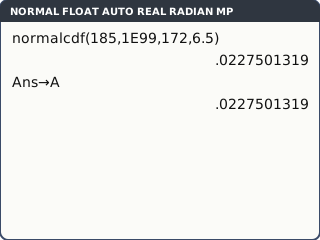
What the screen shows after this step (our drawing of the TI-84 Plus CE screen, not a photo). (b) Y ~ B(15, p) with p = A. At least one: 1 − P(Y = 0) = 1 − binompdf(15, A, 0) enter: 0.291916773.
Using A keeps every digit of p. With p rounded to 0.0228, the last figure can change.
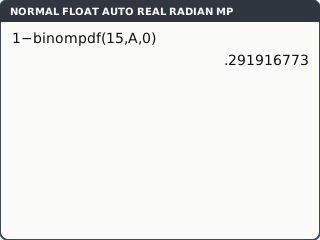
What the screen shows after this step (our drawing of the TI-84 Plus CE screen, not a photo).
What to write down
(a) P(X > 185) = 0.0228
(b) Y ~ B(15, 0.0228); P(Y ≥ 1) = 1 − P(Y = 0) = 0.292
Practice
Do these on your own calculator. Write the answers to 3 significant figures unless the task says otherwise.
- X ~ N(80, 12²). Find (a) P(X < 65), (b) P(70 < X < 95).
- X ~ N(80, 12²). Find k such that P(X > k) = 0.1.
- X ~ B(20, 0.35). Find (a) P(X = 7), (b) P(X ≥ 10).
- X ~ Po(4.5). Find (a) P(X = 3), (b) P(X > 6).
- AI HL. Find a 95% confidence interval for the mean from the sample 12.1, 11.6, 12.8, 12.3, 11.9, 12.5.
- AI HL. Observed counts 18, 30, 32, 20 are tested against equal expected counts of 25. Find χ² and the p-value, and say whether the counts fit at the 5% level.
Show the practice answers
- (a) 0.106 (b) 0.692
- k = 95.4 (invNorm with area 0.1 and Tail: RIGHT, or area 0.9 and LEFT)
- (a) 0.184 (b) 1 − binomcdf(20, 0.35, 9) = 0.122
- (a) 0.169 (b) 1 − poissoncdf(4.5, 6) = 0.169
- (11.7, 12.7) with x̄ = 12.2
- χ² = 5.92, df = 3, p = 0.116: more than 0.05, so there is not enough evidence that the counts do not fit.
Common mistakes
- σ and μ the wrong way round: the TI order is μ then σ.
- Using normalpdf for a probability. It gives the height of the curve.
- Typing −1E99 with the subtraction key: use (−).
- P(X ≥ 5) as 1 − binomcdf(…, 5): that is P(X ≥ 6).
- Reading 8.25E−6 as 8.25, or missing the E altogether.
- Variance instead of standard deviation: N(172, 6.5²) has σ = 6.5, not 42.25.
1-minute quick check
Answer these without looking back. Most need no calculation: they check that the key presses have stuck.
- Which keys open DISTR?
- In normalcdf, which comes first, μ or σ?
- What do you type as the upper bound for P(X > 30)?
- Write P(X ≥ 4) for a binomial X using binomcdf.
- In which menu is χ²GOF-Test?
Show the quick-check answers
- 2nd vars
- μ
- 1E99 (1 2nd , 99)
- 1 − binomcdf(n, p, 3)
- stat, TESTS tab
Teaching this lesson (about 55 minutes)
| 0–5 min | Starter: P(X ≥ 5), P(X > 5), P(X < 5): write each as P(X ≤ something). |
| 5–18 min | Steps 1–3: normalcdf with 1E99, reading E notation, invNorm with Tail. |
| 18–28 min | Steps 4–5: binomial and Poisson. First two "your turn" tasks. |
| 28–36 min | Worked example: store p, then the binomial. Discuss why storing matters. |
| 36–48 min | Practice 1–4. AI HL: steps 6–7 and practice 5–6 instead of 4. |
| 48–52 min | Third "your turn" task: reading p-values. |
| 52–55 min | 1-minute quick check. |
Students need their own TI-84 Plus CE. With a projector, the calculator-skills guides below have a Show on the board view and an animated walkthrough of the key presses.
Matching calculator guides
- How to do a normal distribution (normal cdf and inverse normal) on the Casio fx-CG50, TI-84 Plus CE and TI-Nspire CX II
- How to do binomial and Poisson probabilities (pdf and cdf) on the Casio fx-CG50, TI-84 Plus CE and TI-Nspire CX II
- How to do a t-test and a χ² test on the Casio fx-CG50, TI-84 Plus CE and TI-Nspire CX II
- How to find a confidence interval for a mean on the Casio fx-CG50, TI-84 Plus CE and TI-Nspire CX II