TI-84 Plus CE lesson 12: Matrices, Markov chains and complex numbers
Matrices and complex numbers are HL topics where the calculator saves the most time: a 3 × 3 system, a Markov chain twenty steps ahead or the modulus and argument of a quotient each take seconds, once you know the MATRIX menu and the a+bi mode.
Objective
Enter and use matrices (determinant, inverse, powers, solving AX = B) and work with complex numbers in a+bi mode, including modulus, argument and polar form.
By the end, students can:
- enter a matrix with 2nd x⁻¹ (MATRIX), EDIT, and paste it from NAMES
- find det( and an inverse, and solve AX = B as [A]⁻¹[B]
- raise a transition matrix to a power for a Markov chain, and find the long-run state
- set a+bi mode, type i with 2nd ., and use abs(, angle( and ►Polar from math CMPLX
Which courses this lesson suits
- IB Maths AI HL
- IB Maths AA HL
Matrices and Markov chains are IB AI HL. AA HL students use the complex number steps, and solving a system to check their elimination by hand. The TI-84 Plus CE has no vector menu: check a scalar product with lists, sum(L1*L2), if you need to.
Before you start
Complex results need a+bi on the mode screen; matrices work in any mode. The angle in this lesson is in radians: check the status bar says RADIAN.
The key presses, step by step
Every key is shown as it is printed on the calculator, like 2nd or enter. A second function (printed above a key) is 2nd then that key; a menu item is chosen by its number, or by moving to it and pressing enter.
2nd x⁻¹ opens MATRIX. Move right to the EDIT tab and choose 1: [A].
There are three tabs: NAMES (to paste a matrix into a calculation), MATH (det(, transpose and more) and EDIT (to type one in).
![TI-84 Plus CE lesson 12 screen: MATRIX menu, showing the MATRIX EDIT tab with 1:[A] highlighted](/images/free-lessons/ti84/lesson-12-matrices-markov-chains-and-complex-numbers-step-1-ti-84-plus-ce-screen.svg)
What the screen shows after this step (our drawing of the TI-84 Plus CE screen, not a photo). Type the size first: 3 enter 3 enter. Then the entries row by row, enter after each: 2, 1, −1 / 1, 3, 2 / 3, −1, 4 (negatives with (−)). Then 2nd mode (QUIT).
![TI-84 Plus CE lesson 12 screen: Matrix editor, showing the matrix editor showing [A], 3 by 3, with rows 2 1 −1, 1 3 2, 3 −1 4](/images/free-lessons/ti84/lesson-12-matrices-markov-chains-and-complex-numbers-step-2-ti-84-plus-ce-screen.svg)
What the screen shows after this step (our drawing of the TI-84 Plus CE screen, not a photo). Determinant: 2nd x⁻¹, MATH tab, 1: det(, then 2nd x⁻¹, NAMES tab, 1: [A], ) enter: 40.
A determinant of 0 means there is no inverse: the system has no unique solution.
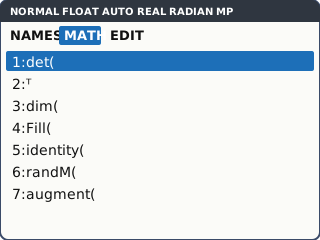
What the screen shows after this step (our drawing of the TI-84 Plus CE screen, not a photo). Solve 2x + y − z = 1, x + 3y + 2z = 13, 3x − y + 4z = 13. [A] holds the coefficients; put the right-hand sides in [B] as a 3 × 1 matrix: 2nd x⁻¹ (MATRIX), EDIT tab, 2: [B], type 3 enter 1 enter for the size, then 1, 13, 13 with enter after each, and 2nd mode (QUIT). On the home screen: [A] x⁻¹ [B] enter gives x = 1, y = 2, z = 3.
The inverse key is x⁻¹ itself, pressed after [A]. Paste the names from NAMES: typing the letter A with alpha is a number, not the matrix.
![TI-84 Plus CE lesson 12 screen: Home screen, showing det([A]) = 40, and [A]⁻¹[B] gives x 1, y 2, z 3](/images/free-lessons/ti84/lesson-12-matrices-markov-chains-and-complex-numbers-step-4-ti-84-plus-ce-screen.svg)
What the screen shows after this step (our drawing of the TI-84 Plus CE screen, not a photo). Complex numbers: mode, move down to the REAL a+bi re^(θi) line, choose a+bi, enter, 2nd mode. i is 2nd .. Type (4 + 3i)/(1 + 2i) enter: 2−i.
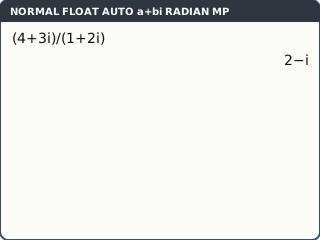
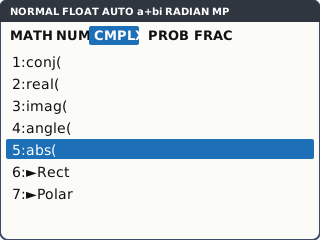
What the screen shows after this step (our drawing of the TI-84 Plus CE screen, not a photo). Modulus and argument: math, move right to the CMPLX tab: 5: abs( and 4: angle(. abs(Ans) = 2.236067977 and angle(Ans) = −0.463647609 radians. 7: ►Polar after a number writes it in polar form.
angle( gives the argument between −π and π, in the angle mode the status bar shows.
What the screen shows after this step (our drawing of the TI-84 Plus CE screen, not a photo).
Your turn: check your understanding
Try these straight after the key presses, on your own calculator, before looking at the answers.
- Enter [C] = [6 −1; 4 3] (a 2 × 2 matrix) and find det([C]).
- In a+bi mode, work out (1 + i)⁴.
- Find the modulus and argument of 5 − 12i.
Show the answers
- 22
- −4
- abs = 13, angle = −1.18 radians (3 s.f.)
Exam efficiency
- Write the matrix equation, e.g. X = A⁻¹B, then the solution: the calculator steps are not working.
- Check a solution of a system by putting it back into one equation in your head.
- Markov chains: say which convention you used (columns or rows add up to 1), and multiply on the matching side.
- For the long-run state, raise the matrix to a large power (50 or 100) and check two powers give the same answer.
- Switch back to REAL mode afterwards: in a+bi mode a question with no real solution gives complex answers instead of an error.
Worked exam-style example
Question. Each month, 80% of customers of shop A stay with A and 20% move to B; 70% of B's customers stay and 30% move to A. In month 0, A has 200 customers and B has 800. (a) Find the number with each shop after 5 months. (b) Find the long-run numbers.
Enter the transition matrix [C] = [0.8 0.3; 0.2 0.7] (each column adds up to 1) and the state [D] = [200; 800] as a 2 × 1 matrix.
![TI-84 Plus CE lesson 12 screen: Matrix editor, showing the matrix editor showing [C] with columns 0.8, 0.2 and 0.3, 0.7](/images/free-lessons/ti84/lesson-12-matrices-markov-chains-and-complex-numbers-example-1-ti-84-plus-ce-screen.svg)
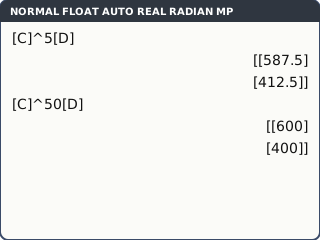
What the screen shows after this step (our drawing of the TI-84 Plus CE screen, not a photo). (a) On the home screen: [C]^5[D] enter (^ for the power): A = 587.5, B = 412.5. (b) [C]^50[D] enter: A = 600, B = 400. [C]^100[D] gives the same, so this is the long-run state.
What the screen shows after this step (our drawing of the TI-84 Plus CE screen, not a photo).
What to write down
T = (0.8 0.3; 0.2 0.7), s₀ = (200; 800).
(a) s₅ = T⁵s₀ = (587.5; 412.5).
(b) Tⁿs₀ → (600; 400): 600 with A and 400 with B in the long run.
Practice
Do these on your own calculator. Write the answers to 3 significant figures unless the task says otherwise.
- Find the determinant of [4 −2 1; 0 3 5; 2 1 −3].
- Find the inverse of [5 2; 3 2]. (Use math 1: ►Frac if you want fractions.)
- Solve x + 2y − z = 4, 2x − y + 3z = 9, 3x + y + z = 10.
- T = [0.9 0.2; 0.1 0.8] (columns add to 1) and s₀ = [500; 500]. Find s₃ and the long-run state.
- Work out (2 + 5i)(3 − i).
- Find the modulus and argument of −3 + 4i.
Show the practice answers
- −82
- [0.5 −0.5; −0.75 1.25]
- x = 1.4, y = 2.8, z = 3
- s₃ = (609.5; 390.5); long run (667; 333) to 3 s.f.
- 11+13i
- abs = 5, angle = 2.21 radians (3 s.f.)
Common mistakes
- Typing A with alpha instead of pasting [A] from NAMES: you get a number, not the matrix.
- [B][A]⁻¹ instead of [A]⁻¹[B]: matrix order matters.
- Entering a Markov matrix with rows and columns swapped, so the columns do not add up to 1.
- ERROR: NONREAL ANSWERS for √(−4) and similar real inputs in REAL mode: switch to a+bi. (Typing i yourself gives a complex result even in REAL mode.)
- Typing i with alpha instead of 2nd ..
- Giving the argument in degrees when the question wants radians (or the other way round).
1-minute quick check
Answer these without looking back. Most need no calculation: they check that the key presses have stuck.
- Which keys open the MATRIX menu?
- How do you solve AX = B on the home screen?
- Where is i?
- Which mode must be on for complex answers?
- Where are abs( and angle(?
Show the quick-check answers
- 2nd x⁻¹
- [A] x⁻¹ [B] enter (names pasted from NAMES)
- 2nd .
- a+bi (the mode screen)
- math, CMPLX tab
Teaching this lesson (about 55 minutes)
| 0–5 min | Starter: by hand, det of [3 1; 2 4]. Then check on the calculator. |
| 5–20 min | Steps 1–4: the matrix editor, det(, solving a 3 × 3 system. First "your turn" task. |
| 20–30 min | Worked example: the Markov chain, 5 steps and the long run. |
| 30–38 min | Steps 5–6: a+bi mode, i, abs(, angle(, ►Polar. Last two "your turn" tasks. |
| 38–52 min | Practice 1–6 (AA HL: 3, 5 and 6). |
| 52–55 min | 1-minute quick check. |
Students need their own TI-84 Plus CE. With a projector, the calculator-skills guides below have a Show on the board view and an animated walkthrough of the key presses.
Matching calculator guides
- How to find a determinant, inverse and eigenvalues of a matrix on the Casio fx-CG50, TI-84 Plus CE and TI-Nspire CX II
- How to do complex numbers (modulus, argument, polar form) on the Casio fx-CG50, TI-84 Plus CE and TI-Nspire CX II