TI-84 Plus CE lesson 10: Statistics: lists, 1-Var Stats and LinReg
Statistics questions reward speed: the data goes into lists once, then every summary, regression and prediction comes from the same lists. This lesson builds that routine on the TI-84 Plus CE, including the two settings that hide r and store the line.
Objective
Enter data in lists, get the summary statistics (with frequencies), find a regression line with r, and use the stored line to predict.
By the end, students can:
- clear a list and enter data, with frequencies in a second list
- run 1-Var Stats with a FreqList and choose between σx and Sx
- turn STAT DIAGNOSTICS on and read a, b and r from LinReg(ax+b)
- store the regression equation in Y1 and predict with Y1(x)
- draw a scatter plot with the line, using ZoomStat
Which courses this lesson suits
- IB Maths AI (SL and HL): every paper
- IB Maths AA (SL and HL): Papers 2 and 3
- A Level Maths (UK and IAL): calculator allowed in every paper
Before you start
Old data in L1 and L2 is the commonest cause of wrong answers in this lesson. Clear the lists together at the start (step 1).
The key presses, step by step
Every key is shown as it is printed on the calculator, like 2nd or enter. A second function (printed above a key) is 2nd then that key; a menu item is chosen by its number, or by moving to it and pressing enter.
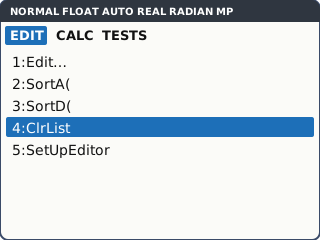
stat opens the STAT menu on its EDIT tab. 4: ClrList clears lists: choose it, then type L1, L2 (2nd 1 is L1, 2nd 2 is L2) and enter. Then 1: Edit… opens the list editor.
In the editor you can also move up onto the L1 heading, press clear then enter. Never press del on a heading: that removes the list from the editor.
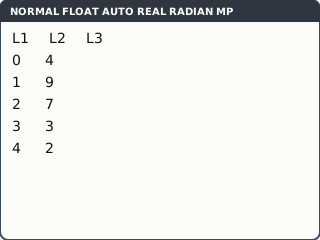
What the screen shows after this step (our drawing of the TI-84 Plus CE screen, not a photo). Enter the number of pets owned by 25 students: values 0, 1, 2, 3, 4 in L1 and their frequencies 4, 9, 7, 3, 2 in L2, pressing enter after each number.
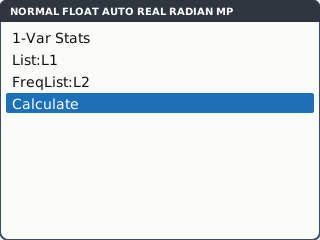
What the screen shows after this step (our drawing of the TI-84 Plus CE screen, not a photo). stat, move right to the CALC tab, 1: 1-Var Stats. List: L1, FreqList: L2 (leave FreqList blank for a plain list of data). Move to Calculate and press enter.
These input screens are the stat wizards. If yours just pastes 1-Var Stats onto the home screen, type L1, L2 after it.
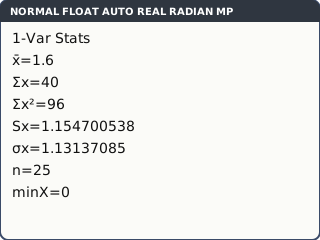
What the screen shows after this step (our drawing of the TI-84 Plus CE screen, not a photo). Read x̄ = 1.6. Sx = 1.154700538 is the sample standard deviation and σx = 1.13137085 the population one. Scroll down with ▼ for n, minX, Q1, Med, Q3 and maxX.
IB questions usually want σx for a set of data; use Sx when the question says the data is a sample used to estimate the population.
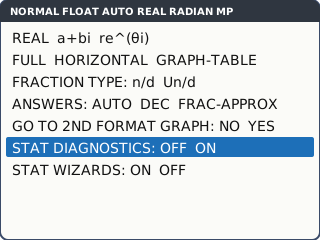
What the screen shows after this step (our drawing of the TI-84 Plus CE screen, not a photo). Before any regression, turn on STAT DIAGNOSTICS once: mode, scroll down to STAT DIAGNOSTICS, choose ON, enter. Without it the calculator does not show r or r².
On an older operating system there is no such line: use 2nd 0 (CATALOG), DiagnosticOn, enter enter.
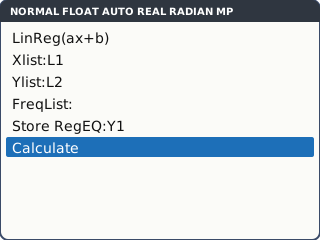
What the screen shows after this step (our drawing of the TI-84 Plus CE screen, not a photo). Linear regression: x in L1, y in L2. stat, CALC tab, 4: LinReg(ax+b). Xlist: L1, Ylist: L2, leave FreqList blank, Store RegEQ: Y1 (alpha trace opens the shortcut menu; choose Y1). Move to Calculate and press enter. The screen shows y = ax + b with a, b, r² and r.
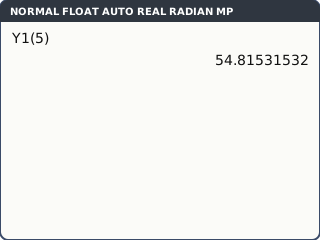
Storing the equation in Y1 saves retyping it: Y1(5) on the home screen gives the prediction at x = 5, with every digit of a and b.
What the screen shows after this step (our drawing of the TI-84 Plus CE screen, not a photo).
Your turn: check your understanding
Try these straight after the key presses, on your own calculator, before looking at the answers.
- Clear L1 and enter 3, 7, 8, 5, 12. Run 1-Var Stats with no FreqList. Give x̄ and σx.
- Enter x = 1, 2, 3, 4, 5 in L1 and y = 2.1, 3.9, 6.2, 7.8, 10.1 in L2. Run LinReg(ax+b). Give a, b and r to 3 s.f.
Show the answers
- x̄ = 7, σx = 3.03 (3 s.f.)
- a = 1.99, b = 0.05 exactly, r = 0.999. No r on the screen? STAT DIAGNOSTICS is off.
Exam efficiency
- Clear the lists before every new question. Check the bottom of each list: one extra old value changes everything.
- Write the regression line with a and b to 3 s.f., but predict with Y1 so the full values are used.
- Say which standard deviation you used if the question is not clear: σx for the data set, Sx for a sample estimate.
- Only predict inside the range of the x data (interpolation); outside it, say the prediction may not be reliable.
- If r is close to 0, a straight-line model is a poor fit: say so rather than predicting.
Worked exam-style example
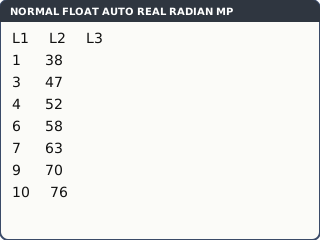
Question. Seven students recorded hours of revision, x, and their test score, y: (1, 38), (3, 47), (4, 52), (6, 58), (7, 63), (9, 70), (10, 76). (a) Find the equation of the regression line of y on x. (b) Find r and comment. (c) Predict the score of a student who revises for 5 hours.
Clear L1 and L2, then type the hours in L1 and the scores in L2.
What the screen shows after this step (our drawing of the TI-84 Plus CE screen, not a photo). stat, CALC tab, 4: LinReg(ax+b). Xlist: L1, Ylist: L2, FreqList blank, Store RegEQ: Y1 (press alpha trace for the shortcut menu and choose Y1). Calculate.
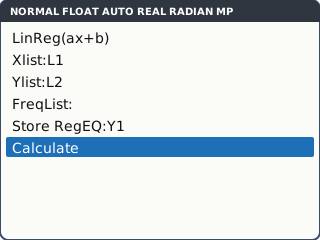
What the screen shows after this step (our drawing of the TI-84 Plus CE screen, not a photo). (a), (b) Read a = 4.058558559, b = 34.52252252 and r = 0.9977869961.
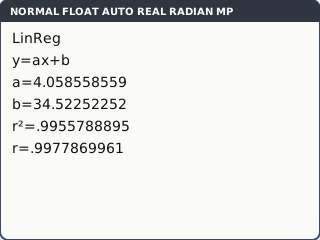
What the screen shows after this step (our drawing of the TI-84 Plus CE screen, not a photo). (c) On the home screen, Y1 is alpha trace → Y1. Type Y1(5) enter: 54.81531532.
What the screen shows after this step (our drawing of the TI-84 Plus CE screen, not a photo). Check with a picture: 2nd y= (STAT PLOT), 1: Plot1…, On, the first Type (scatter), Xlist L1, Ylist L2. Then zoom 9: ZoomStat draws the points with the line Y1.
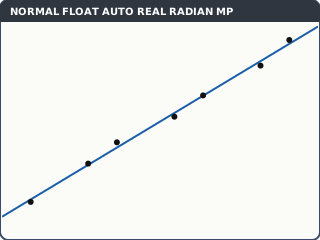
ZoomStat: the points lie close to the line, as r suggests (our drawing of the TI-84 Plus CE screen, not a photo).
What to write down
(a) y = 4.06x + 34.5
(b) r = 0.998: a very strong positive linear correlation.
(c) y = 54.8 (using the full values: Y1(5)). 5 hours is inside the data range, so this is a reasonable estimate.
Practice
Do these on your own calculator. Write the answers to 3 significant figures unless the task says otherwise.
- For the data 12, 15, 9, 20, 17, 14, 11, 18, find x̄, Sx, σx, Q1, the median and Q3.
- Shoe sizes 5, 6, 7, 8, 9 have frequencies 3, 8, 12, 6, 1. Find the mean and σx.
- x: 20, 25, 30, 35, 40, 45; y: 64, 59, 55, 48, 45, 39. Find the regression line of y on x and r (set Store RegEQ to Y1).
- Use your line from task 3 (stored in Y1) to estimate y when x = 32.
- Why should you not use the line from task 3 to estimate y when x = 80?
Show the practice answers
- x̄ = 14.5, Sx = 3.74, σx = 3.5, Q1 = 11.5, median = 14.5, Q3 = 17.5
- Mean 6.8, σx = 0.980 (3 s.f.), n = 30
- y = −0.994x + 84.0, r = −0.997
- Y1(32) = 52.2
- 80 is far outside the x data (20 to 45): extrapolation, so the estimate may not be reliable.
Common mistakes
- Old values left at the bottom of a list: n is wrong, and so is everything else. Check n.
- Frequencies typed into L2 but FreqList left blank, so the frequencies are treated as data.
- STAT DIAGNOSTICS off, so no r: it is not a missing feature, it is a setting.
- Mixing up Sx and σx.
- Predicting with a and b rounded to 3 s.f. when Y1 holds the full values.
- Using LinReg(a+bx) (item 8) and then reading a and b the wrong way round.
1-minute quick check
Answer these without looking back. Most need no calculation: they check that the key presses have stuck.
- Which setting must be on to see r?
- Where does the frequency list go in 1-Var Stats?
- Which is the population standard deviation, Sx or σx?
- How do you predict y at x = 7 once the line is stored in Y1?
- Which zoom fits the window to the data in the lists?
Show the quick-check answers
- STAT DIAGNOSTICS (mode screen).
- FreqList (e.g. L2).
- σx
- Y1(7) on the home screen (Y1 from alpha trace).
- zoom 9: ZoomStat
Teaching this lesson (about 55 minutes)
| 0–5 min | Starter: a list with one old value left at the bottom. What happens to the mean? |
| 5–15 min | Steps 1–4: clearing, entering frequencies, 1-Var Stats. Sx or σx discussion. |
| 15–20 min | Step 5: STAT DIAGNOSTICS on for every calculator in the room. First "your turn" task. |
| 20–32 min | Worked example: LinReg with Store RegEQ, Y1(5), the scatter plot with ZoomStat. |
| 32–48 min | Second "your turn" task, then practice 1–5. |
| 48–52 min | Discuss task 5: interpolation and extrapolation, and what to write. |
| 52–55 min | 1-minute quick check. |
Students need their own TI-84 Plus CE. With a projector, the calculator-skills guides below have a Show on the board view and an animated walkthrough of the key presses.
Matching calculator guides
- How to find the mean, standard deviation and quartiles (1-var and 2-var statistics) on the Casio fx-CG50, TI-84 Plus CE and TI-Nspire CX II
- How to do linear, exponential, power, polynomial, sine and logistic regression on the Casio fx-CG50, TI-84 Plus CE and TI-Nspire CX II
- How to find Pearson's r and Spearman's rank correlation on the Casio fx-CG50, TI-84 Plus CE and TI-Nspire CX II