Casio fx-CG50 lesson 8: Derivatives, integrals and areas
Paper 2 calculus questions mostly come down to four calculator skills: a gradient at a point, a second derivative, a definite integral and an area between curves. This lesson does all four in RUN-MATRIX, then uses them for a kinematics question, where the difference between displacement and distance is worth marks.
Objective
Find gradients, definite integrals and areas between curves numerically, quickly and to full accuracy, in radians.
By the end, students can:
- use OPTN F4 (CALC) F2 (d/dx) and F3 (d²/dx²) for a gradient and a second derivative at a point
- use F4 (∫dx) for a definite integral
- store the x-coordinates of two intersections and integrate between them with Abs
- tell displacement (∫v dt) from distance (∫|v| dt)
- turn on Derivative in SET UP so Trace shows the gradient
- draw the derivative graph y = f′(x) next to y = f(x) and link its roots to the maximum and minimum of f
Which courses this lesson suits
- IB Maths AA (SL and HL): Papers 2 and 3
- IB Maths AI (SL and HL): every paper
- A Level Maths (UK and IAL): calculator allowed in every paper
IB AA Paper 1 is calculator-free, so learn the methods by hand too; use these skills in Paper 2 and to check your practice.
Before you start
Lessons 2 (stored values) and 4 (G-Solve) first. Check that Angle is Rad in SET UP, in RUN-MATRIX and again in GRAPH before you draw: calculus with trig functions is always in radians.
The key presses, step by step
Every key is shown as it is printed on the calculator, like SHIFT or F1. The F-keys do whatever the bottom row of the screen says, so the picture next to each step shows that row.
MENU 1 (RUN-MATRIX), then OPTN F4 (CALC) F2 (d/dx). In the template type X e^(−0.5X) (e^ is SHIFT ln, X is X,θ,T), move with ▶ to the box after x = and type 1. EXE: 0.3032653299.
This is f′(1) for f(x) = xe−0.5x. In linear input mode type d/dx(X e^(−0.5X), 1) instead.
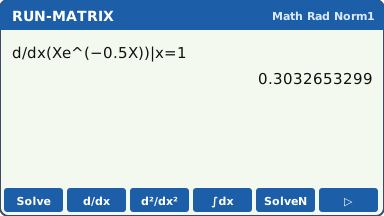
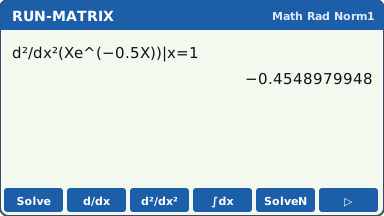
What the screen shows after this step (our drawing of the fx-CG50 screen, not a photo). Second derivative: OPTN F4 (CALC) F3 (d²/dx²), the same function and x = 1. EXE: −0.4548979948.
It is negative, so if f′ were 0 here the point would be a maximum.
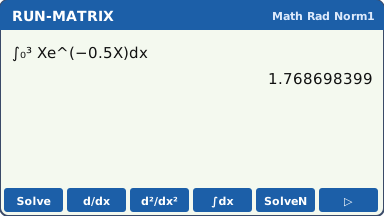
What the screen shows after this step (our drawing of the fx-CG50 screen, not a photo). Definite integral: OPTN F4 (CALC) F4 (∫dx). Type the function, then the lower limit 0 and the upper limit 3 in their boxes. EXE: 1.768698399.
A tip: put the function in Y1 in GRAPH once, then type Y1 inside each template (VARS F4 (GRAPH) F1 (Y) 1), instead of typing the function a third time. A d/dx template cannot be edited into a ∫ template.
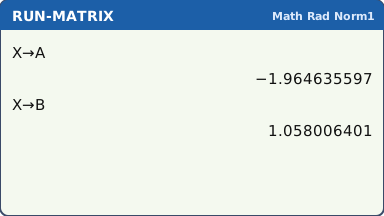
What the screen shows after this step (our drawing of the fx-CG50 screen, not a photo). Area between two curves. MENU 5 (GRAPH): Y1 = 4 − X², Y2 = e^X. V-Window (SHIFT F3): Xmin −3, max 3, Ymin −2, max 5 (▼ past scale and dot to reach Ymin), EXIT, F6 (DRAW). SHIFT F5 (G-SOLVE) F5 (INTSECT): the first intersection is at X = −1.964635597.
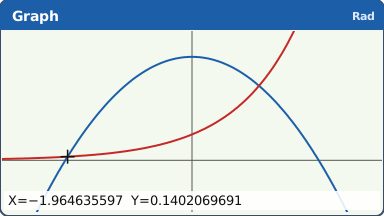
INTSECT: the left intersection of y = 4 − x² and y = eˣ (our drawing of the fx-CG50 screen, not a photo). The result is kept in the variable X. MENU 1 (RUN-MATRIX) and type X → ALPHA X,θ,T (A) EXE to store it in A. Go back to the graph, INTSECT again, ▶ for the second intersection (1.058006401), then store it the same way in B (ALPHA log is B).
Stored limits keep all ten digits. Typing −1.96 and 1.06 as limits gives an area that can be wrong in the third figure.
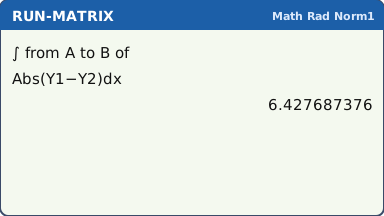
What the screen shows after this step (our drawing of the fx-CG50 screen, not a photo). Now the integral: OPTN F4 (CALC) F4 (∫dx). Inside, put Abs(VARS F4 (GRAPH) F1 (Y) 1 − Y2), with Abs from OPTN F6 (▷) → NUMERIC → Abs. Limits: ALPHA A and ALPHA B. EXE: 6.427687376.
Abs makes the area positive whichever curve is on top. Without it, parts below cancel parts above when the curves cross.
Drawn in words here: on the calculator the ∫ template shows A and B as the limits (our drawing of the fx-CG50 screen, not a photo). Gradients on the graph: in GRAPH press SHIFT MENU (SET UP) and set Derivative to On, EXIT. Draw Y1 = X³ − 3X with V-Window Xmin −3, max 3, Ymin −4, max 4. Now SHIFT F1 (TRACE) shows dY/dX at the cursor as well as X and Y.
Trace moves in dot steps, so it may not land exactly on the x you want. For the gradient at an exact x, use d/dx in RUN-MATRIX (step 1); use Trace to see where dY/dX is positive, zero or negative.
Handy for checking a stationary point (dY/dX should be 0) or a tangent's gradient. Turn it Off again if the screen gets crowded.
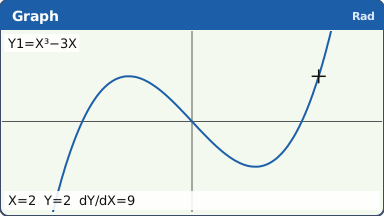
Trace with Derivative On, at a dot where X = 2 (where the values sit on the real screen may differ) (our drawing of the fx-CG50 screen, not a photo). Draw the derivative graph. In GRAPH type Y1 = X³ − 6X² + 9X + 1 and press EXE. On the Y2 line press OPTN F4 (CALC) F2 (d/dx). Inside the template put Y1 (VARS F4 (GRAPH) F1 (Y) 1), then move to the box after x = and press X,θ,T. EXE. Now Y2 is the gradient of Y1 at every X: the graph of y = f′(x).
In linear input mode the same thing reads d/dx(Y1, X). However your screen shows it, the derivative must be of Y1 and taken at X.
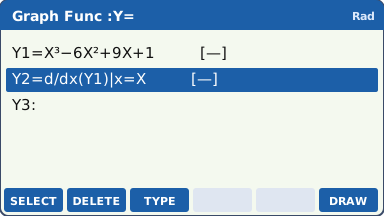
Y2 is the derivative of Y1 (the Math-mode template may look slightly different on your screen) (our drawing of the fx-CG50 screen, not a photo). Set V-Window Xmin −1, max 5, Ymin −10, max 12 (▼ past scale and dot to reach Ymin, as in lesson 3), then F6 (DRAW). Y2 draws slowly, because the calculator works out a gradient at every dot: wait for it.
Where Y1 has its maximum and minimum, Y2 crosses the x-axis. Check it: SHIFT F5 (G-SOLVE) F1 (ROOT) on Y2 gives X = 1 and X = 3; F2 (MAX) and F3 (MIN) on Y1 give (1, 5) and (3, 1).
Where Y2 is above the axis Y1 goes up; where Y2 is below, Y1 goes down. f′ changing from + to − is a maximum, from − to + a minimum. A root of a numerical derivative can show tiny rounding in the last digits (such as 0.9999999998): write it as 1.
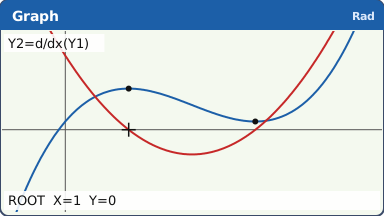
f (blue) and f′ (red): the roots of f′ line up with the maximum and minimum of f (our drawing of the fx-CG50 screen, not a photo).
Your turn: check your understanding
Try these straight after the key presses, on your own calculator, before looking at the answers.
- Draw Y1 = X e−X and its derivative graph Y2 = d/dx(Y1) (window Xmin −1, max 4, Ymin −1, max 1). Find the root of Y2 with ROOT and the maximum of Y1 with MAX. Do the x-values agree?
- In RUN-MATRIX find the gradient of y = x² ex at x = 0.5.
- Work out ∫₁³ (1 ÷ x) dx. Which exact value does it match?
Show the answers
- Yes: Y2 crosses the x-axis at x = 1, and Y1 has its maximum at (1, 0.368).
- 2.06 (3 s.f.)
- 1.10 (3 s.f.), which is ln 3.
Exam efficiency
- Check the angle mode before any calculus with sin or cos: it must be Rad.
- Store intersection x-values (X → A, X → B) and use them as limits. Never type rounded limits.
- Use Y1 and Y2 from VARS F4 (GRAPH) F1 (Y) inside an integral, so the function is typed only once.
- Distance travelled is ∫|v| dt: always put Abs round v. Displacement is ∫v dt, without Abs.
- Write the integral in your working, e.g. "area = ∫ from −1.96 to 1.06 of (4 − x² − eˣ) dx = 6.43", then the value.
Worked exam-style example
Question. A particle moves in a straight line with velocity v(t) = 4 sin(1.5t) − t m s−1 for 0 ≤ t ≤ 4. (a) Find the acceleration when t = 1. (b) Find the displacement of the particle over the 4 seconds. (c) Find the total distance travelled.
Check SET UP: Angle Rad. (a) Acceleration is dv/dt: OPTN F4 (CALC) F2 (d/dx), 4 sin(1.5X) − X, x = 1. EXE: −0.57557679.
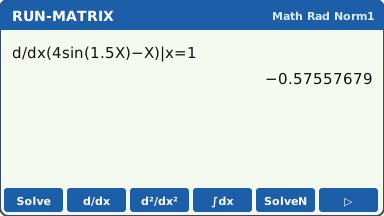
What the screen shows after this step (our drawing of the fx-CG50 screen, not a photo). (b) Displacement: OPTN F4 (CALC) F4 (∫dx), 4 sin(1.5X) − X from 0 to 4. EXE: −7.893787431.
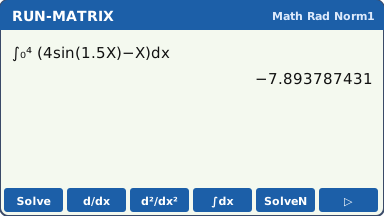
What the screen shows after this step (our drawing of the fx-CG50 screen, not a photo). (c) Distance: retype the integral with Abs first: OPTN F4 (CALC) F4 (∫dx), then Abs (OPTN F6 (▷) → NUMERIC → Abs), then 4 sin(1.5X) − X inside it, limits 0 and 4, EXE: 14.81011681. The graph shows why: v changes sign at t = 1.79, and the part below the axis counts as distance too.
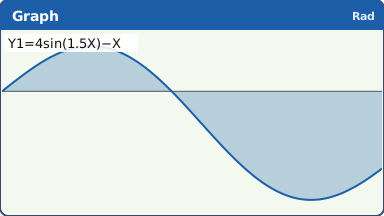
Distance is the whole shaded area, above and below the axis (our drawing of the fx-CG50 screen, not a photo).
What to write down
(a) a = dv/dt at t = 1: a = −0.576 m s−2.
(b) Displacement = ∫₀⁴ (4 sin 1.5t − t) dt = −7.89 m.
(c) Distance = ∫₀⁴ |4 sin 1.5t − t| dt = 14.8 m.
Practice
Do these on your own calculator. Write the answers to 3 significant figures unless the task says otherwise.
- Find the gradient of y = ln(x² + 1) at x = 2.
- Find the value of the second derivative of y = x² sin x at x = 1 (radians).
- Work out ∫₀π x sin x dx (π is SHIFT ×10ˣ). What do you get, and what does the answer suggest?
- Find the area enclosed by y = 2 cos x and y = x².
- A particle has velocity v = t² − 4t + 3 for 0 ≤ t ≤ 4. Find (a) its displacement and (b) the distance it travels.
- Use d/dx in RUN-MATRIX to find the gradient of y = x³ − 3x at x = 2 and at x = 1. Then turn on Derivative in GRAPH's SET UP and trace the curve near those points: do the dY/dX values agree?
Show the practice answers
- 0.8
- 3.00
- 3.14, which looks like π. (In Deg mode you would get a different, wrong value.)
- The curves meet at x = ±1.02; area = 2.70
- (a) 4/3 (b) 4
- 9 at x = 2 and 0 at x = 1 (a stationary point). Trace shows values close to these at the dots nearest x = 2 and x = 1.
Common mistakes
- Calculus in Deg mode: every answer with sin or cos is wrong and there is no warning.
- Typing rounded limits (−1.96 and 1.06) instead of the stored A and B.
- Leaving out Abs for distance or for an area where the curves cross: positive and negative parts cancel.
- Missing brackets: 4sin(1.5X)−X inside d/dx needs the whole expression in the template, not just 4sin(1.5X).
- Forgetting to move to the x = box (or the limit boxes) with the arrow keys before typing the number.
1-minute quick check
Answer these without looking back. Most need no calculation: they check that the key presses have stuck.
- Which keys open the d/dx template?
- Which F-key in the CALC menu gives ∫dx?
- Distance or displacement: which one needs Abs?
- Where do you find Y1 to type it into an integral?
- Which angle mode for calculus with trig?
Show the quick-check answers
- OPTN F4 (CALC) F2 (d/dx)
- F4
- Distance.
- VARS F4 (GRAPH) F1 (Y), then 1.
- Rad.
Teaching this lesson (about 55 minutes)
| 0–4 min | Starter: what is the difference between displacement and distance? Sketch a velocity graph that goes below the axis. |
| 4–12 min | Steps 1–3: d/dx, d²/dx² and ∫dx in RUN-MATRIX, editing from the history. |
| 12–22 min | Steps 4–6: area between curves with stored limits, Y1 and Y2 from VARS, and Abs. |
| 22–26 min | Step 7: Derivative On and Trace. |
| 26–33 min | Steps 8–9: draw the derivative graph and match its roots to the maximum and minimum. |
| 33–38 min | Your turn tasks 1–3. |
| 38–44 min | Worked example: the particle, three parts. |
| 44–52 min | Practice tasks (choose 3 or 4). |
| 52–55 min | 1-minute quick check. |
Students need their own fx-CG50. With a projector, the calculator-skills guides below have a Show on the board view and an animated walkthrough of the key presses.
Matching calculator guides
- How to find a numerical derivative and definite integral on the Casio fx-CG50, TI-84 Plus CE and TI-Nspire CX II
- How to find intersections, zeros, maximum and minimum points on the Casio fx-CG50, TI-84 Plus CE and TI-Nspire CX II
- How do I know if my calculator is in radians or degrees?