Casio fx-CG50 lesson 7: Tables of values, sign changes and sequences
TABLE is the quiet workhorse of the fx-CG50: it fills in a table of values for any function, checks an answer in seconds, narrows a root down by sign changes and answers "find the smallest n" questions by looking down a column. RECURSION does the same for sequences, with a running total.
Objective
Use TABLE and RECURSION to produce values quickly, check algebra, locate a root by sign change, and find the first term that passes a value.
By the end, students can:
- enter a function in TABLE and set Start, End and Step with F5 (SET)
- read the table and spot a change of sign
- zoom in on a root by changing the Step to 0.1, then 0.01
- check a factorised or simplified answer by comparing two columns
- answer "smallest n such that …" questions with a table or with RECURSION
Which courses this lesson suits
- IB Maths AA (SL and HL): Papers 2 and 3
- IB Maths AI (SL and HL): every paper
- A Level Maths (UK and IAL): calculator allowed in every paper
The sign-change method in steps 4–5 is the A Level numerical methods skill; the smallest n questions are common in IB sequences and finance.
Before you start
Lesson 1 (SET UP) first. No angle mode is needed except for trig functions.
The key presses, step by step
Every key is shown as it is printed on the calculator, like SHIFT or F1. The F-keys do whatever the bottom row of the screen says, so the picture next to each step shows that row.
MENU 7 (TABLE). On the Y1 line type X³ − 4X² + X + 3 (X is X,θ,T) and press EXE.
TABLE shares its function list with GRAPH: a function typed in one app is there in the other.
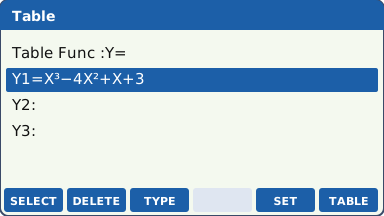
What the screen shows after this step (our drawing of the fx-CG50 screen, not a photo). Press F5 (SET). Type Start −1 EXE, End 5 EXE, Step 1 EXE, then EXIT.
Start and End are the first and last x-values; Step is the gap between them.
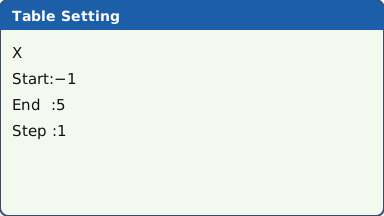
What the screen shows after this step (our drawing of the fx-CG50 screen, not a photo). Press F6 (TABLE). Scroll with ▼. The y-values change sign three times: between x = −1 and 0, between 1 and 2, and between 3 and 4. So the equation x³ − 4x² + x + 3 = 0 has three roots, one in each of those intervals.
A change of sign between two x-values means the curve crosses the axis between them (for a continuous function).
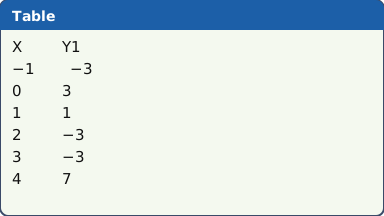
The table from −1 to 4: three changes of sign (our drawing of the fx-CG50 screen, not a photo). Zoom in on the root between 3 and 4: EXIT, F5 (SET), Start 3, End 4, Step 0.1, EXIT, F6 (TABLE). The sign changes between x = 3.4 (−0.536) and x = 3.5 (0.375).
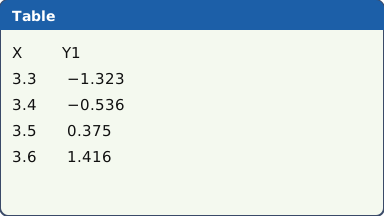
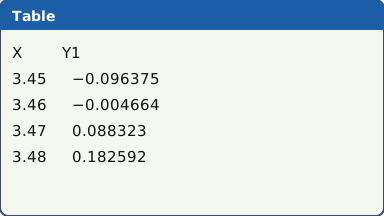
What the screen shows after this step (our drawing of the fx-CG50 screen, not a photo). Zoom again: Start 3.4, End 3.5, Step 0.01. The sign changes between 3.46 (−0.004664) and 3.47 (0.088323). The root is 3.46… To be sure it rounds to 3.46, not 3.47, check the midpoint: at x = 3.465, Y1 = 0.041669625, which is positive, so the root is below 3.465. It is 3.46 to 3 s.f.
This is the sign-change method that numerical methods questions ask you to show: give both x-values and both signs.
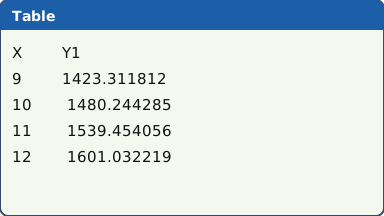
What the screen shows after this step (our drawing of the fx-CG50 screen, not a photo). Smallest n questions with TABLE: Y1 = 1000 × 1.04^X, Start 1, End 20, Step 1. Look down Y1 for the first value over 1500: X = 10 gives 1480.244285, X = 11 gives 1539.454056. So n = 11.
Use Step 1 so X takes whole-number values only. Highlight a cell to see its full value at the bottom of the screen.
What the screen shows after this step (our drawing of the fx-CG50 screen, not a photo). Sums of a sequence with RECURSION: MENU 8 (RECURSION), F3 (TYPE), F1 (aₙ = An + B, the type for a formula in n). Type aₙ = 3n + 4 (n is on the F-key row in the aₙ editor: read the label there) and EXE.
Turn on Σ Display in SHIFT MENU (SET UP), set the n range with F5 (SET) and press F6 (TABLE): the Σaₙ column is the running total Sₙ. S₉ = 171 and S₁₀ = 205, so Sₙ first passes 200 at n = 10.
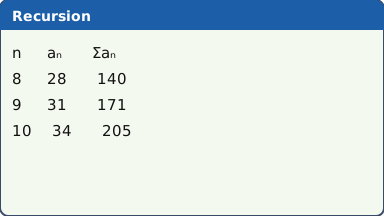
RECURSION with Σ Display on: the last column is the running total (our drawing of the fx-CG50 screen, not a photo).
Your turn: check your understanding
Try these straight after the key presses, on your own calculator, before looking at the answers.
- Make a table of y = x² − 5x + 3 from x = 0 to 6, Step 1. Between which whole numbers are the two roots?
- Find the smallest whole number n for which 3 × 1.5n > 100, using a table with Step 1.
Show the answers
- Between 0 and 1 (y goes from 3 to −1) and between 4 and 5 (y goes from −1 to 3).
- n = 9: n = 8 gives 76.9 and n = 9 gives 115.
Exam efficiency
- Check algebra in ten seconds: put the question in Y1 and your answer in Y2. If the columns match for several x-values, your answer is very likely right.
- For "smallest n" questions write the two values either side: "S₉ = 171 < 200, S₁₀ = 205 > 200, so n = 10".
- When you zoom with a smaller Step, keep the Start just before the sign change, so the table stays short.
- Rounding a root to 3 s.f. from a table: check the sign at the halfway value before you round.
- TABLE and GRAPH share Y1, Y2, …: deselect a function (F1 (SELECT)) to hide its column.
Worked exam-style example
Question. A ball is dropped and, after the nth bounce, rises to a height of 2.4 × 0.75n metres. (a) Find the height after the 5th bounce. (b) Find the first bounce after which the ball rises less than 10 cm.
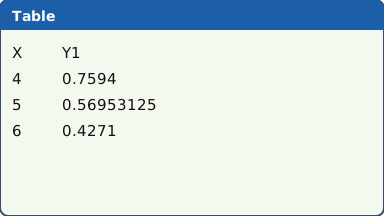
MENU 7 (TABLE). Y1 = 2.4 × 0.75^X EXE. F5 (SET): Start 1, End 15, Step 1, EXIT.
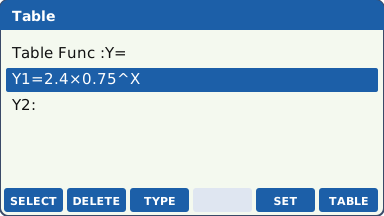
What the screen shows after this step (our drawing of the fx-CG50 screen, not a photo). (a) F6 (TABLE) and move to X = 5: Y1 = 0.56953125.
What the screen shows after this step (our drawing of the fx-CG50 screen, not a photo). (b) 10 cm is 0.1 m. Scroll down: X = 11 gives 0.1013643265 (still above 0.1), X = 12 gives 0.07602324486 (below 0.1).
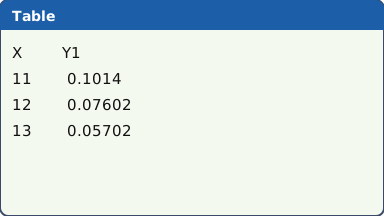
Cells are shortened here; highlight one to see its full value at the bottom of the screen (our drawing of the fx-CG50 screen, not a photo).
What to write down
(a) 2.4 × 0.75⁵ = 0.570 m (3 s.f.).
(b) 2.4 × 0.75¹¹ = 0.101 > 0.1 and 2.4 × 0.75¹² = 0.0760 < 0.1, so after bounce number 12.
Practice
Do these on your own calculator. Write the answers to 3 significant figures unless the task says otherwise.
- Make a table of y = 2x − 3x from x = 0 to x = 1 with Step 0.1. Between which two x-values does y change sign? Give the two y-values.
- A student factorises x² + x − 12 as (x + 4)(x − 3). Put both in TABLE (Y1 and Y2) and check. What is y at x = 5?
- Find the smallest whole number n for which 1.06n > 2.
- aₙ = 5n − 1. Use RECURSION with Σ Display to find the smallest n for which Sₙ > 500.
- Use the table and the sign-change method to find the positive root of ex + x² = 5 correct to 2 decimal places.
Show the practice answers
- Between x = 0.4 (y = 0.120) and x = 0.5 (y = −0.0858).
- The columns match, so the factorisation is right. At x = 5, y = 18.
- n = 12 (1.06¹¹ = 1.90, 1.06¹² = 2.01).
- n = 14 (S₁₃ = 442, S₁₄ = 511).
- x = 1.24 (the sign changes between 1.24 and 1.25, and the value at 1.245 is positive).
Common mistakes
- Step too big: a Step of 1 can jump straight over two roots that are close together, with no sign change showing.
- A sign change at an asymptote: y = 1 ÷ (x − 2) changes sign at x = 2 but has no root there. Look at the size of the values too.
- For "smallest n" questions, using a Step that is not 1, so X is not a whole number.
- Leaving old functions selected: the table fills with columns you do not need. Deselect them with F1 (SELECT).
- Reading a shortened cell: highlight it to see the full value before you round.
1-minute quick check
Answer these without looking back. Most need no calculation: they check that the key presses have stuck.
- Which key opens the Start, End and Step settings in TABLE?
- The y-values go from 0.2 to −0.1 between x = 1.3 and x = 1.4. What does that tell you?
- What Step do you use for a "smallest n" question?
- How do you check a factorisation with TABLE?
- In RECURSION, which setting adds a running total column?
Show the quick-check answers
- F5 (SET)
- There is a root between 1.3 and 1.4 (if the function is continuous there).
- 1
- The original in Y1, your answer in Y2: the columns should match.
- Σ Display, in SET UP (SHIFT MENU).
Teaching this lesson (about 55 minutes)
| 0–5 min | Starter: without a calculator, what is 2³ − 3 × 3? And 2⁴ − 3 × 4? What has happened between x = 3 and x = 4? |
| 5–15 min | Steps 1–3: TABLE, SET and reading a table. Students find all three sign changes. |
| 15–25 min | Steps 4–5: zooming in with Step 0.1 and 0.01, and the midpoint check for rounding. |
| 25–33 min | Steps 6–7: smallest n with TABLE and with RECURSION. |
| 33–40 min | Worked example: the bouncing ball. |
| 40–52 min | Practice tasks 1–5. |
| 52–55 min | 1-minute quick check. |
Students need their own fx-CG50. With a projector, the calculator-skills guides below have a Show on the board view and an animated walkthrough of the key presses.
Matching calculator guides
- How to make a table of values on the Casio fx-CG50, TI-84 Plus CE and TI-Nspire CX II
- How to find terms and sums of sequences on the Casio fx-CG50, TI-84 Plus CE and TI-Nspire CX II
- How to use the trapezium rule on the Casio fx-CG50, TI-84 Plus CE and TI-Nspire CX II