Casio fx-CG50 lesson 6: SolveN, Solve and the Solver
Graphs find roots, but typing the equation is often faster. This lesson covers the three numerical solvers on the fx-CG50: SolveN for every root at once, Solve for the root near a guess, and the Equation app's Solver for finding one letter in a formula when you know all the others.
Objective
Solve equations you cannot rearrange, and find an unknown parameter in a formula, without drawing a graph.
By the end, students can:
- open SolveN with OPTN F4 (CALC) F5 (SolveN) and read every root from the list it gives
- limit SolveN to the interval a question gives
- use Solve with a starting value to get one particular root
- use the Equation app's Solver to find any letter in a formula, and check Lft = Rgt
- keep a parameter at full accuracy and reuse it in the next part
Which courses this lesson suits
- IB Maths AA (SL and HL): Papers 2 and 3
- IB Maths AI (SL and HL): every paper
- A Level Maths (UK and IAL): calculator allowed in every paper
Before you start
Lessons 1 and 2 first (SET UP and stored values). Set Angle to Rad: this lesson has trig equations in radians.
The key presses, step by step
Every key is shown as it is printed on the calculator, like SHIFT or F1. The F-keys do whatever the bottom row of the screen says, so the picture next to each step shows that row.
MENU 1 (RUN-MATRIX). Press OPTN: the F-keys show the option menus. Press F4 (CALC). The F-keys now read Solve, d/dx, d²/dx², ∫dx, SolveN and ▷.
CALC is the one menu for solving, derivatives and integrals in RUN-MATRIX (lesson 8 uses the rest of it).
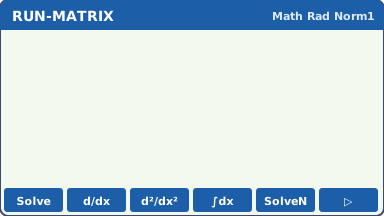
OPTN F4 (CALC): the solving and calculus commands on the F-keys (our drawing of the fx-CG50 screen, not a photo). Press F5 (SolveN). Type X³ − 6X + 2 = 0 (X is X,θ,T; the = sign is SHIFT .), close the bracket and press EXE.
The answer is a list of every root it finds: −2.601679132, 0.3398768866 and 2.261802245. Scroll along the list with ▶ if it does not fit.
SolveN gives all the roots at once (up to 10), so you cannot miss one the way you can with a single root.
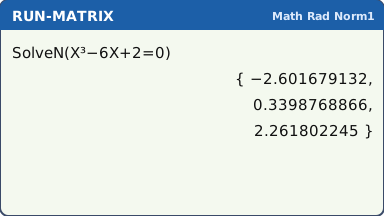
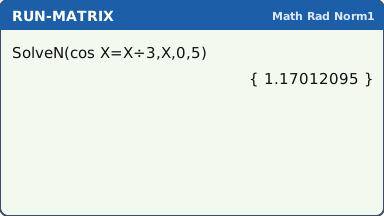
The list of roots (drawn on three lines here; on the calculator scroll along it with ▶) (our drawing of the fx-CG50 screen, not a photo). Only the roots in an interval: after the equation type the variable and the two ends, separated by commas (,): SolveN(cos X = X ÷ 3, X, 0, 5) EXE gives just 1.17012095.
Without the interval it would also give the two negative roots.
When a question says "for 0 ≤ x ≤ 5", give SolveN the same interval: you only get the roots the question wants.
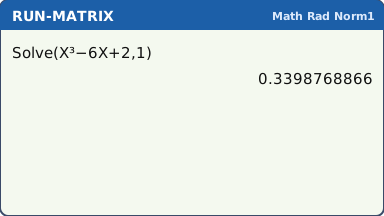
What the screen shows after this step (our drawing of the fx-CG50 screen, not a photo). One root near a guess: OPTN F4 (CALC) F1 (Solve). Type the expression that equals 0, then a comma and a starting value: Solve(X³ − 6X + 2, 1) EXE gives 0.3398768866, the root nearest 1.
Solve finds one root, the one its method reaches from your start value. Change the start value to get another.
What the screen shows after this step (our drawing of the fx-CG50 screen, not a photo). A letter in a formula: MENU, open EQUATION (the icon labelled A), then F3 (SOLVER). Type A = P(1 + R ÷ 100)^N, using ALPHA for each letter and SHIFT . for =, and press EXE.
A list of the letters appears. Type A = 5000, P = 3500 and N = 8 (EXE after each), then highlight R.
This finds the annual rate that turns 3500 into 5000 in 8 years. Any letter can be the unknown: just highlight it.
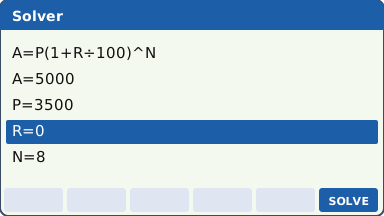
Values typed in and the unknown R highlighted (the Lower and Upper lines below are not drawn) (our drawing of the fx-CG50 screen, not a photo). Press F6 (SOLVE). R = 4.559318759, so the rate is 4.56% to 3 s.f. Check that Lft and Rgt are equal: here both are 5000.
Lft and Rgt are the two sides worked out with the answer. If they differ, the Solver did not find a true solution: change the start value of R and solve again.
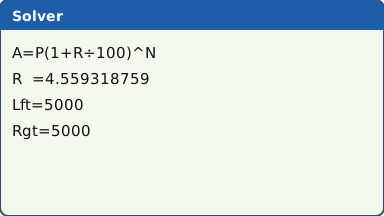
What the screen shows after this step (our drawing of the fx-CG50 screen, not a photo).
Your turn: check your understanding
Try these straight after the key presses, on your own calculator, before looking at the answers.
- Use SolveN to solve ex = x + 2.
- In the Solver, type V = πR²H. Set V = 500 and H = 8, then solve for R.
- Use Solve with a starting value of 1 to solve x³ + x = 5.
Show the answers
- x = −1.84 and x = 1.15
- R = 4.46 (3 s.f.)
- x = 1.52
Exam efficiency
- Use SolveN first: it gives every root in one go. Use Solve or the Solver when you want one particular root.
- Put the question's interval into SolveN, so you never have to throw roots away (and never forget to).
- The Solver keeps every letter's value. Solve for k in part (a), and k is already there, unrounded, for part (b).
- Check: put the answer back. Lft = Rgt in the Solver, or type the equation's left side with Ans in RUN-MATRIX.
- In your working, write the equation you solved, not "SolveN": e.g. x³ − 6x + 2 = 0 ⇒ x = −2.60, 0.340, 2.26.
Worked exam-style example
Question. A town's population is modelled by P = 1200ekt, where t is the time in years. When t = 4, P = 1500. (a) Find k. (b) Find when the population reaches 3000. (c) A second town's population is Q = 1000 + 110t. Find the values of t for which P = Q.
(a) MENU, EQUATION, F3 (SOLVER). Type P = 1200e^(KT) (e^ is SHIFT ln) and EXE. Enter P = 1500 and T = 4, highlight K and press F6 (SOLVE): K = 0.05578588783.
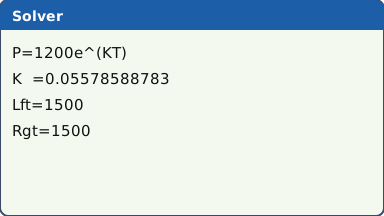
What the screen shows after this step (our drawing of the fx-CG50 screen, not a photo). (b) EXIT back to the list. K still holds the full value. Change P to 3000, highlight T and press F6 (SOLVE): T = 16.42513488.
Retyping a rounded k can change the last figure of an answer that sits near a rounding boundary. Leaving K alone avoids the risk.
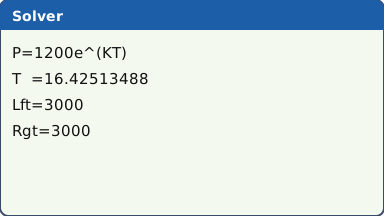
What the screen shows after this step (our drawing of the fx-CG50 screen, not a photo). (c) MENU 1 (RUN-MATRIX). The Solver used the letter K, so it is stored there. OPTN F4 (CALC) F5 (SolveN): SolveN(1200e^(KX) = 1000 + 110X, X, 0, 50) EXE gives 7.320556846 and 10.43937902.
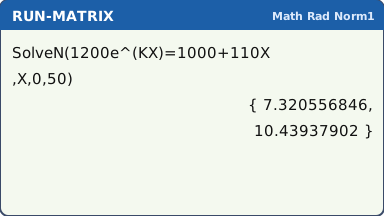
What the screen shows after this step (our drawing of the fx-CG50 screen, not a photo).
What to write down
(a) 1500 = 1200e4k ⇒ k = 0.0558 (3 s.f.).
(b) 3000 = 1200ekt ⇒ t = 16.4 years.
(c) 1200ekt = 1000 + 110t ⇒ t = 7.32 or t = 10.4.
Practice
Do these on your own calculator. Write the answers to 3 significant figures unless the task says otherwise.
- Use SolveN to find all three roots of x³ − 5x + 1 = 0.
- Solve cos x = x ÷ 3 for −5 ≤ x ≤ 5 (x in radians). How many roots are there?
- Solve 3x = 10 − x².
- £8000 grows to £11 000 in 6 years with interest compounded once a year. Use the Solver to find the annual interest rate.
- A cup of tea cools as T = 20 + 70e−kt. When t = 10, T = 50. Find k.
- Use Solve with a starting value of 1 to solve ln x = 2 − x.
Show the practice answers
- x = −2.33, 0.202, 2.13
- Three: x = −2.94, −2.66, 1.17
- x = −3.16 or x = 1.76
- R = 5.450938606%, so 5.45% (3 s.f.)
- k = 0.0847
- x = 1.56
Common mistakes
- Using − instead of (−) for a negative bound, or typing the = sign with ALPHA instead of SHIFT ..
- Trig equations in the wrong angle mode: cos X = X ÷ 3 has different roots in Deg mode.
- Reading only the first number of SolveN's list: scroll right for the rest.
- Forgetting the Solver's Lower and Upper bounds: if the answer must be positive (a rate, a time), a negative solution can appear unless you set Lower = 0.
- Not checking Lft = Rgt: if they differ, the number shown is not a solution.
- Rounding k and retyping it, instead of leaving it stored.
1-minute quick check
Answer these without looking back. Most need no calculation: they check that the key presses have stuck.
- Which keys open SolveN in RUN-MATRIX?
- How do you type the = sign in an equation?
- SolveN gives too many roots for the question. What do you add?
- In the Solver, how do you choose which letter to find?
- What should Lft and Rgt show after a good solve?
Show the quick-check answers
- OPTN F4 (CALC) F5 (SolveN)
- SHIFT .
- The variable and the interval: SolveN(…, X, lower, upper).
- Highlight it, then F6 (SOLVE).
- The same value.
Teaching this lesson (about 55 minutes)
| 0–5 min | Starter: solve x³ − 6x + 2 = 0 by drawing the graph (lesson 4). Time it. |
| 5–15 min | Steps 1–3: SolveN, the list of roots, and SolveN with an interval. Compare the time with the starter. |
| 15–20 min | Step 4: Solve with a start value. Try three different start values: which root do you get each time? |
| 20–30 min | Steps 5–6: the Equation Solver for a rate. Discuss Lft and Rgt. |
| 30–40 min | Worked example (a)–(c): one stored k carried through three parts. |
| 40–52 min | Practice tasks 1–6. |
| 52–55 min | 1-minute quick check. |
Students need their own fx-CG50. With a projector, the calculator-skills guides below have a Show on the board view and an animated walkthrough of the key presses.
Matching calculator guides
- How to solve equations, polynomials and simultaneous equations on the Casio fx-CG50, TI-84 Plus CE and TI-Nspire CX II
- How to find intersections, zeros, maximum and minimum points on the Casio fx-CG50, TI-84 Plus CE and TI-Nspire CX II