Casio fx-CG50 lesson 5: The Equation menu: polynomials and simultaneous equations
The Equation app answers two kinds of question in seconds: the roots of a polynomial and the solution of a set of linear equations. The skill is entering the coefficients correctly, every time: a missing term, a sign or a row in the wrong order gives a confident wrong answer.
Objective
Solve polynomial equations up to degree 6 and systems of up to 6 linear equations in the Equation app, entering every coefficient correctly.
By the end, students can:
- open the Equation app and choose POLY (F2) or SIMUL (F1) and the right size
- rearrange to = 0 (POLY) or to ax + by + cz = d (SIMUL) before typing
- enter 0 for a missing term and use (−) for negatives
- switch Complex Mode to a+bi to see complex roots
Which courses this lesson suits
- IB Maths AA (SL and HL): Papers 2 and 3
- IB Maths AI (SL and HL): every paper
- A Level Maths (UK and IAL): calculator allowed in every paper
Complex roots (step 6) are for IB AA HL and AI HL, and A Level Further Maths.
Before you start
Each equation must be in the right form before you touch the calculator: everything on one side = 0 for POLY, and the unknowns in the same order on the left with the number on the right for SIMUL. Write the rearranged equation down: it is your working.
The key presses, step by step
Every key is shown as it is printed on the calculator, like SHIFT or F1. The F-keys do whatever the bottom row of the screen says, so the picture next to each step shows that row.
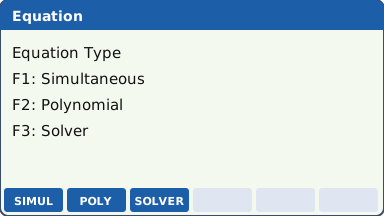
MENU, highlight EQUATION (the icon labelled A) and press EXE. The F-keys show the three solvers: F1 SIMUL, F2 POLY, F3 SOLVER (lesson 6).
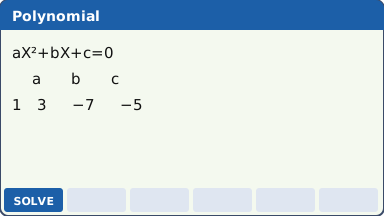
What the screen shows after this step (our drawing of the fx-CG50 screen, not a photo). Quadratic: solve 3x² − 7x − 5 = 0. F2 (POLY), then the degree: F1 for 2. Type 3 EXE (−) 7 EXE (−) 5 EXE: the coefficients a, b and c.
Read the row back before solving: a sign error here is the commonest mistake in the whole app.
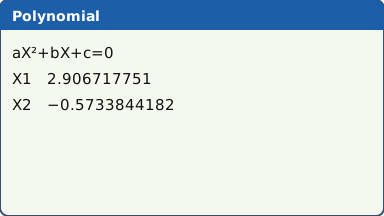
The coefficients typed in (the other F-keys are not drawn) (our drawing of the fx-CG50 screen, not a photo). Press F1 (SOLVE): X1 = 2.906717751 and X2 = −0.5733844182. EXIT goes back to the coefficients to change them.
In Math input/output mode the roots may appear in exact form, as a fraction or with a square root. It is the same number: write the decimal to 3 s.f. unless an exact answer is asked for.
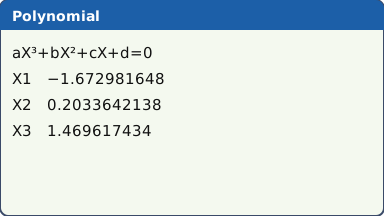
The roots, shown as decimals (they can appear in exact form) (our drawing of the fx-CG50 screen, not a photo). A missing term: solve 2x³ − 5x + 1 = 0. Press EXIT until you are back at the degree choice, F2 for 3, then type 2, 0, (−) 5, 1, with EXE after each. The 0 is the x² term. F1 (SOLVE): X = −1.672981648, 0.2033642138 and 1.469617434.
Every coefficient box must be filled, 0 included. Leave out the 0 and the numbers move up a place: the calculator solves 2x³ − 5x² + x + d = 0 with whatever is left in d, with no warning.
What the screen shows after this step (our drawing of the fx-CG50 screen, not a photo). Simultaneous: solve 3x + 2y = 7 and 5x − 4y = 19. EXIT until you are back at the first Equation screen, F1 (SIMUL), F1 for 2 unknowns. Type each equation as a row: 3, 2, 7, then 5, (−) 4, 19. F1 (SOLVE): X = 3, Y = −1.
3 unknowns: EXIT back to the number of unknowns and press F2 for 3. For x + 2y − z = −3, 3x − y + 2z = 13 and 2x + 3y + z = 4, type the rows 1, 2, −1, −3 / 3, −1, 2, 13 / 2, 3, 1, 4. F1 (SOLVE): X = 2, Y = −1, Z = 3.
Check one solution by putting it back into one of the equations: 2(2) + 3(−1) + 3 = 4.
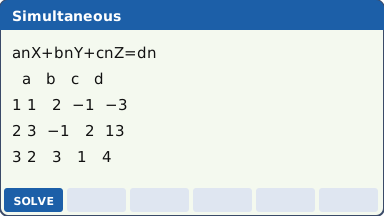
Three equations, one row each: a, b, c, then d (our drawing of the fx-CG50 screen, not a photo). Complex roots: solve x² + 2x + 5 = 0. To see complex roots written as a+bi, set Complex Mode to a+bi first: SHIFT MENU (SET UP), move to Complex Mode, choose a+bi, EXIT. Then POLY, degree 2, coefficients 1, 2, 5, F1 (SOLVE): X1 = −1+2i, X2 = −1−2i.
Set Complex Mode back to Real afterwards if a later question expects only real answers.
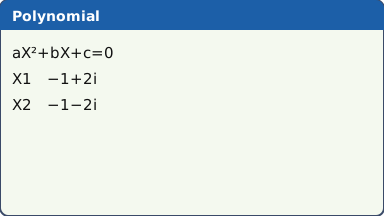
What the screen shows after this step (our drawing of the fx-CG50 screen, not a photo).
Your turn: check your understanding
Try these straight after the key presses, on your own calculator, before looking at the answers.
- Solve 2x² − 5x − 3 = 0 with POLY.
- Solve 3x + 2y = 7 and x − 4y = 7 with SIMUL.
- Solve x³ − 2x² − 5x + 6 = 0. In what order do the coefficients go in?
Show the answers
- x = 3 or x = −0.5
- x = 3, y = −1
- x = 3, 1 and −2. The coefficients go in from the highest power down: 1, −2, −5, 6.
Exam efficiency
- Rearrange on paper first, then type. Write the equation you solved as working, then the calculator's roots.
- Read the coefficients back against your written equation before pressing SOLVE.
- Put a solution back into the original equations or the graph: it takes ten seconds.
- The Equation app gives every root of a polynomial at once; G-Solve (lesson 4) needs a graph and a window. For a polynomial, POLY is faster.
- Up to degree 6 and up to 6 unknowns. For anything that is not a polynomial or linear, use SOLVER or SolveN (lesson 6).
Worked exam-style example
Question. The curve y = ax² + bx + c passes through (1, 4), (3, 10) and (5, 24). (a) Write down three equations in a, b and c. (b) Find a, b and c. (c) Find the positive value of x for which y = 30.
(a) Substitute each point: a + b + c = 4, 9a + 3b + c = 10, 25a + 5b + c = 24.
(b) SIMUL with 3 unknowns. The calculator calls them X, Y and Z: here X = a, Y = b, Z = c. Rows 1, 1, 1, 4 / 9, 3, 1, 10 / 25, 5, 1, 24, then F1 (SOLVE).
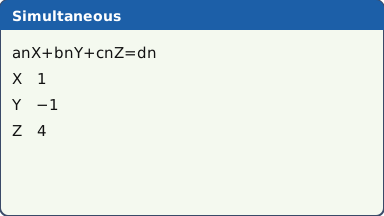
What the screen shows after this step (our drawing of the fx-CG50 screen, not a photo). (c) y = 30 means x² − x + 4 = 30, so x² − x − 26 = 0. POLY, degree 2: 1, (−) 1, (−) 26, F1 (SOLVE). X1 = 5.623475383, X2 = −4.623475383.
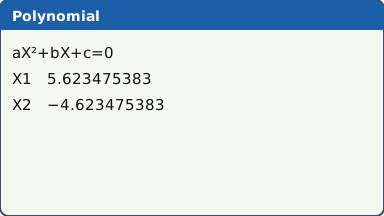
What the screen shows after this step (our drawing of the fx-CG50 screen, not a photo).
What to write down
(b) a = 1, b = −1, c = 4, so y = x² − x + 4.
(c) x² − x − 26 = 0 ⇒ x = 5.62 (the negative root, −4.62, is rejected).
Practice
Do these on your own calculator. Write the answers to 3 significant figures unless the task says otherwise.
- Solve x³ − 7x + 3 = 0.
- Solve 1.2x + 3.5y = 7.4 and 2.8x − 1.6y = 3.9.
- Solve x + 2y − z = 4, 3x − y + 2z = 1, 2x + 3y + z = 9. Give exact answers.
- Solve 2x³ + 3x² = 4 (rearrange first). Give the real root, then switch Complex Mode to a+bi and give the other two.
- Solve x⁴ − 3x² − 4 = 0 (degree 4: F3). Give the real roots, then the complex ones in a+bi mode.
Show the practice answers
- x = −2.84, 0.441 or 2.40
- x = 2.17, y = 1.37
- x = 3/8, y = 19/8, z = 9/8
- Real root x = 0.911. Complex roots x = −1.21 ± 0.862i.
- x = 2 or x = −2; complex: x = i or x = −i.
Common mistakes
- Not rearranging to = 0 first: 2x³ + 3x² = 4 must be typed as 2, 3, 0, −4.
- Leaving out the 0 for a missing term.
- − instead of (−) for a negative coefficient.
- In SIMUL, the unknowns in a different order in different equations, or the constant on the wrong side (it goes in the last column, as it is on the right of the = sign).
- Reporting a complex root, or a negative length, when the question wants a real, positive answer.
- Forgetting the calculator's X, Y, Z stand for your own letters (a, b, c, or t, u, v): say which is which.
1-minute quick check
Answer these without looking back. Most need no calculation: they check that the key presses have stuck.
- Which F-key in the Equation app gives POLY?
- What do you type for the x² coefficient of 4x³ − x + 2?
- How many numbers go in each row for 3 unknowns?
- You want the roots of x² + 4 = 0 written as a+bi. What do you set first?
- Which key enters −7?
Show the quick-check answers
- F2
- 0
- 4: the three coefficients and the constant.
- SET UP → Complex Mode → a+bi
- (−) 7
Teaching this lesson (about 55 minutes)
| 0–5 min | Starter: rearrange three equations to = 0 or ax + by = c on mini whiteboards, no calculators. |
| 5–18 min | Steps 1–4: POLY for a quadratic and a cubic with a missing term. Model the missing 0 going wrong. |
| 18–28 min | Step 5: SIMUL, 2 and 3 unknowns, and the check by substitution. |
| 28–33 min | Step 6: complex roots (HL and Further Maths groups; others can skip). |
| 33–42 min | Worked example: the quadratic through three points. |
| 42–52 min | Practice tasks 1–5. |
| 52–55 min | 1-minute quick check. |
Students need their own fx-CG50. With a projector, the calculator-skills guides below have a Show on the board view and an animated walkthrough of the key presses.
Matching calculator guides
- How to solve equations, polynomials and simultaneous equations on the Casio fx-CG50, TI-84 Plus CE and TI-Nspire CX II
- How to find the roots and vertex of a quadratic on the Casio fx-CG50, TI-84 Plus CE and TI-Nspire CX II
- How to find a determinant, inverse and eigenvalues of a matrix on the Casio fx-CG50, TI-84 Plus CE and TI-Nspire CX II
- How to do complex numbers (modulus, argument, polar form) on the Casio fx-CG50, TI-84 Plus CE and TI-Nspire CX II