Casio fx-CG50 lesson 4: G-Solve: roots, intersections, maximum and minimum
G-Solve is the most-used tool on a calculator paper: zeros of a model, the greatest profit, where two curves meet, the input that gives a target output. This lesson builds speed and the habit of checking that every solution has been found.
Objective
Use G-Solve to find roots, turning points, intercepts and intersections accurately, step to the next solution with ▶, and carry the result into the next part without rounding.
By the end, students can:
- open G-Solve with SHIFT F5 on a drawn graph and choose ROOT, MAX, MIN, Y-ICEPT or INTSECT
- pick the right curve with ▲ ▼ and move to the next solution with ▶
- use Y-CAL and X-CAL (after F6 (▷)) for f(a) and for f(x) = k
- count solutions from the graph before trusting the calculator's list
Which courses this lesson suits
- IB Maths AA (SL and HL): Papers 2 and 3
- IB Maths AI (SL and HL): every paper
- A Level Maths (UK and IAL): calculator allowed in every paper
Before you start
Lesson 3 first: G-Solve only finds what is inside the View Window. Clear or switch off any old graphs in the Graph list.
The key presses, step by step
Every key is shown as it is printed on the calculator, like SHIFT or F1. The F-keys do whatever the bottom row of the screen says, so the picture next to each step shows that row.
MENU 5 (GRAPH). Enter Y1 = 0.5X³ − 3X² + 2X + 4 and Y2 = 2 − 0.5X. Set V-Window (SHIFT F3) to Xmin −2, max 6, Ymin −8, max 8 (▼ past scale and dot to reach Ymin, as in lesson 3), EXIT, then F6 (DRAW).
Look first: the cubic crosses the x-axis three times, turns twice and meets the line three times. That tells you how many answers to find.
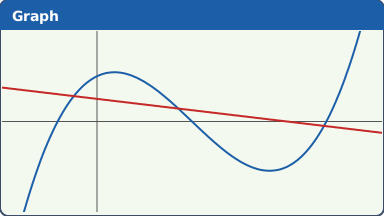
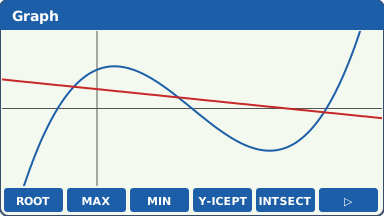
Y1 (blue) and Y2 (red) (our drawing of the fx-CG50 screen, not a photo). SHIFT F5 (G-SOLVE). The F-keys change to the G-Solve menu: F1 ROOT, F2 MAX, F3 MIN, F4 Y-ICEPT, F5 INTSECT, F6 ▷ for more.
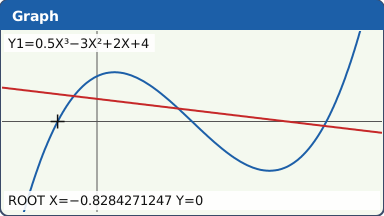
What the screen shows after this step (our drawing of the fx-CG50 screen, not a photo). F1 (ROOT). With two graphs drawn the calculator asks which one: move to Y1 with ▲ ▼ and press EXE. The first root from the left is shown: X = −0.8284271247.
Press ▶ for the next root, X = 2, and again for X = 4.828427125.
Keep pressing ▶ until the pointer stops moving: then you have every root in the window.
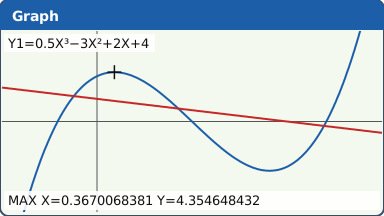
What the screen shows after this step (our drawing of the fx-CG50 screen, not a photo). SHIFT F5 F2 (MAX), choose Y1: the local maximum is at X = 0.3670068381, Y = 4.354648432. SHIFT F5 F3 (MIN) gives X = 3.632993162, Y = −4.354648432.
MAX and MIN find a turning point inside the window. A cubic has no greatest value overall: the question means the local maximum.
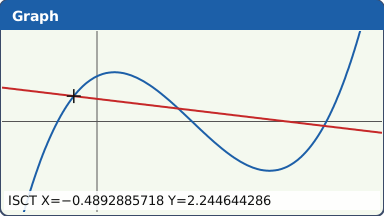
What the screen shows after this step (our drawing of the fx-CG50 screen, not a photo). SHIFT F5 F5 (INTSECT). With only two graphs drawn it may go straight to the first intersection; with more drawn it asks you to choose two curves (▲ ▼, EXE on each). The first intersection is X = −0.4892885718, Y = 2.244644286. ▶ gives X = 1.710831454 and X = 4.778457118.
What the screen shows after this step (our drawing of the fx-CG50 screen, not a photo). SHIFT F5 F4 (Y-ICEPT) on Y1 gives where it crosses the y-axis: Y = 4.
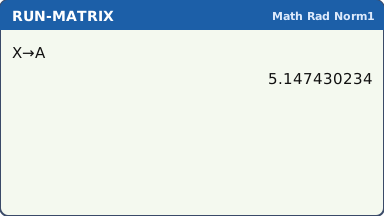
For more, SHIFT F5 F6 (▷): F1 (Y-CAL). With Y1 and Y2 both drawn it first asks which graph: choose Y1 with ▲ ▼ and press EXE. It then asks for an X: type 5 EXE: Y = 1.5. F2 (X-CAL), choose Y1 again, then it asks for a Y: type 3 EXE for X = −0.328872182, then ▶ for 1.181441948 and 5.147430234.
Y-CAL is f(a); X-CAL solves f(x) = k, so you do not need to draw the line y = k.
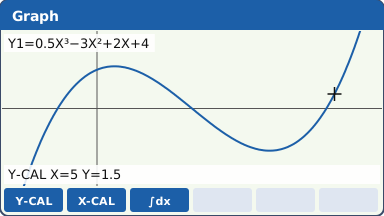
After F6 (▷) in G-Solve: Y-CAL, X-CAL and ∫dx (only these three are drawn) (our drawing of the fx-CG50 screen, not a photo). Carry the answer on. After G-Solve the coordinates are kept in the variables X and Y. MENU 1 (RUN-MATRIX), then X,θ,T → ALPHA X,θ,T (A) EXE stores the last X in A for the next part.
Use the stored value, not the 3 s.f. one, in any later calculation (lesson 2).
What the screen shows after this step (our drawing of the fx-CG50 screen, not a photo).
Your turn: check your understanding
Try these straight after the key presses, on your own calculator, before looking at the answers.
- Draw y = x² − 2x − 4. The INITIAL window (y from −3.1 to 3.1) cuts off the lowest point, so choose a window that shows it first. Then use G-Solve to find both roots and the minimum point.
- Draw y = e0.5x and y = 4 − x. Find where they meet with INTSECT.
- With y = x² − 2x − 4 drawn, use F6 (▷) F1 (Y-CAL) to find y when x = 2.5.
Show the answers
- A window such as Xmin −3, max 5, Ymin −6, max 6. Roots x = −1.24 and x = 3.24; minimum (1, −5).
- (1.68, 2.32)
- y = −2.75
Exam efficiency
- Before G-Solve, count from the graph how many answers there should be. After it, check you found them all with ▶.
- Only answers inside the View Window are found. If one is missing, widen the window and try again.
- Write the equation you solved, then the answers: "0.5x³ − 3x² + 2x + 4 = 0 ⇒ x = −0.828, 2, 4.83".
- Reject solutions outside the question's domain (a negative time, x beyond the model's range) and say why.
- X-CAL saves drawing an extra line for f(x) = k; INTSECT is for two curves.
Worked exam-style example
Question. The weekly profit, in thousands of euros, from selling x hundred items is P(x) = −0.02x³ + 0.6x² + 4x − 30, for 0 ≤ x ≤ 30. (a) Find the least number of items that must be sold to make a profit. (b) Find the maximum weekly profit. (c) Find how many items give a profit of 50 thousand euros.
Y1 = −0.02X³ + 0.6X² + 4X − 30. The domain gives Xmin 0, max 30; P(0) = −30 and the profit goes up to roughly 140, so Ymin −40, max 150. F6 (DRAW).
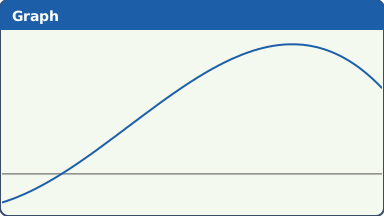
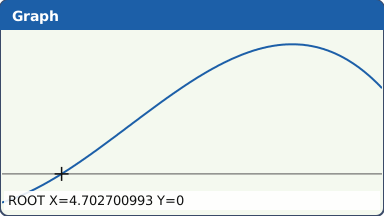
What the screen shows after this step (our drawing of the fx-CG50 screen, not a photo). (a) SHIFT F5 F1 (ROOT): X = 4.702700993. Press ▶: no other root inside 0 ≤ x ≤ 30.
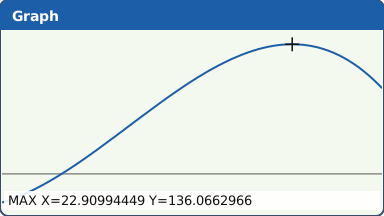
What the screen shows after this step (our drawing of the fx-CG50 screen, not a photo). (b) SHIFT F5 F2 (MAX): X = 22.90994449, Y = 136.0662966.
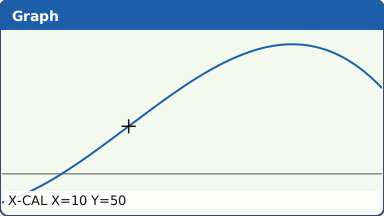
What the screen shows after this step (our drawing of the fx-CG50 screen, not a photo). (c) SHIFT F5 F6 (▷) F2 (X-CAL), Y = 50 EXE: X = 10. ▶ finds no other inside the window: the other two solutions of P(x) = 50, x = −12.4 and x = 32.4, are outside 0 ≤ x ≤ 30.
What the screen shows after this step (our drawing of the fx-CG50 screen, not a photo).
What to write down
(a) P(x) = 0 ⇒ x = 4.70 (GDC), so at least 471 items must be sold (x is in hundreds).
(b) Maximum profit = 136 thousand euros, when x = 22.9.
(c) P(x) = 50 ⇒ x = 10, so 1000 items. The other solutions (−12.4 and 32.4) are outside 0 ≤ x ≤ 30.
Practice
Do these on your own calculator. Write the answers to 3 significant figures unless the task says otherwise.
- f(x) = x³ − 5x + 1. Find the three zeros of f and the coordinates of its local maximum and local minimum.
- Solve ex = 3x with INTSECT. Then use MIN on y = ex − 3x to find its least value.
- In Rad mode, solve x² = 4 sin x + 1.
- h(t) = 30t e−0.5t for 0 ≤ t ≤ 10. Find (a) the maximum of h, (b) h(5) with Y-CAL, (c) the values of t for which h(t) = 10 with X-CAL.
Show the practice answers
- Zeros: −2.33, 0.202, 2.13. Maximum (−1.29, 5.30); minimum (1.29, −3.30).
- x = 0.619 or x = 1.51. Least value −0.296 at x = 1.10.
- x = −0.238 or x = 2.11
- (a) 22.1 at t = 2. (b) 12.3. (c) t = 0.409 or t = 5.67.
Common mistakes
- The answer is outside the View Window, so G-Solve finds nothing or misses one. Widen the window.
- Stopping after the first root: press ▶ until the pointer stops.
- Choosing the wrong curve when two are drawn: watch which graph the pointer is on before EXE.
- Using ROOT to solve f(x) = g(x): ROOT finds where one graph meets the x-axis. Use INTSECT, or ROOT on Y1 − Y2.
- Giving the x-coordinate when the question asks for the maximum value (the y-coordinate), or the other way round.
- Keeping solutions outside the domain, such as a negative time.
1-minute quick check
Answer these without looking back. Most need no calculation: they check that the key presses have stuck.
- Which keys open G-Solve?
- Which F-key gives an intersection?
- How do you find the next root to the right?
- Where are Y-CAL and X-CAL?
- G-Solve finds only two of three roots you expected. First thing to check?
Show the quick-check answers
- SHIFT F5
- F5 (INTSECT)
- Press ▶
- In G-Solve, after F6 (▷): F1 Y-CAL, F2 X-CAL
- The View Window: the third root is probably outside it.
Teaching this lesson (about 55 minutes)
| 0–5 min | Starter: show the cubic and the line. How many roots, turning points and intersections? Students commit to numbers. |
| 5–20 min | Steps 1–5: ROOT with ▶, MAX and MIN, INTSECT. Students check their counts from the starter. |
| 20–27 min | Step 6: Y-ICEPT, Y-CAL and X-CAL. Step 7: storing X in A. |
| 27–37 min | Worked example: the profit model, with what to write and which solution to reject. |
| 37–50 min | Practice tasks 1–4. |
| 50–55 min | 1-minute quick check. |
Students need their own fx-CG50. With a projector, the calculator-skills guides below have a Show on the board view and an animated walkthrough of the key presses.
Matching calculator guides
- How to find intersections, zeros, maximum and minimum points on the Casio fx-CG50, TI-84 Plus CE and TI-Nspire CX II
- How to find the roots and vertex of a quadratic on the Casio fx-CG50, TI-84 Plus CE and TI-Nspire CX II
- How to solve equations, polynomials and simultaneous equations on the Casio fx-CG50, TI-84 Plus CE and TI-Nspire CX II