Casio fx-CG50 lesson 2: Run-Matrix: storing values and avoiding rounding errors
A wrong final digit is the cheapest mark to lose. This lesson shows students how to keep every digit of an answer they will use again: store it in a letter, recall it and build on it, then round once at the end.
Objective
Store values in the letters A to Z in RUN-MATRIX, use them in later calculations, and see how rounding too early changes an answer to 3 significant figures.
By the end, students can:
- store a result in a letter with → and recall it with ALPHA
- use stored letters inside a formula, such as B² − 4AC
- build a calculation on the last answer with Ans, repeating it with EXE
- explain why a value used again is stored, not rounded and retyped
Which courses this lesson suits
- IB Maths AA (SL and HL): Papers 2 and 3
- IB Maths AI (SL and HL): every paper
- A Level Maths (UK and IAL): calculator allowed in every paper
Before you start
Open RUN-MATRIX (MENU 1). If an answer comes out as a fraction or with π in it, press S⇔D to see the decimal: the screens in this lesson show decimals.
The key presses, step by step
Every key is shown as it is printed on the calculator, like SHIFT or F1. The F-keys do whatever the bottom row of the screen says, so the picture next to each step shows that row.
Work something out and store it in one line. Type √(3.7² + 2.9²), then press → (the arrow key on the row above 7 8 9, just right of the comma key), then the letter A: ALPHA X,θ,T. Press EXE.
The letters are printed in red above the keys: A is on X,θ,T, B on log, C on ln. The value is stored with every digit, not just the ones on the screen.
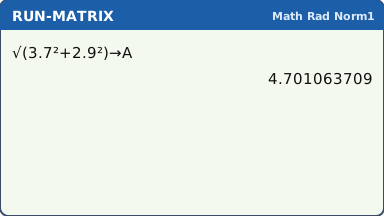
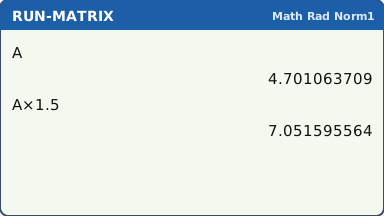
What the screen shows after this step (our drawing of the fx-CG50 screen, not a photo). Recall it: ALPHA X,θ,T EXE shows the value of A. Use it like a number: A × 1.5 EXE gives 7.051595564.
Typing the rounded value from the screen instead loses digits. The gap is small at first, but it grows when the value is squared, cubed or used again and again.
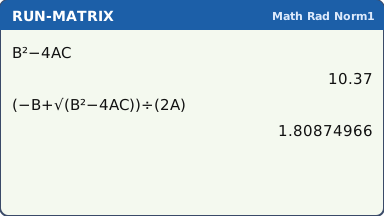
What the screen shows after this step (our drawing of the fx-CG50 screen, not a photo). Several letters in one formula. Store 2.3 → A, −5.1 → B (use (−) for the minus) and 1.7 → C, each with EXE. Then type B² − 4AC EXE: 10.37.
Next type (−B + √(B² − 4AC)) ÷ (2A) EXE for one root of 2.3x² − 5.1x + 1.7 = 0: 1.80874966.
A formula typed once with letters can be reused: store new values in A, B and C, press ▲ to the formula and EXE.
What the screen shows after this step (our drawing of the fx-CG50 screen, not a photo). Ans chains. Type 2 EXE. Then type (Ans + 5 ÷ Ans) ÷ 2 EXE (Ans is SHIFT (−)). Now press EXE again and again: each press repeats the line on the newest answer.
The answers settle at 2.236067977, which is √5.
This is how any iteration is done in an exam: type the rule once with Ans, then count the presses.
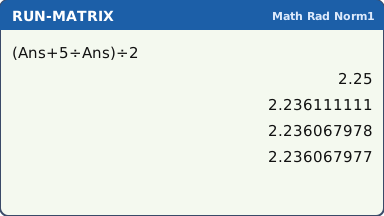
Each EXE repeats the rule on the last answer (our drawing of the fx-CG50 screen, not a photo). Letters keep their values when the calculator is turned off, until you store something new. So at the start of a new question, store fresh values rather than trusting what is already in A.
A Casio letter that has never been used holds 0, so a formula with an empty letter in it still gives an answer: a wrong one, with no warning.
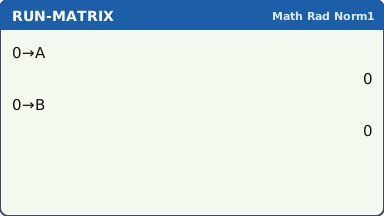
Storing 0 (or new values) at the start of a question (our drawing of the fx-CG50 screen, not a photo).
Your turn: check your understanding
Try these straight after the key presses, on your own calculator, before looking at the answers.
- Store 2.75 → A and 1.6 → B. Then work out √(A² + B²) without retyping either number.
- Work out 7 ÷ 3 and store it in C. Then work out C × 3, and also 2.33 × 3. Why are the answers different?
- Store 9.81 → G. Work out √(2 × G × 20).
Show the answers
- A² + B² = 10.1225, so √(A² + B²) = 3.18 (3 s.f.).
- C × 3 = 7 exactly, but 2.33 × 3 = 6.99: the rounded value has lost digits.
- 19.8 (3 s.f.)
Exam efficiency
- Store any answer you will use again the moment you get it: → and a letter. Write the rounded value on paper, keep the full one in the calculator.
- Use one letter per quantity and write down which is which ("r stored in A").
- Round only the final answer, to 3 significant figures unless the question says otherwise.
- After G-Solve or the Equation app, the result can be copied into RUN-MATRIX and stored straight away (lessons 4 and 5).
Worked exam-style example
Question. A spherical balloon has volume 500 cm³. (a) Find its radius. (b) Find its surface area.
(a) r = ∛(3V ÷ 4π). Type (3 × 500 ÷ (4π))^(1 ÷ 3) → A EXE. π is SHIFT ×10ˣ; ^ is ^. In Math input ^ opens a small exponent box: type 1 ÷ 3 in it, then press ▶ to leave the box before →.
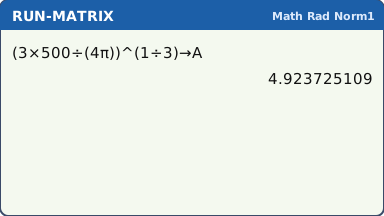
What the screen shows after this step (our drawing of the fx-CG50 screen, not a photo). (b) Use the stored radius: 4πA² EXE gives 304.6473893, so 305 cm² to 3 s.f.
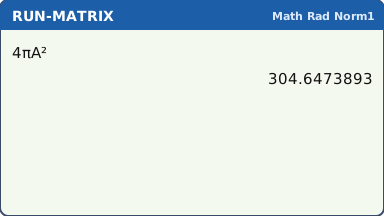
What the screen shows after this step (our drawing of the fx-CG50 screen, not a photo). See the trap: with the radius rounded to 4.92 first, 4π × 4.92² gives 304.1865936, which rounds to 304 cm²: the wrong answer to 3 s.f.
Rounding r to 3 s.f. throws away enough to move the final answer by one in its last figure. That is an accuracy mark lost.
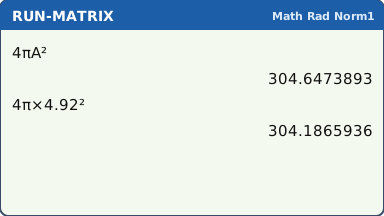
What the screen shows after this step (our drawing of the fx-CG50 screen, not a photo).
What to write down
(a) (4/3)πr³ = 500, so r = 4.92 cm (3 s.f.).
(b) Surface area = 4πr² = 305 cm² (3 s.f.), using the unrounded r.
Practice
Do these on your own calculator. Write the answers to 3 significant figures unless the task says otherwise.
- Store 1.4 → A, 3.7 → B and −2.3 → C. Use (−B ± √(B² − 4AC)) ÷ (2A) to solve 1.4x² + 3.7x − 2.3 = 0.
- A sphere has surface area 400 cm². Find its radius and store it. Then find its volume (a) with the stored radius, (b) with the radius rounded to 3 s.f. first.
- Type 3 EXE, then (Ans + 7 ÷ Ans) ÷ 2 and press EXE repeatedly. What value does it settle at (10 significant figures), and on which press of the rule does that value first appear?
- Store 1500 → P, 3.2 → R and 8 → N. Type P(1 + R ÷ 100)^N. Then store 12 → N, press ▲ twice (past the 12→N line) to the formula and EXE. Give both answers to 2 decimal places.
Show the practice answers
- x = 0.520 or x = −3.16
- r = 5.64 cm. (a) 752 cm³. (b) 751 cm³: one out in the last figure.
- 2.645751311 (√7), first on the 4th press; after that the screen does not change.
- 1929.87 and 2189.01
Common mistakes
- Pressing a letter key without ALPHA: X,θ,T alone types X, not A.
- Using an old value: a letter keeps its value until you store a new one, even after the calculator is switched off.
- Typing the rounded answer from the screen into the next part instead of the stored value.
- − instead of (−) when storing a negative number: −5.1 → B needs the (−) key.
- AB means A × B: writing AB where a two-letter name was meant multiplies two letters.
1-minute quick check
Answer these without looking back. Most need no calculation: they check that the key presses have stuck.
- Which key stores a value in a letter?
- Which key gives the letter A?
- You need r in three later parts. What do you do with it?
- What does pressing EXE on its own do after (Ans + 5 ÷ Ans) ÷ 2?
- When do you round?
Show the quick-check answers
- →, then the letter
- ALPHA X,θ,T
- Store it in a letter (r → A) and use A each time.
- It repeats the same rule on the newest answer.
- Only the final answer, usually to 3 significant figures.
Teaching this lesson (about 55 minutes)
| 0–5 min | Starter: the balloon question with r rounded to 4.92. Who gets 304 and who gets 305? Why? |
| 5–15 min | Steps 1–2: store with →, recall with ALPHA. Students find A, B and C on their keypads. |
| 15–25 min | Step 3: a formula with letters. Change the values and reuse it with ▲. |
| 25–32 min | Step 4: Ans chains. Students count the presses to √5. |
| 32–40 min | Worked example: the balloon, done properly with r stored. |
| 40–50 min | Practice tasks 1–4; answers from the box. |
| 50–55 min | Step 5 (old values) and the 1-minute quick check. |
Students need their own fx-CG50. With a projector, the calculator-skills guides below have a Show on the board view and an animated walkthrough of the key presses.
Matching calculator guides
- How to use standard form and round to significant figures on the Casio fx-CG50, TI-84 Plus CE and TI-Nspire CX II
- How to change a fraction to a decimal on your calculator (and back)
- How to solve equations, polynomials and simultaneous equations on the Casio fx-CG50, TI-84 Plus CE and TI-Nspire CX II