Casio fx-CG50 lesson 1: Setup, exam mode, angle mode and Ans
The first lesson of the series: get every student's fx-CG50 into a known state, then learn the habits that save time on every calculator paper. Most lost calculator marks start here, with the wrong angle mode or a retyped rounded number.
Objective
Set up the fx-CG50 for an exam and move around it without getting lost: menus, SET UP, exam mode, angle mode, exact or decimal answers, the history and Ans.
By the end, students can:
- open any app from the main menu and get back with MENU and EXIT
- check and change the angle mode in SET UP, and test it with sin 30
- switch an answer between a fraction and a decimal with S⇔D
- reuse the last answer with Ans (SHIFT (−)) and edit an earlier calculation instead of retyping it
- say how Examination Mode (for IB) is turned on and how to tell it is on
Which courses this lesson suits
- IB Maths AA (SL and HL): Papers 2 and 3
- IB Maths AI (SL and HL): every paper
- A Level Maths (UK and IAL): calculator allowed in every paper
Before you start
Each student needs an fx-CG50 with charged batteries. If you plan to reset the calculators (step 6), ask students to save anything they want to keep first: a reset deletes lists, matrices, variables and programs.
The key presses, step by step
Every key is shown as it is printed on the calculator, like SHIFT or F1. The F-keys do whatever the bottom row of the screen says, so the picture next to each step shows that row.
Press MENU. The main menu shows the apps as icons. Move with the arrow keys and press EXE, or press the key printed on the icon: 1 is RUN-MATRIX, 2 STATISTICS, 5 GRAPH, 7 TABLE.
From any app, MENU brings you back here. EXIT goes back one screen inside an app.
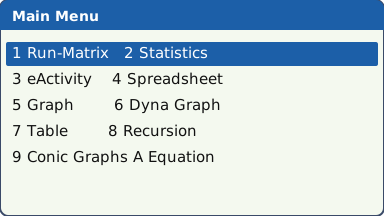
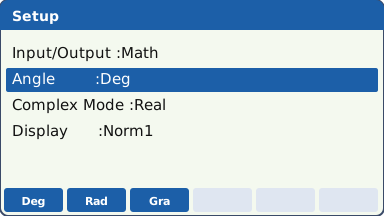
The main menu (drawn as a list: the real screen shows icons) (our drawing of the fx-CG50 screen, not a photo). Press 1 to open RUN-MATRIX, then SHIFT MENU (SET UP). Move down with ▼ to the Angle line. The F-keys now show the choices: F1 Deg, F2 Rad, F3 Gra.
Choose F2 (Rad) for calculus and anything in radians, or F1 (Deg) for a triangle or bearings question. Press EXIT.
Check SET UP in the app you are about to use. The status bar at the top of the screen shows Rad or Deg.
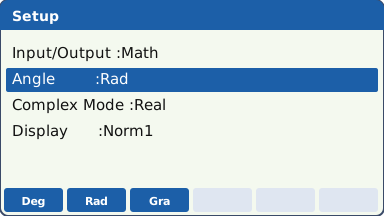
SET UP with the Angle line highlighted (only the lines this lesson uses are drawn) (our drawing of the fx-CG50 screen, not a photo). Test the mode. Type sin 30 EXE (the sin key does not open a bracket). In Deg mode the answer is 0.5. In Rad mode it is −0.9880316241.
This is the fastest check there is: do it at the start of every calculator paper and whenever an answer looks odd.
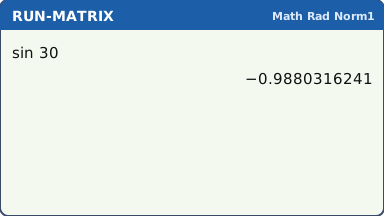
sin 30 in Rad mode: not 0.5, so you are not in degrees (our drawing of the fx-CG50 screen, not a photo). Exact or decimal. Type 3 ÷ 4 + 1 ÷ 6 EXE. In Math input/output mode the answer comes out as a fraction, 11/12. Press S⇔D to see it as a decimal, 0.9166666667, and again to go back.
Give an exact answer when the question asks for one; otherwise the decimal, rounded at the end.
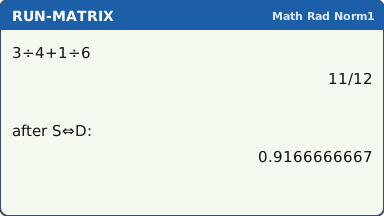
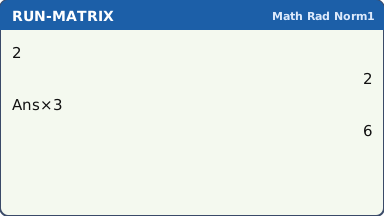
What the screen shows after this step (our drawing of the fx-CG50 screen, not a photo). Ans and the history. Type 2 EXE, then × 3 EXE: the calculator starts the line with Ans for you. Ans on its own is SHIFT (−).
Press ▲ to go back up to an earlier calculation, change a number, and press EXE to work it out again. No retyping.
Ans and the history carry every digit forward. Retyping a rounded number is where accuracy is lost.
What the screen shows after this step (our drawing of the fx-CG50 screen, not a photo). Before a real exam the calculator goes into Examination Mode (for IB): turn it off (SHIFT AC/ON), hold cos and 7 and press AC/ON, then F1 (Yes) and follow the screens. A green border round the screen shows it is on. It ends by itself after 12 hours.
To clear old data and settings instead: MENU → System → Reset (on the F-key row) → MAIN → Yes. Read the F-key labels on your screen: the numbers can change with the OS.
The IB says exam mode goes on immediately before the exam. Practise it once before the mocks so nothing is a surprise; Casio's UK Exam Mode (magenta border) is not the IB one. Casio lists what Examination Mode (for IB) turns off, including programs, Python, add-ins and vector calculations.
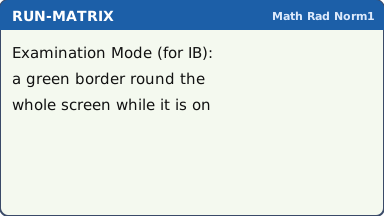
In Examination Mode (for IB) a green border runs round the screen (our drawing of the fx-CG50 screen, not a photo).
Your turn: check your understanding
Try these straight after the key presses, on your own calculator, before looking at the answers.
- Set Deg mode and work out cos 60. Then change to Rad mode, without retyping, press ▲ to the same line and EXE. Write down both answers.
- Work out 1 ÷ 3 + 1 ÷ 4. Give the answer as a fraction, then press S⇔D for the decimal.
- Type 5 EXE. Then type x² − 3 EXE (the calculator starts the line with Ans) and press EXE once more. What are the two answers?
Show the answers
- Deg: 0.5. Rad: −0.952 (3 s.f.). If you got 0.5 both times, the mode did not change: check SET UP again.
- 7/12 = 0.583 (3 s.f.)
- 22, then 481
Exam efficiency
- First 30 seconds of every calculator paper: SHIFT MENU, check Angle, EXIT. Then sin 30 as a test.
- Never retype a rounded answer: use Ans or the history, or store it (lesson 2).
- sin⁻¹ never gives an obtuse angle. When the angle you want is opposite the longest side, use the cosine rule (cos⁻¹ handles angles up to 180°), and check that the angles of the triangle add to 180°.
- AC/ON clears the line you are typing; it does not clear the history or your stored values.
- If the screen fills with an error, read it, then EXIT and fix the line with the arrow keys: you do not need to start again.
Worked exam-style example
Question. In triangle ABC, AB = 7.2 cm, BC = 5.1 cm and angle ABC = 38°. (a) Find AC. (b) Find the area of the triangle. (c) Find angle ACB.
Check the mode first: SHIFT MENU, Angle, F1 (Deg), EXIT. sin 30 should give 0.5.
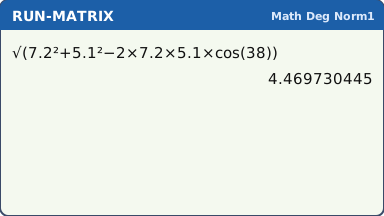
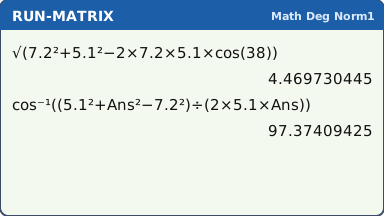
What the screen shows after this step (our drawing of the fx-CG50 screen, not a photo). (a) Type the cosine rule in one go: √ is SHIFT x². √(7.2² + 5.1² − 2 × 7.2 × 5.1 × cos(38)) EXE gives 4.469730445.
What the screen shows after this step (our drawing of the fx-CG50 screen, not a photo). (c) Do this part straight after (a), while Ans still holds the full AC. Angle C is opposite AB = 7.2, the longest side, so it may be obtuse. Use the cosine rule, which always gives the right angle: cos⁻¹ is SHIFT cos. Type cos⁻¹((5.1² + Ans² − 7.2²) ÷ (2 × 5.1 × Ans)) EXE: 97.37409425.
The exam trap: the sine rule, sin⁻¹(7.2 × sin(38) ÷ AC), gives 82.6°. That is wrong here, because sin⁻¹ never gives an obtuse angle: the obtuse answer is 180° − 82.6° = 97.4°.
Using Ans keeps every digit of AC. When the angle may be obtuse (opposite the longest side), use cos⁻¹, or check whether 180° minus the sin⁻¹ answer is the one you need.
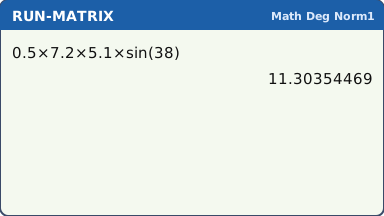
What the screen shows after this step (our drawing of the fx-CG50 screen, not a photo). (b) 0.5 × 7.2 × 5.1 × sin(38) EXE gives 11.30354469.
What the screen shows after this step (our drawing of the fx-CG50 screen, not a photo).
What to write down
(a) AC² = 7.2² + 5.1² − 2(7.2)(5.1)cos 38°, so AC = 4.47 cm (3 s.f.).
(b) Area = ½(7.2)(5.1)sin 38° = 11.3 cm².
(c) cos C = (5.1² + AC² − 7.2²) ÷ (2 × 5.1 × AC), so C = 97.4°. Check: the angles add to 180°: 38° + 44.6° + 97.4° = 180°. (The sine rule would give 82.6°, and then 38° + 59.4° + 82.6° is not 180°: the sign that the angle is obtuse.)
Practice
Do these on your own calculator. Write the answers to 3 significant figures unless the task says otherwise.
- Work out tan 50 with the calculator in Deg mode, then in Rad mode. Give both answers.
- Work out 2 ÷ 3 + 5 ÷ 8 as a fraction, then press S⇔D and give the decimal to 3 s.f.
- In Rad mode type 1 EXE, then cos Ans EXE and keep pressing EXE. What number does the answer settle at, to 3 s.f.?
- Work out 2000 × 1.05¹⁰. Then press ▲, change the 10 to 15 and press EXE. Give both answers to the nearest whole number.
- In SET UP set Display to Sci with 3 significant figures (F2 (Sci), then set 3 significant figures). What does 123456 × 789 show? Then set Display back to Norm1.
Show the practice answers
- Deg: 1.19. Rad: −0.272.
- 31/24 = 1.29
- 0.739 (each EXE repeats cos(Ans) on the last answer)
- 3258 and 4158
- 9.74 × 10⁷ (on screen as 9.74×10⁷ or 9.74E+07). Back to normal: SET UP → Display → F3 (Norm), and choose Norm1.
Common mistakes
- Wrong angle mode. A triangle answer in Rad mode, or a calculus answer in Deg mode, is wrong with no warning. Test with sin 30.
- Not checking the mode in the app you are about to use: open SET UP there and look at the Angle line, or check the status bar.
- Using − (subtract) instead of (−) (negative) at the start of a number: Syntax ERROR.
- Brackets after sin and cos: sin 30 + 5 means (sin 30) + 5. For the sine of 35 type sin(30 + 5), with the brackets.
- Using sin⁻¹ for an angle that may be obtuse: sin⁻¹ never gives an angle over 90°. In the example the sine rule gives 82.6° instead of 97.4°. Check that the angles add to 180°, or use the cosine rule.
- Turning on Casio's UK Exam Mode (magenta border) for an IB exam: the IB one has a green border.
1-minute quick check
Answer these without looking back. Most need no calculation: they check that the key presses have stuck.
- Which keys open SET UP?
- You type sin 30 and get −0.988. Which mode are you in?
- Which keys give Ans on its own?
- How can you tell Examination Mode (for IB) is on?
- A result shows as 11/12 and you want the decimal. Which key?
Show the quick-check answers
- SHIFT MENU
- Rad (radians). In Deg it would be 0.5.
- SHIFT (−)
- A green border round the screen.
- S⇔D
Teaching this lesson (about 55 minutes)
| 0–5 min | Starter: everyone types sin 30. Who gets 0.5 and who gets −0.988? Why the difference? |
| 5–15 min | Steps 1–3: the main menu, MENU and EXIT, SET UP and the angle test. Students say the keys back to a partner. |
| 15–25 min | Steps 4–5: S⇔D, Ans and editing the history. Model one mistake (a rounded retype) and its effect. |
| 25–35 min | Worked example on the board: triangle in Deg mode. Students follow on their calculators. |
| 35–48 min | Practice tasks 1–5 in pairs; check answers from the box. |
| 48–52 min | Step 6: what exam mode is and when it goes on (demonstrate on one calculator only). |
| 52–55 min | 1-minute quick check, no calculators. |
Students need their own fx-CG50. With a projector, the calculator-skills guides below have a Show on the board view and an animated walkthrough of the key presses.
Matching calculator guides
- How do I know if my calculator is in radians or degrees?
- How to put your calculator in exam mode (and exit it)
- How to reset your calculator before an exam
- How to change a fraction to a decimal on your calculator (and back)
- How to use standard form and round to significant figures on the Casio fx-CG50, TI-84 Plus CE and TI-Nspire CX II