Casio fx-CG50 lesson 10: Statistics: lists, 1-VAR, 2-VAR and regression
Statistics questions are where the fx-CG50 saves the most time, and where one wrong setting (an old list, the frequency left at 1, σx mixed up with sx) costs the most marks. This lesson builds one routine for every data question.
Objective
Enter data into lists and get the summary statistics, the regression line, r and a prediction quickly, with the right settings every time.
By the end, students can:
- clear a list and type data into List 1 and List 2
- set 1-VAR with a frequency list and read x̄, σx, sx, n and the quartiles
- choose σx or sx and say why
- find the linear regression line y = ax + b and r with F3 (REG)
- make a prediction from the stored line and say when it is reliable
Which courses this lesson suits
- IB Maths AA (SL and HL): Papers 2 and 3
- IB Maths AI (SL and HL): every paper
- A Level Maths (UK and IAL): calculator allowed in every paper
Spearman's rank (AI) uses the same regression steps on the ranks: see the correlation guide below.
Before you start
Ask students to open STATISTICS (MENU 2) and look for data left in the lists from earlier work: old data in List 2 is the most common reason for a wrong mean.
The key presses, step by step
Every key is shown as it is printed on the calculator, like SHIFT or F1. The F-keys do whatever the bottom row of the screen says, so the picture next to each step shows that row.
MENU 2 (STATISTICS). To clear an old list, move the cursor onto it, then F6 (▷) F4 (DEL-ALL) F1 (Yes).
Type the values 1, 2, 3, 4, 5 into List 1 and the frequencies 3, 7, 9, 4, 2 into List 2, with EXE after each number.
Clear the lists first, every time. A leftover value at the bottom of a list is easy to miss and changes every answer.
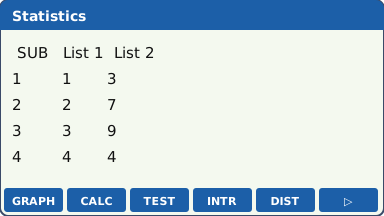
The list editor: values in List 1, frequencies in List 2 (our drawing of the fx-CG50 screen, not a photo). F2 (CALC) F6 (SET). Set 1Var XList to List1 and 1Var Freq to List2 (with Freq highlighted, the F-keys offer 1 or List). Press EXIT.
With the frequency left at 1 the calculator treats the frequencies as more data. This is the setting to check.
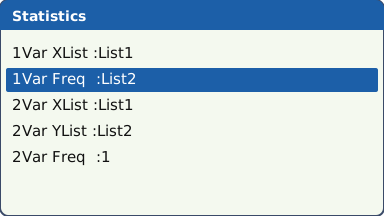
The SET screen with 1Var Freq set to List2 (our drawing of the fx-CG50 screen, not a photo). F1 (1-VAR). The first screen shows x̄ = 2.8, σx = 1.095445115, sx = 1.118033989 and n = 25. Scroll down with ▼ for minX, Q1, Med, Q3 and maxX: here Q1 = 2, Med = 3, Q3 = 3.5.
σx divides by n (the data are the whole population); sx divides by n − 1 (an estimate from a sample). IB questions usually want σx unless they talk about estimating from a sample.
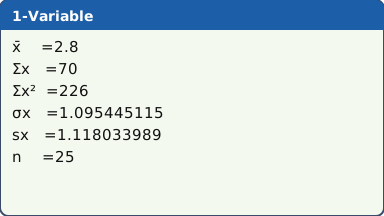
1-VAR results (scroll down for the quartiles) (our drawing of the fx-CG50 screen, not a photo). Two variables: clear the lists, then type x = 2, 3, 5, 6, 8, 9 (hours of revision) into List 1 and y = 52, 55, 63, 66, 74, 79 (test score) into List 2.
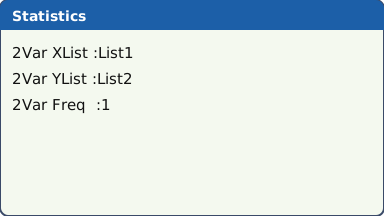
F2 (CALC) F6 (SET): 2Var XList = List1, 2Var YList = List2, 2Var Freq = 1. EXIT.
Check n on the results screen: it should equal the number of pairs, 6 here.
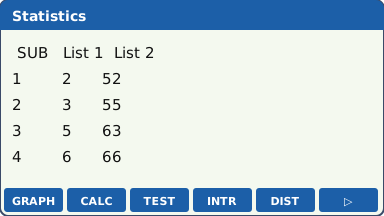
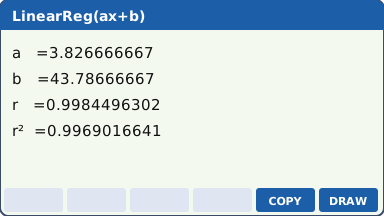
What the screen shows after this step (our drawing of the fx-CG50 screen, not a photo). F2 (CALC) F3 (REG) F1 (X) F1 (ax+b). Read a = 3.826666667, b = 43.78666667 and r = 0.9984496302.
Other models are in the same REG menu: F3 (X²) quadratic, F4 (X³) cubic, and after F6 (▷) log, exponential, power, sine and logistic.
r is shown with the line. The logarithmic, exponential and power models also show r and r². The quadratic, cubic and quartic models show R² instead, and the sine and logistic models show neither.
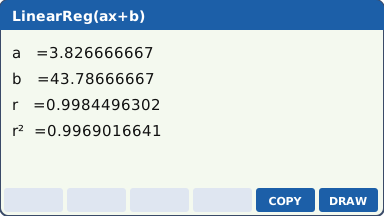
What the screen shows after this step (our drawing of the fx-CG50 screen, not a photo). To predict, keep every digit of a and b. In RUN-MATRIX type 7, then OPTN F5 (STAT) F2 (ŷ) EXE: ŷ at x = 7 is 70.57333333. Or type the line yourself with the full a and b from the screen.
Back in STATISTICS, F5 (COPY) on the regression screen puts the line into the GRAPH list, and F6 (DRAW) draws it over the scatter diagram.
The calculator uses the line from the last regression you ran, so run the regression for these data first.
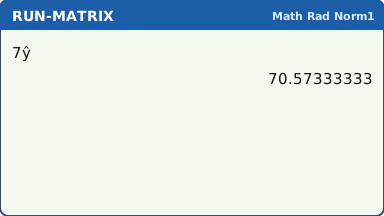
The prediction at x = 7 from the stored regression line (our drawing of the fx-CG50 screen, not a photo).
Your turn: check your understanding
Try these straight after the key presses, on your own calculator, before looking at the answers.
- Find the mean, σx and sx of 4, 7, 7, 9, 13. Which one would you give for "the standard deviation of these five values"?
- For x = 1, 2, 3, 4 and y = 2, 5, 7, 10, find the regression line y = ax + b and r.
Show the answers
- Mean 8, σx = 2.97, sx = 3.32. For the five values themselves, give σx.
- y = 2.6x − 0.5, r = 0.997
Exam efficiency
- One routine for every data question: clear the lists, type the data, check SET, then CALC.
- Check n on the results screen against the question before you copy anything down.
- Write the regression line with a and b to 3 s.f. (y = 3.83x + 43.8) but predict with the full values.
- A prediction inside the range of the x data (interpolation) with r close to ±1 is reliable; outside the range (extrapolation) it is not.
- Grouped data: type the class midpoints as the values and the frequencies in the next list.
Worked exam-style example
Question. A teacher records the hours of revision x and the test score y of six students: x = 2, 3, 5, 6, 8, 9 and y = 52, 55, 63, 66, 74, 79. (a) Find r. (b) Find the regression line of y on x. (c) Estimate the score of a student who revises for 7 hours. (d) Is the estimate reliable?
Clear List 1 and List 2, type the data, then F2 (CALC) F6 (SET) with 2Var XList = List1, 2Var YList = List2, 2Var Freq = 1, and EXIT.
What the screen shows after this step (our drawing of the fx-CG50 screen, not a photo). F3 (REG) F1 (X) F1 (ax+b) gives r and the line in one screen.
What the screen shows after this step (our drawing of the fx-CG50 screen, not a photo). (c) RUN-MATRIX: 7 OPTN F5 (STAT) F2 (ŷ) EXE gives 70.57333333.
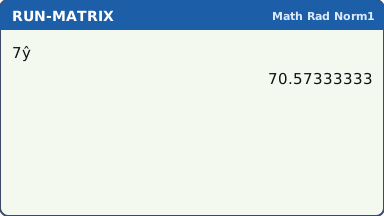
What the screen shows after this step (our drawing of the fx-CG50 screen, not a photo).
What to write down
(a) r = 0.998.
(b) y = 3.83x + 43.8.
(c) y = 70.6 (marks).
(d) Yes: r is very close to 1 (strong positive linear correlation) and 7 hours is inside the data (2 to 9 hours), so this is interpolation.
Practice
Do these on your own calculator. Write the answers to 3 significant figures unless the task says otherwise.
- Find the mean, the standard deviation σx and the median of 12, 15, 9, 20, 14, 17, 11.
- The values 10, 20, 30, 40 have frequencies 4, 6, 8, 2. Find the mean and σx. (Use a frequency list.)
- For x = 1, 2, 3, 4, 5 and y = 3.1, 4.9, 7.2, 8.8, 11.1, find the regression line of y on x and r.
- Use your line from task 3 to estimate y when x = 6.5. Is the estimate reliable?
- Find Q1, the median and Q3 of 3, 5, 7, 8, 10, 12, 15, 20, and the interquartile range.
Show the practice answers
- x̄ = 14, σx = 3.46, median = 14
- x̄ = 24, σx = 9.17
- y = 1.99x + 1.05, r = 0.999
- y = 14.0. Less reliable: 6.5 is outside the x data (1 to 5), so it is extrapolation, even though r is close to 1.
- Q1 = 6, median = 9, Q3 = 13.5, IQR = 7.5
Common mistakes
- Old data left in a list: clear both lists first and check n.
- 1Var Freq left at 1 when the data come with frequencies, or left at List2 when they do not.
- Copying sx when the question wants σx (or the other way round).
- Running the regression on the wrong lists: SET still says List3 and List4 from an earlier Spearman question.
- Predicting with a and b rounded to 3 s.f., which can change the last figure of the estimate.
- Writing calculator words as working: write r = 0.998 and y = 3.83x + 43.8, not "LinReg".
1-minute quick check
Answer these without looking back. Most need no calculation: they check that the key presses have stuck.
- Where do you set which lists 1-VAR uses?
- Which one divides by n − 1: σx or sx?
- Which keys give the linear regression line from the list editor?
- How do you clear a whole list?
- Is a prediction outside the range of the x data reliable?
Show the quick-check answers
- F2 (CALC) F6 (SET)
- sx
- F2 (CALC) F3 (REG) F1 (X) F1 (ax+b)
- Cursor on the list, F6 (▷) F4 (DEL-ALL) F1 (Yes)
- No: that is extrapolation.
Teaching this lesson (about 55 minutes)
| 0–5 min | Starter: a mean that came out wrong because of an old value left in List 2. Who can spot it? |
| 5–20 min | Steps 1–3: clear, enter with frequencies, SET, 1-VAR. Discuss σx against sx. |
| 20–30 min | Steps 4–6: two-variable data, regression, r, prediction and COPY/DRAW. |
| 30–38 min | Worked example: the revision data, with what to write for each part. |
| 38–50 min | Practice tasks 1–5; pairs check n and the SET screen for each other. |
| 50–55 min | 1-minute quick check. |
Students need their own fx-CG50. With a projector, the calculator-skills guides below have a Show on the board view and an animated walkthrough of the key presses.
Matching calculator guides
- How to find the mean, standard deviation and quartiles (1-var and 2-var statistics) on the Casio fx-CG50, TI-84 Plus CE and TI-Nspire CX II
- How to do linear, exponential, power, polynomial, sine and logistic regression on the Casio fx-CG50, TI-84 Plus CE and TI-Nspire CX II
- How to find Pearson's r and Spearman's rank correlation on the Casio fx-CG50, TI-84 Plus CE and TI-Nspire CX II