ManageBac ready

IB Maths unit plans for ManageBac: copy, paste, done

In one line: pick your course below, copy the unit overview and its 8 lesson blocks into ManageBac's unit planner, and upload the rubric and grade files as CSV. Free, nothing to install.

Every artefact on this page is a copy/paste or download that drops straight into ManageBac's unit-plan editor, lesson editor, rubric library, or grade-book import screen. Nothing to install, no admin approval, no IT ticket.

Why this works: ManageBac's editors accept pasted markdown for long-form fields and CSV uploads for grades + lessons. Everything below is generated live from the same content library that powers your students' practice on ibmathrevision.com.

1 · Unit-plan bundles

One "Copy overview" gives you the ManageBac unit-plan description (statement of inquiry, key concepts, ATL skills, sub-topics, resource link). One "Copy lesson blocks" gives you a ready-to-paste 8-lesson breakdown per unit.

2 · Rubric library for classroom activities

Every activity type on /activities.html comes with a pre-mapped ManageBac-friendly 4-band rubric (Excellent / Proficient / Developing / Beginning). Download one CSV per activity, upload once to ManageBac's rubric library, and reuse across every class you run.

3 · Assignment grade-book export

Publish an assignment via the Teacher dashboard. When results come in, hit "📥 Export to ManageBac" on the assignment row — you'll get a CSV in ManageBac's grade-import column order (Student name, Student email, Assignment title, Score, Max, Comment). Open ManageBac → Assignments → Import grades → drop the CSV. Done.

This export button lives on the Teacher Dashboard next to each assignment; see the dashboard for the live flow.

4 · ATL-skills quick reference

Every unit in the table above already carries the 1–2 ATL skills it develops. Copy the overview markdown and the ATL block drops straight into the ManageBac unit-planner ATL section — no more free-text guesswork.

5 · Assignment PDF pack (ZIP)

Every worksheet and online test in 📚 My worksheets now carries a 📦 ManageBac pack button. One click zips a ManageBac-ready brief (with a backlink to online practice), a print-friendly questions.html, the matching markscheme.html, and a step-by-step attach guide. Drop the ZIP into ManageBac's assignment attachments and you're done.

Go to My worksheets → pick a worksheet → hit 📦 ManageBac pack.

6 · One-click "Copy brief" on every assignment

On the Homework Mark Book, every assignment column header now shows a 📋 Copy brief pill. Click it to copy a ManageBac-ready brief (title, aim, tasks, ATL skills, online-practice link) to your clipboard — paste straight into ManageBac's assignment description.

7 · Unit-page shortcut (teachers only)

While you're on any unit page (e.g. SLAA Unit 1), a floating 📋 Copy for ManageBac button in the bottom-right lets you grab that unit's overview markdown, all lesson blocks, one specific sub-topic's lesson block, or the lesson-schedule CSV. Only appears when you're signed in as a teacher, so students never see it.

8 · Weekly Skill Builders: "This week for ManageBac"

Turn on Weekly Skill Builders for a class and every student gets their own short sets each week, picked from topics you've taught and their weakest ones. Each week's set (and any homework you set by hand) appears on This week for ManageBac as a ready-to-paste task: title, due date and a description with the student link, each with its own Copy button. Paste it into ManageBac (your class → Tasks & Units → Add Task), tick Added, and the reminder stops.

To be clear about what it is: a copy page and a reminder (a push notification, or one line in your weekly email), not an automatic sync. Tasks go into ManageBac by themselves only if a ManageBac admin at your school creates an API token and your licence admin or head of department connects it on our site. The copied text pastes into Toddle the same way.
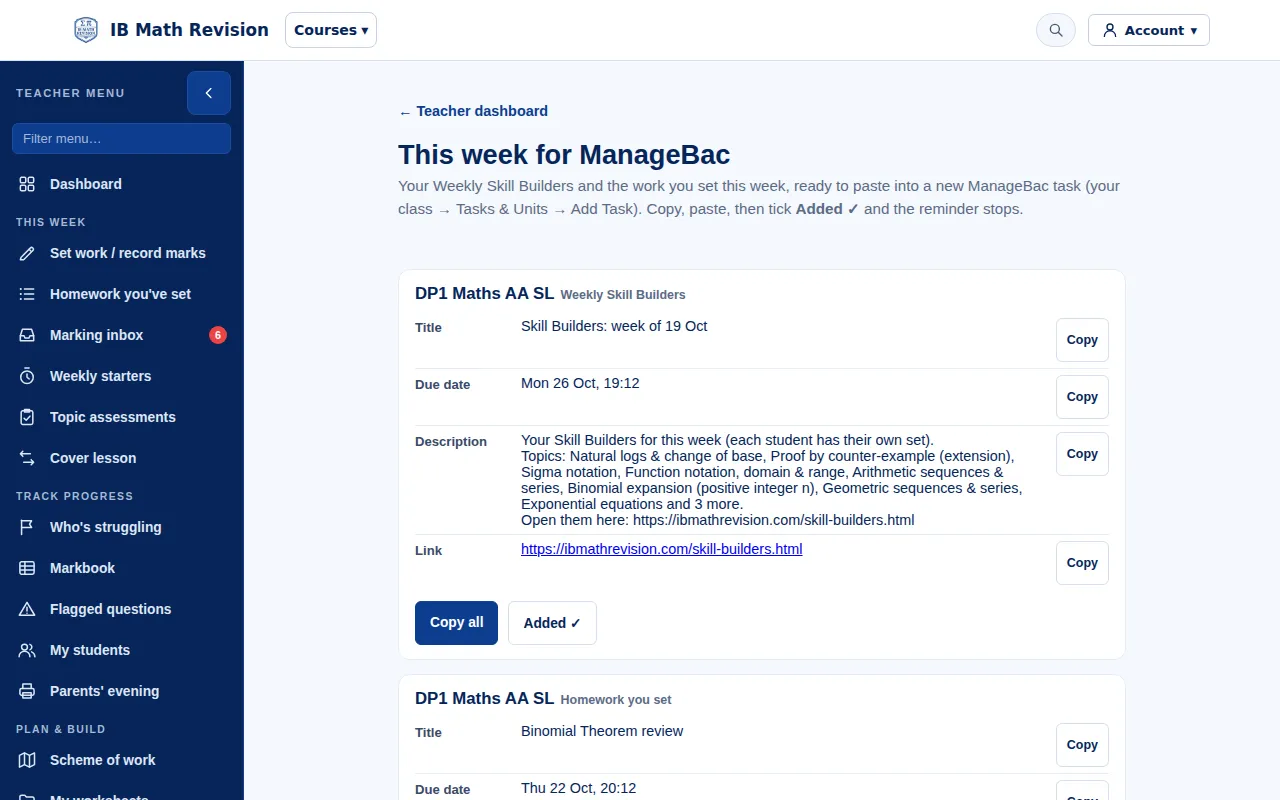
This week for ManageBac page for a demo IB Maths class: the week's Skill Builders as a ManageBac task with title, due date, description and student link, each with a Copy button, then Copy all and Added
The page with a made-up demo class. Teachers open it from the teacher dashboard once they're signed in.

How it all fits together

  1. Planning a term? Grab the unit-plan overview markdown for each unit above (or via the floating shortcut on the unit page itself).
  2. Building a lesson? Copy a single lesson block from the unit-page shortcut in seconds.
  3. Setting an assignment? Build it in the Worksheet builder (or as an online test (auto-marked)), then hit the ManageBac pack button in My worksheets.
  4. Setting quick homework? On the Mark Book, hit "📋 Copy brief" on the assignment column.
  5. Running Weekly Skill Builders? Each week, copy every class's set from This week for ManageBac (Section 8) and tick Added.
  6. Grading it back? When work comes in, use the ⬇ ManageBac CSV button on the mark book to get a grade-import CSV in ManageBac's exact column order.
  7. Running an activity? Download the matching 4-band rubric from Section 2 above and upload once to ManageBac's rubric library.