Casio fx-CG50 lesson 12: Matrices, Markov chains and complex numbers
The last lesson of the series covers the HL tools in RUN-MATRIX: matrices (AI HL: systems, Markov chains) and complex numbers (AA HL and AI HL). The skill is the same in both: store the object once, then work with its name.
Objective
Store matrices and use them for determinants, inverses, systems of equations and Markov chains; switch to complex mode and find the modulus, argument, conjugate and polar form of a complex number.
By the end, students can:
- enter a matrix with the MAT/VCT editor and recall it as Mat A
- find a determinant and an inverse, and solve AX = B with A⁻¹B
- raise a transition matrix to a power for a Markov chain and find the long-term state
- turn on Complex Mode a+bi and type i
- find |z|, arg z, z* and the polar form with OPTN F3 (COMPLEX)
Which courses this lesson suits
- IB Maths AI HL
- IB Maths AA HL
Matrices are in IB AI HL. Complex numbers are in AA HL and AI HL. Neither is in A Level Maths. Vectors: Casio lists vector calculations among the functions Examination Mode (for IB) turns off, so step 7 is only for checking practice work.
Before you start
Matrices persist in the calculator's memory: ask students to look at the MAT/VCT list before the lesson and delete anything left over that could confuse them. Examination Mode (for IB) does not stop matrices or complex numbers.
The key presses, step by step
Every key is shown as it is printed on the calculator, like SHIFT or F1. The F-keys do whatever the bottom row of the screen says, so the picture next to each step shows that row.
MENU 1 (RUN-MATRIX), then F3 (MAT/VCT). Highlight Mat A and press EXE. Set m = 2 EXE and n = 2 EXE, then type 3, 5, 1, 2 row by row with EXE after each. EXIT twice to get back.
m is the number of rows and n the number of columns. A wrong size is the usual reason for a Dimension ERROR later.
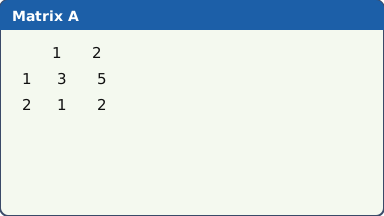
The matrix editor with Mat A entered (our drawing of the fx-CG50 screen, not a photo). Determinant: OPTN F2 (MAT/VCT) F3 (Det), then F1 (Mat) ALPHA X,θ,T (A) EXE: det A = 1.
F1 (Mat) types the word Mat, and ALPHA X,θ,T types A. The same two keys recall Mat A anywhere.
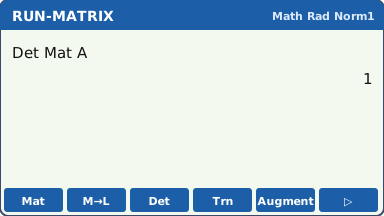
Det Mat A, with the OPTN MAT/VCT F-keys (our drawing of the fx-CG50 screen, not a photo). Inverse: F1 (Mat) ALPHA X,θ,T (A), then x⁻¹ (SHIFT )), EXE. A⁻¹ has rows 2, −5 and −1, 3.
To solve AX = B, put B = (7, 3) as a 2 × 1 matrix in Mat B, then type Mat A⁻¹ × Mat B EXE: x = −1, y = 2.
A matrix with determinant 0 has no inverse (Math ERROR): then the system has no unique solution.
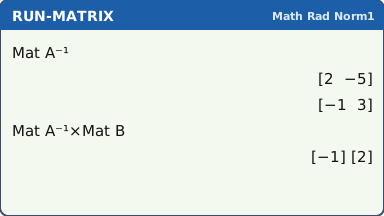
What the screen shows after this step (our drawing of the fx-CG50 screen, not a photo). Markov chains (AI HL): put the transition matrix in Mat A and the starting state in Mat B (a column). The state after n steps is Mat A ^ n × Mat B: type ^ with the ^ key. In Math input ^ opens an exponent box: type n, then press ▶ to leave it before ×.
For the long term, use a large power such as 50 and check that the answer stops changing.
This is the column convention the IB uses: each column of the transition matrix adds up to 1.
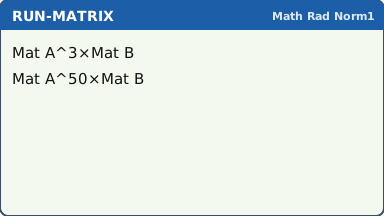
The two commands for a Markov chain (results in the worked example) (our drawing of the fx-CG50 screen, not a photo). Complex numbers: SHIFT MENU (SET UP), Complex Mode → a+bi, Angle → Rad, EXIT. In RUN-MATRIX, i is SHIFT 0.
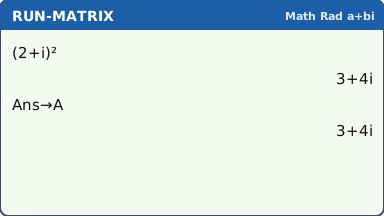
Type (2 + i)² EXE: 3+4i. Store it so you can reuse it: → ALPHA X,θ,T (A) EXE puts Ans into A.
In Real mode √(−4) and similar real inputs give Non-Real ERROR. Once you type i, the calculator works with complex numbers, but set a+bi so every answer shows in that form.
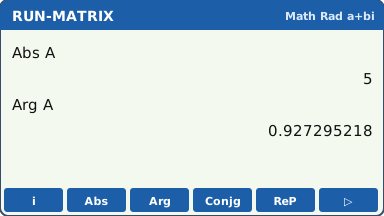
What the screen shows after this step (our drawing of the fx-CG50 screen, not a photo). OPTN F3 (COMPLEX): F2 (Abs) A EXE gives |z| = 5; F3 (Arg) A EXE gives arg z = 0.927295218 (radians); F4 (Conjg) A EXE gives z* = 3−4i.
Polar form: type A, then F6 (▷) and ▶r∠θ, EXE: 5∠0.927295218. ▶a+bi converts back.
Arg uses the angle mode: keep it in Rad unless the question gives degrees. Ans changes after each EXE, which is why z was stored in A.
What the screen shows after this step (our drawing of the fx-CG50 screen, not a photo). Vectors, for checking only. F3 (MAT/VCT), then F6 (M⇔V) switches to the vector list. The vector commands (DotP, CrossP, Norm, Angle) are under OPTN F2 (MAT/VCT) and F6 (▷).
Casio lists vector calculations among the functions Examination Mode (for IB) turns off, so they will not be there in the exam. Do vector questions by hand, then use this to check practice answers.
A reminder: vectors are for checking practice work (our drawing of the fx-CG50 screen, not a photo).
Your turn: check your understanding
Try these straight after the key presses, on your own calculator, before looking at the answers.
- Put A = (2 1; 5 3) in Mat A. Find det A and A⁻¹.
- In a+bi mode work out (1 + 2i)(3 − i), then |3 + 4i|.
- Find arg(1 + i) in Rad mode. Which fraction of π is it?
Show the answers
- det A = 1; A⁻¹ has rows 3, −1 and −5, 2.
- 5+5i, and |3 + 4i| = 5
- 0.785, which is π ÷ 4.
Exam efficiency
- Enter a matrix once and call it by name: retyping entries is slow and error-prone.
- Check the size (m × n) before you multiply: the number of columns of the first must equal the rows of the second.
- Write the method, not the keys: "X = A⁻¹B" or "s₃ = T³s₀", then the answer.
- Turn Complex Mode back to Real after complex work if you prefer error messages for real-only questions.
Worked exam-style example
Question. (AI HL) Each week, 70% of customers of shop A stay with A and 30% move to B; 80% of customers of B stay with B and 20% move to A. At the start A has 100 customers and B has 200. (a) Write down the transition matrix T. (b) Find the number of customers of each shop after 3 weeks. (c) Find the long-term number of customers of each shop.
(a) T has columns "from A" and "from B": first row 0.7, 0.2 and second row 0.3, 0.8. Enter it as Mat A (2 × 2) and the starting state (100, 200) as Mat B (2 × 1).
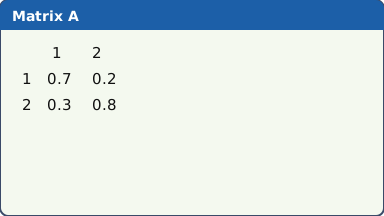
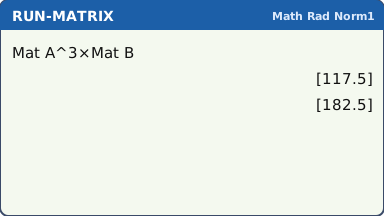
What the screen shows after this step (our drawing of the fx-CG50 screen, not a photo). (b) Mat A ^ 3 × Mat B EXE (in Math input, press ▶ to leave the exponent box after the 3, before ×): A has 117.5 and B has 182.5.
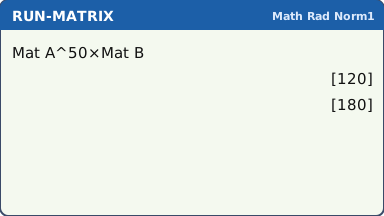
What the screen shows after this step (our drawing of the fx-CG50 screen, not a photo). (c) Mat A ^ 50 × Mat B EXE, then Mat A ^ 60 × Mat B: both give 120 and 180, so the state has settled.
What the screen shows after this step (our drawing of the fx-CG50 screen, not a photo).
What to write down
(a) T = (0.7 0.2; 0.3 0.8), columns from A and from B.
(b) s₃ = T³s₀ = (117.5, 182.5): about 117.5 customers for A and 182.5 for B (expected numbers, so they need not be whole).
(c) Tⁿs₀ tends to (120, 180): 120 customers for A and 180 for B. You can confirm it by solving Ts = s with the total 300.
Practice
Do these on your own calculator. Write the answers to 3 significant figures unless the task says otherwise.
- A = (4 1; 2 3). Find det A and A⁻¹.
- Solve x + 2y − z = 4, 2x − y + 3z = 9, 3x + y + z = 8 using matrices (A⁻¹B).
- (AI HL) T = (0.9 0.4; 0.1 0.6) and s₀ = (500, 500). Find s₅ and the long-term state.
- Work out (2 + 3i)(4 − i) and (2 + 3i) ÷ (4 − i).
- z = −1 + √3 i. Find |z| and arg z in radians, and write z in polar form.
- Work out by hand the scalar product of a = (1, 2, −2) and b = (3, 0, 4), and the angle between them. Then check with the vector commands (practice only: not available in Examination Mode (for IB)). The calculator is still in Rad from step 5: switch Angle to Deg, or convert the answer.
Show the practice answers
- det A = 10; A⁻¹ = (0.3 −0.1; −0.2 0.4). The calculator may show the entries as fractions in Math mode: S⇔D switches.
- x = −0.6, y = 4.8, z = 5
- s₅ = (791, 209); long term (800, 200)
- 11+10i and 0.294+0.824i (3 s.f.)
- |z| = 2, arg z = 2π/3 = 2.09, z = 2∠2π/3 (the calculator may show the exact 2π/3 in Math mode)
- a · b = −5, angle = 109°
Common mistakes
- Entering a matrix with the wrong size (m and n swapped): Dimension ERROR, or a wrong answer.
- Typing A instead of Mat A: without Mat, A is the ordinary variable A.
- Multiplying in the wrong order: A⁻¹B, not BA⁻¹; T³s₀, not s₀T³.
- A transition matrix written with rows that add up to 1 when the question uses columns (or the other way round).
- Complex Mode left on Real: √(−4) and similar give Non-Real ERROR. Set a+bi before complex number work.
- Arg in degrees when the question wants radians.
1-minute quick check
Answer these without looking back. Most need no calculation: they check that the key presses have stuck.
- Which key opens the matrix list from RUN-MATRIX?
- Which keys give x⁻¹?
- How do you find the long-term state of a Markov chain?
- Which keys give i?
- Are the vector commands available in Examination Mode (for IB)?
Show the quick-check answers
- F3 (MAT/VCT)
- SHIFT )
- Mat A ^ a large power (such as 50) × Mat B, and check it has stopped changing.
- SHIFT 0 (with Complex Mode a+bi)
- No: Casio lists vector calculations among the functions it turns off.
Teaching this lesson (about 55 minutes)
| 0–5 min | Starter: solve a 2 × 2 system by hand; then show the same on the calculator in 20 seconds. |
| 5–20 min | Steps 1–3: the matrix editor, Det, inverse, AX = B. |
| 20–30 min | Step 4 and the worked example: Markov chains (AI HL). |
| 30–40 min | Steps 5–6: complex mode, i, Abs, Arg, Conjg, polar form (AA HL and AI HL). |
| 40–50 min | Practice tasks 1–6 (students pick the ones for their course); step 7 for checking task 6. |
| 50–55 min | 1-minute quick check. |
Students need their own fx-CG50. With a projector, the calculator-skills guides below have a Show on the board view and an animated walkthrough of the key presses.
Matching calculator guides
- How to find a determinant, inverse and eigenvalues of a matrix on the Casio fx-CG50, TI-84 Plus CE and TI-Nspire CX II
- How to do complex numbers (modulus, argument, polar form) on the Casio fx-CG50, TI-84 Plus CE and TI-Nspire CX II
- How to do vectors (scalar product, cross product, angle) on the Casio fx-CG50, TI-84 Plus CE and TI-Nspire CX II